
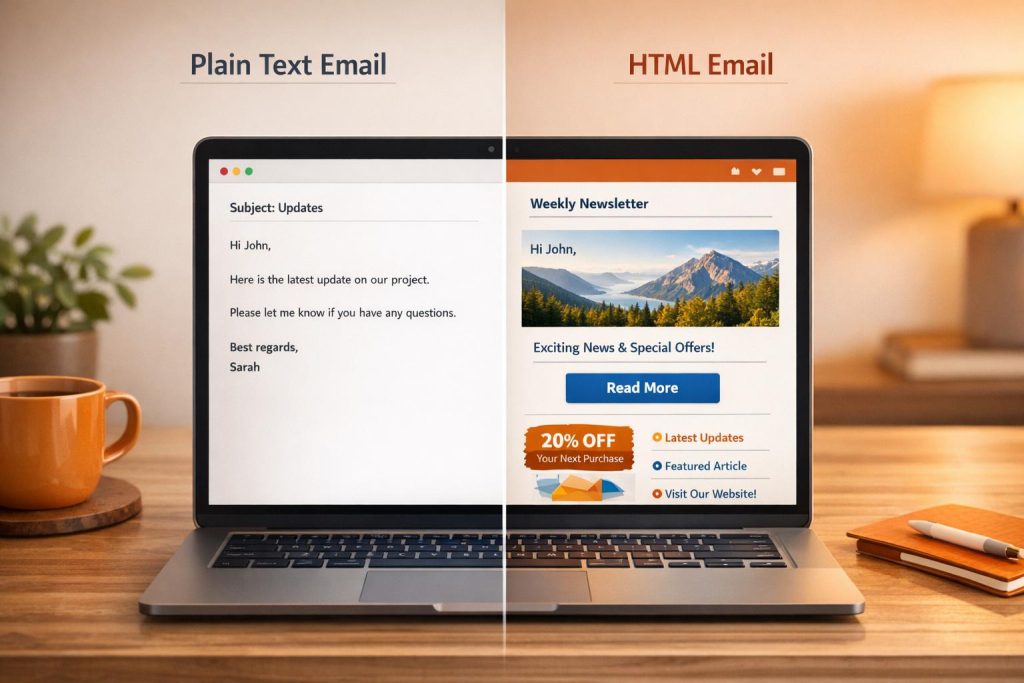
Which email format works best? It depends on your goals. Plain text emails are simple, personal, and better at avoiding spam filters. HTML emails are visually appealing, great for branding, and offer advanced tracking but face stricter spam scrutiny.
Key takeaways:
- Plain text emails often land in primary inboxes and can boost open rates by up to 42%.
- HTML emails shine for eCommerce and newsletters but are likely sorted into "Promotions" tabs.
- Use both formats (Multipart MIME) to balance deliverability and design.
Quick Comparison:
| Feature | Plain Text Emails | HTML Emails |
|---|---|---|
| Inbox Placement | High; often in primary inbox | Moderate; often in Promotions tab |
| Spam Filter Risk | Low; simple and clean | Higher; scrutinized for code issues |
| Visual Appeal | None; simple text | High; includes images and branding |
| Tracking | Limited; no tracking pixels | Full; supports open/click tracking |
| Loading Speed | Instant | Slower; depends on images and code |
Plain text is ideal for personal communication or cold outreach. HTML is better for visually-driven campaigns. For best results, test deliverability and always include both formats.
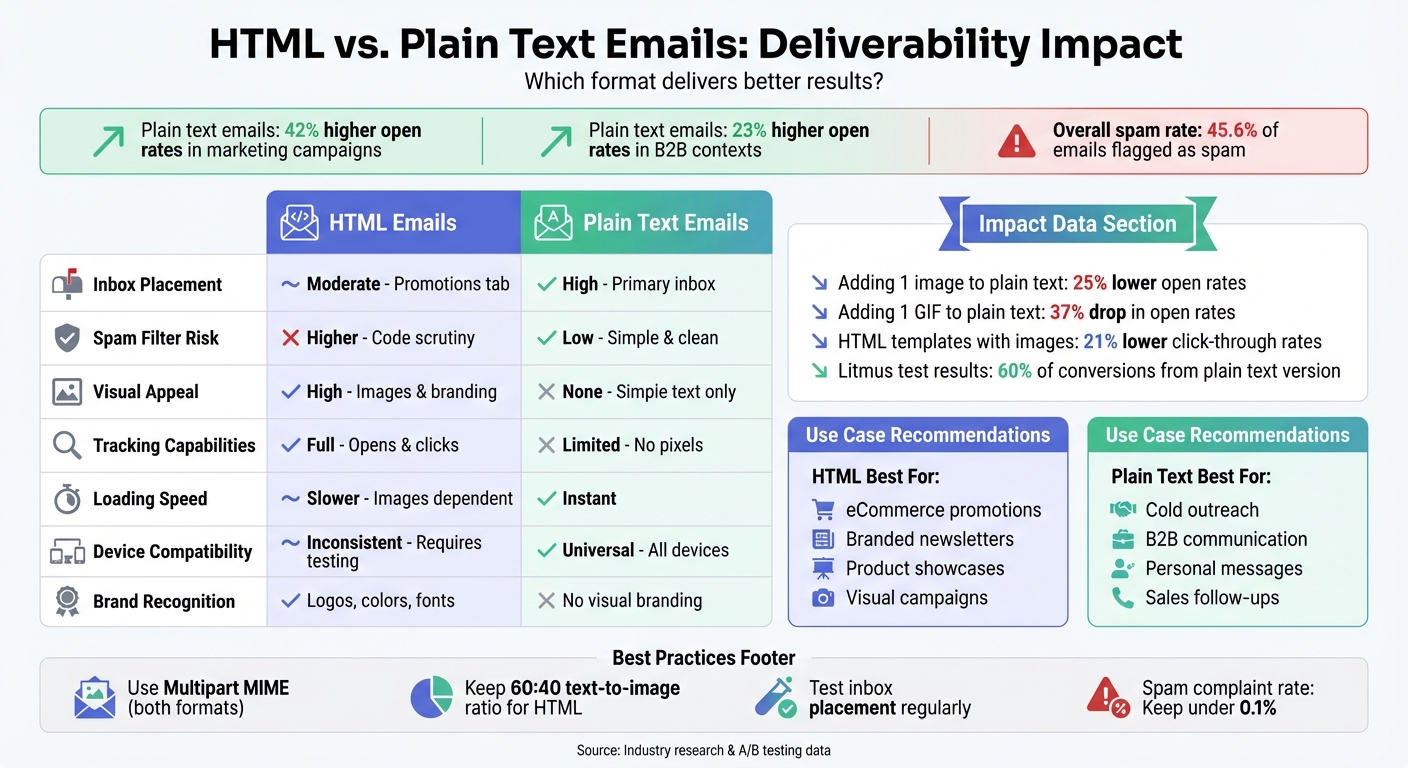
HTML vs Plain Text Email Deliverability Comparison Chart
Does Plain Text Email Increase Email Deliverability? – TheEmailToolbox.com
HTML vs. Plain Text Emails: Deliverability Comparison
Continuing from the earlier discussion on email formats, let’s dive into how HTML and plain text emails stack up when it comes to deliverability.
Plain text emails tend to have an edge in deliverability because they resemble personal messages. This resemblance helps them bypass spam filters and land directly in the primary inbox. On the other hand, HTML emails, with their complex code and image-to-text ratios, often face stricter scrutiny from spam filters, increasing the likelihood of being flagged or redirected [1][7].
The difference becomes even more apparent with how email providers like Gmail categorize incoming messages. HTML emails are frequently sorted into the "Promotions" or "Commercial" tabs, which reduces their visibility and open rates. As Niti Shah from HubSpot aptly explains:
"Just because something says it’s been delivered doesn’t mean it’s actually in a noticeable place of someone’s inbox." [7]
Plain text emails, free from the complications of HTML code, significantly reduce the risk of being flagged as spam. In contrast, HTML emails are more prone to triggering spam filters due to broken tags, excessive CSS, or an imbalance between images and text [1][7].
Key Deliverability Metrics: A Side-by-Side Look
Here’s a breakdown of how plain text and HTML emails compare across important deliverability metrics:
| Metric | Plain Text Emails | HTML Emails |
|---|---|---|
| Inbox Placement | High; often lands in the Primary/Priority inbox [1][7] | Moderate; frequently sorted into Promotions/Commercial tabs [1][7] |
| Spam Filter Risk | Low; free from complex code or hidden elements [1][4] | Higher; flagged for broken code, images, and link density [1][7] |
| Loading Speed | Instantaneous [1] | Variable; affected by image sizes and code complexity [1] |
| Device Compatibility | Universal; works seamlessly across all devices and screen readers [1][4] | Inconsistent; requires testing for compatibility with different clients like Outlook or Gmail [2] |
| Tracking Capabilities | None; lacks the ability to track opens without HTML pixels [1][2] | Full; supports tracking pixels for monitoring opens and clicks [1][2] |
To ensure optimal deliverability, always send emails in both HTML and plain text formats using Multipart MIME. This approach not only aligns with best practices but also provides a fallback option in case one format fails to render properly [1][8]. Skipping the plain text version can often lead to your HTML emails being flagged as spam [8].
Benefits and Drawbacks of HTML Emails
HTML emails can enhance brand visibility and engagement, but they also come with challenges like spam filter risks and rendering inconsistencies.
Advantages of HTML Emails
HTML emails let you create visually appealing messages that strengthen your brand identity. You can include images, GIFs, custom fonts, logos, and color schemes to make your emails stand out instantly [9][10]. This format also helps organize detailed content – like multi-offer newsletters – into easy-to-read sections with headings and columns [2][10].
Another advantage is the tracking capabilities HTML provides. Unlike plain text, HTML supports tracking pixels and coded links, so you can monitor open rates, click-through rates, and conversions [2][4][9]. Plus, interactive elements like buttons, carousels, and polls can further encourage engagement [2][4].
Take Print.inc’s January 2026 seasonal sale campaign as an example. Their plain-text email, packed with multiple offers in one dense block, frustrated readers. Switching to an HTML design with product images, clear pricing, and bold call-to-action buttons made their email more effective [10]. Similarly, Grammarly improved its password reset emails by using branded HTML designs with action buttons and alert icons, making the primary task crystal clear [10].
To avoid spam filters, keeping a 60:40 text-to-image ratio is crucial [9][5]. Matt Harris, CEO of Dyspatch, emphasizes:
"A high image-to-text ratio is the most common cause of false positives in spam filters" [5].
Using clean HTML code and Multipart MIME formatting can also help minimize spam risks [4][9][5].
Disadvantages of HTML Emails
Despite their visual appeal, HTML emails can complicate deliverability. Spam filters often flag overly complex HTML, and poor coding practices exacerbate the issue [1][7]. In fact, 45.6% of emails are marked as spam, frequently due to such complexities [4].
Another challenge is inconsistent rendering across email clients. As Email on Acid explains:
"The HTML and CSS code that works in Apple Mail, may look different in Gmail, and horrible in Outlook inboxes" [2].
These inconsistencies can frustrate recipients, leading them to mark emails as spam, which damages your sender reputation.
Performance data also shows that HTML complexity can hurt engagement. For instance, adding a GIF to a hybrid email in A/B testing caused a 37% drop in open rates compared to a plain text version with identical content [4]. Even a single image can lower click rates, and HTML templates with images often see a 21% lower click-through rate than plain-text emails [7]. Interestingly, while nearly two-thirds of professionals say they prefer HTML and image-based emails, engagement data doesn’t always reflect this preference [7].
HTML emails also come with larger file sizes and require extra effort for accessibility. For example, you’ll need to include alt-text for images and ensure buttons are easy to tap on mobile devices [2][10]. Additionally, their complexity makes it easier for email providers like Gmail to classify them as "commercial", often relegating them to the Promotions tab, where engagement tends to drop [7].
Benefits and Drawbacks of Plain Text Emails
Plain text emails offer a straightforward alternative to HTML emails. While their simplicity can be a strength, it also comes with limitations that influence deliverability and campaign performance.
Advantages of Plain Text Emails
One of the biggest perks of plain text emails is their ability to improve deliverability. Since email providers like Gmail often treat these emails as personal correspondence, they’re more likely to land in the primary inbox rather than being shuffled into the Promotions tab [1]. As sendcheckit.com highlights:
"Plain text emails are significantly less likely to be flagged as spam. They load instantly, work across all devices, and email providers generally treat them as personal communication rather than bulk marketing." [1]
This format also tends to drive higher engagement. For instance, plain text emails have been shown to achieve about 42% higher open rates in marketing campaigns and 23% higher open rates in B2B contexts [1]. A real-world example comes from Litmus, which ran a 50/50 A/B test on their webinar program in July 2024. The results? An impressive 60% of conversions among existing customers came from the plain text version [4].
Another advantage is their simplicity. By skipping complicated HTML code, broken tags, and heavy images, plain text emails avoid common spam triggers. They load instantly on all devices and are fully accessible for screen readers, making them user-friendly across the board [1]. Brands like Ugmonk even use plain text emails for limited-time sales, crafting messages that feel like personal notes straight from the founder [10].
But while plain text emails excel in authenticity and simplicity, they do have their downsides.
Disadvantages of Plain Text Emails
One major drawback is the lack of tracking capabilities. Without tracking pixels, it’s tough to measure open rates or gather detailed engagement metrics. As Kasey Steinbrinck from Sinch Email on Acid puts it:
"True plain text emails can’t include tracking pixels or other elements used for monitoring open rates and email engagement metrics. This makes it much harder to measure the success of a campaign." [11]
Another limitation is the absence of visual branding. Plain text emails don’t support logos, colors, or custom fonts, which can dilute brand recognition [11]. Additionally, hyperlinks appear as raw URLs instead of clickable anchor text, and the format doesn’t allow for layout enhancements like columns or styled text, which can make organizing content more challenging [2].
For example, Print.inc tested plain text emails during a seasonal sale campaign. The format listed multiple product offers with scattered hyperlinks, but the dense text and lack of visual context made the email less engaging. Marilia Dimitriou, Lead Content Editor at Moosend, noted:
"The plain-text email forced all those details into long copy with scattered links, which created friction… HTML design communicated value faster than words could." [10]
While plain text emails shine in scenarios where authenticity and deliverability are critical, it’s worth noting that 66% of professionals still prefer HTML and image-based emails for their visual appeal and branding potential [7].
sbb-itb-eece389
Testing and Optimizing Deliverability with MailMonitor
Understanding where your emails end up is crucial, yet 88% of senders struggle to define basic deliverability metrics like delivery rate versus inbox placement rate [12]. That’s why testing tools like MailMonitor are invaluable. MailMonitor provides inbox placement testing and reputation monitoring, giving you a clear picture of where your emails land. Let’s take a closer look at how inbox placement testing helps tackle deliverability challenges.
Using Inbox Placement Testing
Inbox placement testing, often referred to as seed testing, tracks where your emails are delivered across major providers like Gmail, Yahoo, and Outlook [12]. By sending test emails to a set of test mailboxes, you can calculate your Inbox Placement Rate (IPR) – the percentage of emails that land in the inbox compared to those delivered [12].
This type of testing identifies specific issues, like HTML formatting problems, that can hurt deliverability. For instance, Gmail might route emails with heavy HTML content to the Promotions tab, while Outlook could flag emails with broken code as suspicious. Testing across multiple providers ensures you catch these inconsistencies [1].
Despite its importance, only 13.3% of senders use inbox placement testing [12]. To get accurate results, it’s crucial to test with your actual campaign content, including tracking links and headers, rather than using simplified versions that can give misleading outcomes [13]. High-performing email campaigns typically achieve inbox placement rates above 95% [13].
Reputation Monitoring and Actionable Insights
In addition to inbox testing, reputation monitoring provides real-time feedback on your sender credibility. MailMonitor alerts you if your domain or IP address appears on major blocklists like Spamhaus or Barracuda, which often happens due to high spam complaints or authentication failures [12]. Kate Nowrouzi, VP of Deliverability and Product Strategy at Sinch, explains the importance of staying vigilant:
"Landing on a blocklist can impact your bottom line as well as your future sending. By proactively monitoring and addressing blocklist issues as they arise, you can safeguard your reputation, maintain customer trust, and ensure your messages aren’t automatically flagged as spam." [12]
The platform also deciphers bounce codes to identify technical issues. For example, a 5.1.1 code indicates invalid email addresses, while other codes point to SPF or DKIM authentication failures [12]. Since 48% of senders cite avoiding the spam folder as their biggest challenge [12], these insights are essential for resolving problems before they escalate. Keep your spam complaint rate under 0.1% and ensure SPF, DKIM, and DMARC are properly configured to maintain strong deliverability [12].
Choosing the Right Email Format for Your Campaign
To ensure your email campaigns resonate with your audience and achieve your goals, picking the right format is key. Your choice should align with both your audience’s preferences and the objectives of your campaign.
When to Use Plain Text Emails
Plain text emails are perfect when you’re aiming for simplicity and a personal touch. They excel in cold outreach – like when you’re reaching out to a prospect for the first time – because they reduce the chances of being flagged as bulk marketing [1]. In B2B settings, plain text often feels more natural, resembling the one-on-one communication typical among colleagues and peers [1].
These emails are also a great fit for sales follow-ups, personal introductions, and transactional messages, such as password resets or shipping updates. For technical audiences, the minimalistic approach of plain text feels less like overt marketing and more like genuine communication [2]. Plus, plain text emails are highly accessible, working seamlessly with screen readers and voice assistants, making them a versatile choice [3].
Before finalizing your format, check your inbox placement tests to ensure plain text aligns with your deliverability goals. However, if visuals play a critical role in your message, you may need to consider another option.
When to Use HTML Emails
HTML emails shine when visual design and detailed tracking are essential. They’re ideal for campaigns where images, branding, and layouts help convey your message. For instance, eCommerce and retail brands often use HTML emails to showcase products through eye-catching visuals and branded designs [1]. Similarly, newsletters for existing subscribers benefit from the polished, engaging experience HTML provides.
If you need advanced tracking – like embedded pixels for open rates or coded links for click-through analysis – HTML is the way to go. But keep in mind, HTML emails are more likely to face scrutiny from spam filters and often land in Gmail’s Promotions tab [7]. To balance this, you can use Multipart MIME emails, which include both HTML and plain text versions, allowing recipients’ email clients to display the format they prefer [1].
As with plain text, make sure to review your inbox placement tests to confirm that HTML aligns with your deliverability goals.
Conclusion: Key Takeaways on Email Format and Deliverability
When it comes to email deliverability, the format you choose – HTML or plain text – plays a crucial role in determining whether your message makes it to the primary inbox or ends up lost in the Promotions tab. Plain text emails often have the upper hand in deliverability because they mimic personal, one-to-one communication, making them less likely to trigger spam filters [1].
On the other hand, HTML emails are ideal for visually-driven content, like eCommerce promotions or branded newsletters. However, they face stricter scrutiny from spam filters that evaluate factors like code complexity, image-to-text ratios, and link patterns. For instance, including just one image in a plain text email can lower open rates by 25%, while adding a GIF can drop them by 37% [4][7][6]. To balance these challenges, many marketers turn to Multipart MIME emails, which combine both HTML and plain text versions, ensuring compatibility across various email clients [1][14].
With nearly 45.6% of all emails flagged as spam [4], it’s essential to ensure your emails reach the right inbox. MailMonitor’s inbox placement testing offers a window into where your emails land across different providers, while reputation monitoring delivers actionable insights to refine your strategy. Whether you opt for plain text to convey authenticity or HTML for visual appeal, consistent testing is the key to improving placement and maximizing campaign performance.
FAQs
Should I use HTML or plain text for my email campaign?
When deciding between HTML emails and plain text emails, it all comes down to what you want to achieve with your campaign. Plain text emails are straightforward and feel more personal, making them a great choice for transactional messages, quick updates, or when you’re aiming for a conversational vibe. They’re also less likely to get flagged as spam.
On the flip side, HTML emails let you showcase your brand with eye-catching visuals, consistent design, and interactive elements. These are perfect for newsletters, promotional campaigns, or product launches. However, they might need extra testing to make sure they don’t end up in the spam folder.
The best approach? Think about your audience and your message. If you’re prioritizing simplicity and ensuring the email lands in the inbox, stick with plain text. If you’re focusing on design and tracking engagement, go with HTML. You can even run A/B tests to compare how each format performs with your audience. Tools like MailMonitor can help you track inbox placement and engagement to make data-driven decisions.
How can I prevent my HTML emails from being marked as spam?
To keep your HTML emails far away from the dreaded spam folder, start by ensuring you’re only reaching out to people who want to hear from you. Ideally, this means sending emails to recipients who’ve explicitly opted in – double opt-in is even better. Steer clear of purchased email lists, as sending unsolicited messages can tank your sender reputation. On the technical side, authenticate your emails with SPF, DKIM, and DMARC to prove they’re genuinely coming from your domain. For an extra layer of protection, consider using a dedicated subdomain for your marketing emails to keep any potential reputation issues isolated.
When it comes to design, simplicity is key. Aim for a 60% text-to-image ratio, avoid oversized or hidden images, and stick with inline CSS to ensure your emails render properly across devices. Be mindful of your language – skip the overly promotional tone, steer clear of spam-trigger words, and don’t overdo it with exclamation points. Including a plain-text version of your email is another smart move that can enhance deliverability.
Finally, keep your email list healthy. Regularly remove hard bounces and inactive contacts to maintain a clean list. If you’re using a new IP or subdomain, start small by sending to a highly engaged group before gradually increasing your send volume.
By sticking to these practices, you’ll improve your odds of landing in the inbox – where your audience is ready to engage with your message.
What is Multipart MIME, and why is it important for email campaigns?
When you use Multipart MIME, you can include both plain-text and HTML versions of an email in a single message. This ensures that recipients can view the email in the format their email client supports best, making it more accessible and user-friendly.
Another advantage is that spam filters tend to trust Multipart MIME emails more. Their structured format aligns with email best practices, which can boost your chances of landing in the inbox instead of the spam folder – helping your campaigns reach their audience effectively.

