
SPF, DKIM, and DMARC are email authentication protocols that protect your domain, improve email deliverability, and help comply with the CAN-SPAM Act. Here’s how they work:
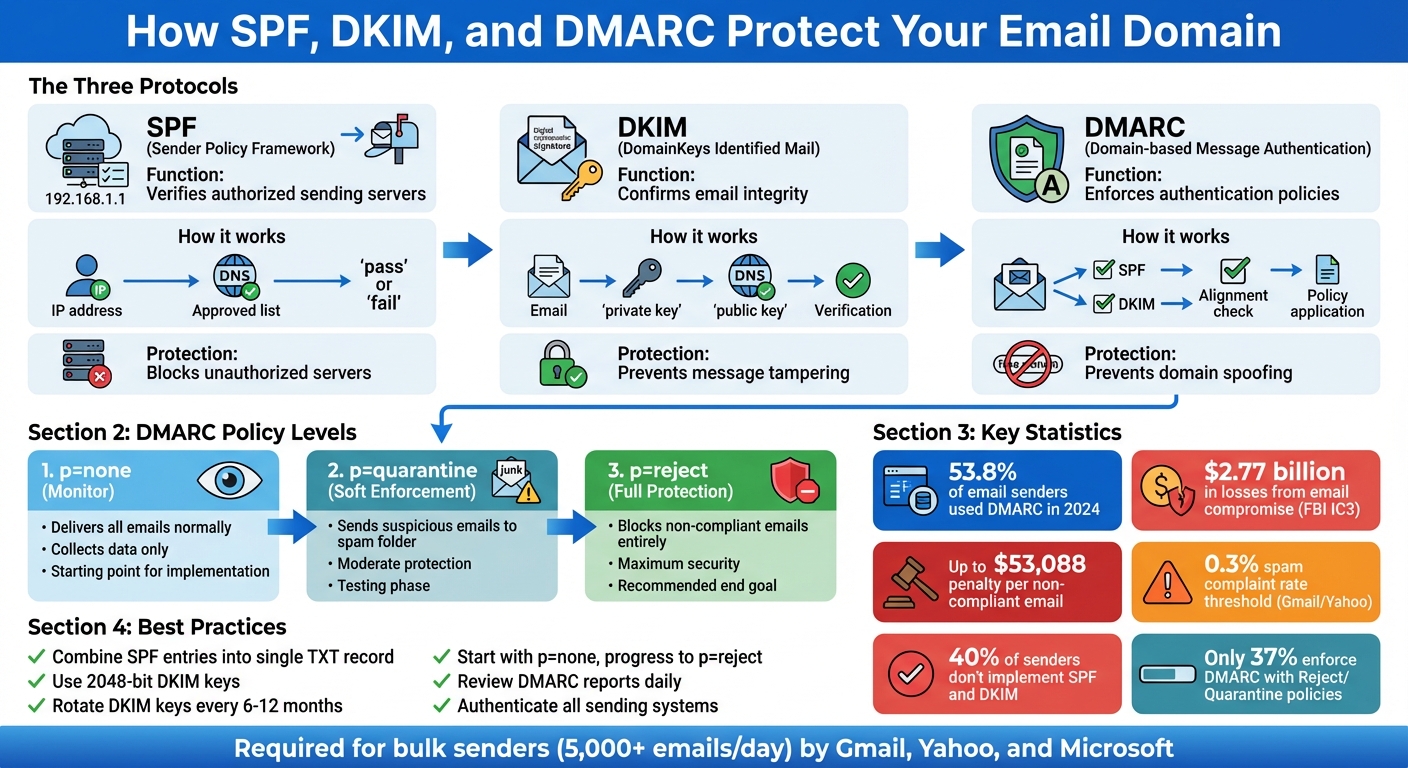
- SPF: Ensures emails are sent from authorized servers by verifying IP addresses.
- DKIM: Uses cryptographic signatures to confirm that emails haven’t been tampered with.
- DMARC: Enforces policies to align the "From" address with SPF and DKIM, preventing domain spoofing.
Without these protocols, your emails could be flagged as spam, rejected, or exploited by attackers. In 2024, 53.8% of email senders used DMARC – a growing trend as major providers like Gmail and Yahoo now require these measures for bulk senders. Misconfigured settings can hurt your sender reputation, increase bounce rates, and lead to legal penalties of up to $53,088 per email.
Key Takeaways:
- Use SPF and DKIM to verify sender identity and message integrity.
- Implement DMARC to control how non-compliant emails are handled.
- Gradually move DMARC policies from "monitor" (p=none) to "reject" for stronger protection.
- Regularly review DMARC reports and rotate DKIM keys to maintain security.
These steps not only ensure compliance but also safeguard your brand and keep your emails out of spam folders.
How SPF, DKIM, and DMARC Work Together for Email Authentication
Stop Your Emails from Going to Spam! SPF, DKIM & DMARC Setup for Small Business Owners
SPF and DKIM: Verifying Sender Identity
SPF works like a public directory, listing all the IP addresses and servers allowed to send emails on behalf of your domain. When a receiving server gets an email claiming it’s from your domain, it checks this list to confirm the sender’s IP is authorized [1].
DKIM adds another layer of security by attaching a tamper-proof signature to your emails. Your email server uses a private key to sign the email header, and recipients can verify this signature using a public key stored in your DNS records. This setup ensures emails haven’t been altered during transit.
Together, SPF and DKIM are critical for preventing spoofing – where attackers send fake emails that appear to come from your domain. SPF blocks unauthorized servers from sending emails under your name, while DKIM ensures the integrity of the message.
Failing to implement these protocols leaves your domain vulnerable. Without proper authentication, legitimate emails might get flagged as spam or rejected outright. This is especially important since providers like Gmail and Yahoo expect spam complaint rates to stay under 0.3% [6] [9].
To optimize your email authentication, follow these best practices:
- Combine all SPF entries into a single TXT record if you use multiple email services.
- Use 2048-bit DKIM keys for stronger security.
- Rotate your DKIM keys annually to maintain integrity.
You can check your email authentication settings by selecting "Show original" in Gmail’s email menu to review the results. These steps work hand-in-hand with DMARC policies to create a robust compliance framework.
DMARC: Adding Policy Enforcement and Reporting
While SPF and DKIM handle sender authentication, DMARC steps in to provide a critical layer of policy enforcement and feedback.
Why DMARC Protects Your Domain
DMARC acts as a safeguard by ensuring the visible "From" domain aligns with the domains authenticated by SPF and DKIM [10][5]. This alignment helps prevent attackers from spoofing your domain, a tactic often used in phishing and fraud attempts that bypass lone SPF or DKIM validation.
Here’s how DMARC works: it checks whether the "From" domain matches the SPF "Return-Path" or the DKIM "d=" tag. You can configure this alignment to require either an exact match (strict alignment) or allow subdomain matches (relaxed alignment) [5][8]. For DMARC to pass, at least one of these underlying protocols must validate the email and align with the "From" domain [5]. Without this alignment, businesses are vulnerable to email compromise, which has already caused over $2.77 billion in reported losses, according to FBI IC3 data [6].
Using DMARC Policies to Block Non-Compliant Emails
DMARC gives you the power to tell receiving servers how to handle emails that fail authentication. You can choose from three policy levels:
- p=none: Monitor emails without blocking them.
- p=quarantine: Send suspicious emails to the spam or junk folder.
- p=reject: Block delivery of non-compliant emails entirely [3][10].
| DMARC Policy | Action Taken by Receiver | Purpose |
|---|---|---|
p=none |
Message delivered as usual. | For monitoring and data collection. |
p=quarantine |
Message sent to spam/junk folder. | Soft enforcement for suspicious emails. |
p=reject |
Message blocked entirely. | Full protection against spoofing. |
A common approach is to start with p=none to collect data, then gradually move to p=quarantine, and finally to p=reject for full enforcement [3][10]. You can also use the pct tag to test policies on a portion of your email traffic. For example, setting pct=20 applies the policy to 20% of emails, letting you observe the impact without disrupting legitimate mail [10][5].
Once your policy is in place, DMARC’s reporting tools help you monitor compliance and make adjustments as needed.
DMARC Reporting for Compliance Monitoring
Beyond enforcement, DMARC provides detailed reporting to help you fine-tune your email authentication strategy.
There are two types of reports available:
- Aggregate reports (RUA): Delivered daily in XML format, these reports include statistics on sending IPs, SPF/DKIM alignment results, and message counts [3].
- Forensic reports (RUF): Provide real-time alerts on authentication failures, often with redacted message details [3].
These reports are invaluable for identifying unauthorized third-party senders and ensuring your email streams are secure [10][6]. For large-scale senders, monitoring RUA data is particularly important. It helps confirm that all legitimate mail passes authentication before tightening your policy to p=quarantine or p=reject [10][3].
DMARC reporting also supports CAN-SPAM compliance by offering actionable insights to maintain accurate sender identification and prevent unauthorized use of your domain. This feedback loop ensures your domain remains secure and your email practices stay compliant.
sbb-itb-eece389
Managing Authentication Across Multiple Systems
Many organizations rely on multiple platforms to send emails. You might use Google Workspace or Microsoft 365 for internal communications, platforms like Mailchimp or HubSpot for marketing, Salesforce for customer outreach, and Zendesk for support tickets. Each of these systems needs proper SPF, DKIM, and DMARC configurations to comply with CAN-SPAM regulations and avoid deliverability problems.
Ensuring All Sending Systems Are Authenticated
When managing multiple email-sending platforms, ensuring proper authentication across all systems is essential for maintaining compliance and avoiding gaps.
Start by identifying every system that sends emails on behalf of your domain. This includes marketing tools, CRMs, transactional email services, and internal servers. If even one sender is missed, it can create a compliance issue.
Next, update your SPF record to authorize each platform. Use the "include" mechanism to delegate IP management to third-party providers while keeping them authorized under your domain. For example, Delta Air Lines handled their complex sender environment by creating separate SPF records for internal and vendor systems.
Keep in mind the SPF 10-lookup limit – exceeding this limit will cause authentication failures. To work around this, consider assigning third-party services to dedicated subdomains (e.g., marketing.yourdomain.com). This approach isolates their reputation and ensures compliance without hitting the lookup cap.
Additionally, assign unique DKIM selectors for each platform. This strategy allows independent control of keys and simplifies key rotation, which is typically done every 6 to 12 months. For example, airlines have successfully used this method with subdomains to manage their authentication more effectively.
Centralized Tools for Monitoring Authentication and Deliverability
When juggling multiple platforms, having clear visibility into authentication performance is crucial. DMARC aggregate reports can help you identify unauthenticated senders before they cause compliance issues. Reviewing these reports daily ensures you catch unauthorized systems early.
Tools like MailMonitor provide a centralized view of your authentication status, deliverability metrics, and infrastructure health. With features like DMARC result tracking, inbox placement monitoring, and custom alerts, these tools make it easier to ensure all legitimate emails pass authentication checks. This is especially important as you move toward stricter DMARC policies like p=quarantine or p=reject.
For organizations sending large volumes of email, centralized tools also track sender reputation across IPs and domains. With nearly half of senders reporting challenges in avoiding spam folders [6], having real-time insights into authentication and deliverability is critical to ensuring emails consistently reach their intended recipients.
How Weak Authentication Affects Reputation and Compliance
Reputation Damage from Misconfigured Authentication
When your SPF, DKIM, or DMARC records aren’t set up correctly, mailbox providers can’t verify your emails’ authenticity – even if you’re a legitimate business. Without proper authentication, your messages may appear to come from a fake sender, triggering spam filters and harming your sender reputation [3].
The fallout is immediate. Misconfigured authentication leads to increased bounce rates, more spam complaints, and even IP address blocklisting [5]. Shockingly, around 40% of senders either don’t implement or are unsure about implementing both SPF and DKIM [3]. This means nearly half of organizations are leaving gaps in their authentication, putting email deliverability at serious risk.
One common issue? Exceeding the SPF 10-lookup limit, which causes authentication failures [8][5]. Similarly, DMARC alignment failures occur when the domain in your "From" header doesn’t match the domains validated by SPF or DKIM – a frequent problem for businesses using third-party email platforms [8][5].
For organizations sending more than 5,000 emails daily, implementing SPF, DKIM, and DMARC authentication is non-negotiable [3][4]. Without it, your emails are more likely to be blocked or sent straight to spam folders. Marcel Becker, Senior Director of Product at Yahoo, emphasizes:
"The end goal is ideally a policy of p=reject. That’s what DMARC is for. Ensuring that your domain cannot be spoofed and protecting our mutual customers from abuse." [3][4]
Weak authentication doesn’t just affect deliverability – it also creates compliance risks under CAN-SPAM laws. If scammers spoof your domain, they can send misleading emails that legally implicate your brand. Each violation can result in penalties of up to $53,088 per email [7].
Using Authentication Data to Improve Reputation
While misconfigured authentication can wreak havoc, using authentication data effectively can help rebuild and strengthen your reputation.
DMARC aggregate reports are a powerful tool for spotting authentication issues before they spiral out of control. These reports reveal which IP addresses are sending emails using your domain and whether those emails pass or fail authentication checks. Regularly reviewing these reports allows you to catch unauthorized senders and fix configuration errors early [8][5].
However, only 37% of senders who use DMARC enforce it with a "Reject" or "Quarantine" policy. The majority stick with "None", which provides no real protection against spoofing [4]. Moving from p=none to p=quarantine or p=reject requires careful analysis of your authentication data to avoid accidentally blocking legitimate emails.
Another often-overlooked practice is DKIM key rotation. Surprisingly, nearly 48% of DKIM users only rotate keys after a security breach [4]. To stay ahead of potential threats, it’s best to rotate your DKIM keys every 6–12 months [4].
Tools like MailMonitor can help you stay on top of these challenges. With real-time alerts, you can quickly address authentication failures, monitor DMARC results, track inbox placement, and safeguard your sender reputation. These features are especially useful when transitioning to stricter DMARC policies, ensuring legitimate emails pass authentication while blocking spoofed messages that could harm your brand.
Conclusion
SPF, DKIM, and DMARC work together to protect your domain by verifying sender identity and ensuring header accuracy – key steps to avoid misleading recipients and hefty fines of up to $53,088 per email [7]. Beyond security, these protocols enhance email deliverability and help ensure compliance with CAN-SPAM regulations.
Top email providers like Gmail, Yahoo, and Microsoft now require bulk senders – those sending over 5,000 emails daily – to implement these protocols. Without proper authentication, even legitimate emails risk being blocked or sent straight to spam [3]. What was once optional is now essential.
Experts stress the importance of ongoing monitoring to maintain a strong reputation. This includes analyzing DMARC reports, rotating DKIM keys every 6–12 months, and ensuring all sending systems are properly authenticated [2][4][5][6]. These steps are critical for staying compliant with CAN-SPAM and ensuring reliable email delivery.
To simplify this process, tools like MailMonitor provide centralized solutions, including real-time reputation tracking, inbox placement testing, and DMARC insights. With MailMonitor, you can address configuration issues quickly and integrate proactive DMARC reporting to safeguard both your compliance and sender reputation.
Achieving successful email deliverability requires a combination of strong authentication and consistent oversight. By properly implementing and maintaining SPF, DKIM, and DMARC, you protect your brand, adhere to CAN-SPAM requirements, and ensure your emails land where they’re meant to – your recipients’ inboxes.
FAQs
How do SPF, DKIM, and DMARC work together to improve email security and compliance?
SPF, DKIM, and DMARC are essential tools for safeguarding your email domain and boosting security. Here’s how they work together:
- SPF (Sender Policy Framework) checks if emails are sent from servers authorized by your domain. It does this by matching the sender’s IP address with your DNS records.
- DKIM (DomainKeys Identified Mail) adds a digital signature to your emails, ensuring they haven’t been altered and confirming they genuinely come from your domain.
- DMARC (Domain-based Message Authentication, Reporting, and Conformance) ties SPF and DKIM together. It tells email providers how to handle messages that fail these checks and offers detailed reports to help you track and fix any issues.
When you set up these protocols, you’re not just stopping fraudulent emails – you’re also improving email deliverability and meeting anti-spam regulations like CAN-SPAM. Tools like MailMonitor simplify the process, helping you manage your email authentication so your messages land in inboxes and your brand stays protected.
What risks does your domain face without a DMARC policy?
Without a DMARC policy in place, your domain is left exposed to risks like email spoofing, phishing attacks, and business email compromise. These types of threats can do serious damage to your brand’s reputation, weaken customer trust, and even result in financial losses.
On top of that, skipping DMARC can hurt your email deliverability. Legitimate emails might end up marked as spam or, worse, never make it to your recipients’ inboxes at all. Setting up DMARC isn’t just about security – it’s also about ensuring your emails reliably reach your audience and keeping your business communications running smoothly.
How can businesses make sure their email systems are properly authenticated?
To maintain strong email authentication, businesses should take the following steps:
- Set up precise SPF records to define which servers can send emails on their behalf.
- Use DKIM to sign outgoing emails, ensuring the integrity of the messages.
- Establish a DMARC policy (either quarantine or reject) to block unauthorized use of their domains.
It’s equally important to routinely check DNS settings and review DMARC aggregate reports. This helps ensure all domains and servers are properly secured. Following these practices not only boosts email security and improves deliverability but also helps meet compliance requirements like those outlined in the CAN-SPAM Act.

