
Email fraud is a growing threat, costing businesses billions annually. To combat this, three key protocols – SPF, DKIM, and DMARC – help secure email communications by verifying sender identity, preserving message integrity, and enforcing policies to block fake emails.
Here’s what they do:
- SPF: Authorizes sending servers using DNS records.
- DKIM: Adds a digital signature to ensure emails aren’t altered.
- DMARC: Aligns "From" addresses with SPF/DKIM and provides reports for better visibility.
Despite their importance, many domains fail to enforce these protocols, leaving them vulnerable. Proper setup and monitoring can improve email security and even boost deliverability rates by 5–10%.
Email Security Explained: SPF, DKIM & DMARC for Beginners (Stop Phishing & Spoofing)
What Is SPF (Sender Policy Framework)
SPF (Sender Policy Framework) is an email authentication protocol outlined in RFC 7208. It helps protect your domain from unauthorized use by allowing you to specify which mail servers are permitted to send emails on your behalf. In simple terms, SPF acts as a gatekeeper, ensuring that only approved IP addresses can send emails from your domain[2].
You set up SPF by adding a single-line DNS TXT record to your domain’s DNS settings. When an email claims to come from your domain, the receiving server checks this TXT record to confirm whether the sending server’s IP address is authorized[2]. To handle unauthorized emails, SPF uses qualifiers like -all (hard fail), which blocks such emails outright, or ~all (soft fail), which flags them as suspicious but still delivers them. Starting with a soft fail during setup can help avoid accidentally blocking legitimate emails.
How SPF Works
Every time an email is received, the SPF validation process kicks in. The receiving server checks the envelope sender address (Return-Path), queries the sending domain’s DNS records for the SPF entry, and compares the sending server’s IP address against the list of authorized senders. Based on this, the server returns a result like Pass, Fail, Soft Fail, or Neutral.
An SPF record starts with the version tag v=spf1, followed by mechanisms that define authorized senders, and ends with an "all" qualifier. Common mechanisms include:
ip4: Authorizes specific IPv4 addresses (e.g.,ip4:192.168.0.1)mx: Designates your domain’s mail exchange serversinclude: Allows third-party services (e.g.,include:_spf.google.com)
To ensure smooth operation, audit all systems sending emails for your domain – like marketing tools, CRMs, and transactional services – and include every legitimate sender in your SPF record. Missing even one can cause valid emails to fail SPF checks. Once you’ve identified all sources, consolidate them into a single SPF record, such as:
v=spf1 ip4:1.2.3.4 include:_spf.google.com ~all
After adding this to your DNS settings, use an online SPF validator to check for errors and confirm all authorized IPs are correctly listed. Keep in mind that DNS changes can take up to 48 hours to propagate globally[4].
While SPF is effective at verifying sender IPs, it does have some limitations.
SPF Limitations
SPF isn’t flawless, and several common issues can reduce its effectiveness:
- DNS Lookup Limit: SPF allows a maximum of 10 DNS lookups to prevent abuse through DNS-based attacks[4]. If this limit is exceeded, the SPF check fails. To avoid this, you can use SPF flattening services, consolidate third-party providers, and regularly review your sender list. Note that
ip4andip6mechanisms don’t count toward the lookup limit. - Envelope vs. Visible Address: SPF validates the envelope sender (Return-Path), not the visible "From" address that recipients see. This gap can let attackers pass SPF checks while spoofing the visible sender. To close this loophole, combine SPF with DMARC, which enforces alignment between these addresses.
- Forwarding Issues: When emails are forwarded, the forwarding server’s IP address often isn’t included in the original SPF record, leading to failed validation. In such cases, DKIM becomes crucial because its cryptographic signatures remain intact even after forwarding.
- Lack of Reporting: SPF doesn’t provide feedback on failed authentication or spoofing attempts. Adding DMARC can fill this gap by offering reports that show who is sending emails on your behalf and whether they’re passing authentication checks.
For domains or subdomains that don’t send emails, it’s a best practice to publish a "deny all" record (v=spf1 -all) to block spoofing attempts. These limitations highlight the importance of pairing SPF with other protocols like DMARC and DKIM for a more secure email system.
What Is DKIM (DomainKeys Identified Mail)
DKIM (DomainKeys Identified Mail) is an email authentication method designed to protect the integrity of outgoing emails. Think of it as a digital seal – if someone tampers with the email’s content after it leaves your server, the signature won’t match, signaling the receiving server that something’s off.
This method relies on public-key cryptography. A private key generates the signature, while a public key, published in DNS records, verifies it. Here’s how it works: when you send an email, your server creates a hash of key email headers and the body, encrypts it using the private key, and attaches this encrypted hash (the DKIM signature) to the email header as "DKIM-Signature."
DKIM originated in 2004, merging Yahoo’s DomainKeys and Cisco‘s Identified Internet Mail. Today, it’s a must-have for bulk senders, especially since Google requires it to ensure email deliverability [5].
How DKIM Works
When an email reaches a receiving server, the server extracts the DKIM signature from the email header. Using a selector (a string within the signature), it locates the matching public key in the sender’s DNS records. The server then decrypts the signature with this public key and compares the result to a freshly computed hash of the email. If the two hashes match, the email’s origin and content are validated.
Here’s a breakdown of the key elements in a DKIM signature:
| Tag | Description |
|---|---|
| v= | DKIM protocol version (commonly v=1) |
| a= | Algorithm used for the signature (e.g., rsa-sha256) |
| d= | Domain name of the sender |
| s= | Selector to find the public key in DNS |
| bh= | Hash of the email body |
| b= | The actual digital signature, derived from the headers and body |
| h= | List of headers included in the signature |
To set up DKIM effectively, follow these tips:
- Rotate your private keys annually and use multiple selectors for smooth transitions.
- Use DKIM keys that are at least 2,048 bits long for stronger security.
- Ensure the "Signing Domain ID" matches the "Header From" address to meet DMARC requirements.
To confirm DKIM is working, check the email’s "Authentication-Results" header for a "dkim=pass" status.
DKIM Security Benefits
One of DKIM’s standout features is its ability to maintain email integrity, even when messages are forwarded. Unlike SPF, which often fails in such scenarios, DKIM ensures that newsletters, transactional emails, and other forwarded messages remain verifiable.
"DKIM provides an essential layer of trust, preventing email spoofing and guaranteeing message integrity." – Valimail
By invalidating altered emails, DKIM makes it nearly impossible for attackers to forge a valid signature without access to the private key. This protection is crucial, especially when you consider that business email compromise (BEC) has caused over $2.77 billion in reported losses worldwide, according to the FBI IC3 report [4]. As Marcel Becker, Senior Director of Product at Yahoo, emphasizes:
"Authenticating your email traffic should be something that you’re already doing if you care about the health of your email traffic as well as your infrastructure." – Marcel Becker, Yahoo
That said, DKIM isn’t flawless. It can fail when forwarding services or mailing lists modify emails, and it doesn’t specify how to handle failed authentications. That’s where DMARC steps in. By combining DKIM with SPF and DMARC, you can build a robust email security system.
What Is DMARC (Domain-Based Message Authentication)
DMARC (Domain-Based Message Authentication, Reporting & Conformance) is a protocol that works with SPF (Sender Policy Framework) and DKIM (DomainKeys Identified Mail) to create a cohesive email authentication system. SPF checks if an email is sent from authorized servers, while DKIM ensures the content hasn’t been tampered with. DMARC ties it all together by verifying that the domain in the visible "From" header matches the domain authenticated by SPF or DKIM. It also provides instructions on how to handle emails that fail these checks.
For instance, imagine an email claims to be from [email protected], but it’s actually sent from phishing-site.com. Even if SPF and DKIM pass, DMARC identifies the mismatch and prevents the email from deceiving recipients.
What sets DMARC apart is its reporting feature. Unlike SPF and DKIM, which simply pass or fail emails, DMARC generates reports for domain owners. These reports reveal which entities are sending emails on behalf of your domain and why some emails fail authentication. This visibility is crucial – about 75% to 80% of domains with DMARC records stick to a monitoring-only policy, leaving them vulnerable [1].
"DMARC is the only protocol that tells inboxes what to do with failed messages and gives you visibility through reports." – Valimail
As of February 2024, major providers like Google and Yahoo require bulk senders (those sending over 5,000 emails daily) to use SPF, DKIM, and DMARC to ensure their emails land in inboxes. Adopting a strict DMARC policy can even improve marketing email delivery rates by 5% to 10%. By enforcing domain alignment, DMARC works alongside SPF and DKIM to create a robust email security framework.
How DMARC Works
When an email is received, DMARC verifies the sender by checking SPF authorization, validating the DKIM signature, and ensuring the visible "From" domain matches the authenticated domains.
DMARC offers two alignment modes:
- Relaxed: Subdomains are allowed. For example, an email from marketing.example.com aligns with a DKIM signature for example.com.
- Strict: Only an exact domain match is acceptable.
These modes are configured using adkim and aspf tags in the DMARC record.
The policy in a DMARC record dictates how servers handle emails that fail checks. There are three main options:
- p=none: No action is taken; this is for monitoring purposes.
- p=quarantine: Failing emails are treated as suspicious and often sent to spam.
- p=reject: Failing emails are blocked entirely.
Here’s an example of a DMARC record:
v=DMARC1; p=quarantine; rua=mailto:[email protected]; pct=100; adkim=r; aspf=r
- The
ruatag specifies where aggregate reports are sent. - The
pcttag determines the percentage of emails the policy applies to.
Starting with a p=none policy allows you to collect data without affecting email delivery. Use the reports to confirm that all authorized senders – like your CRM, marketing tools, or transactional email services – are properly set up with SPF and DKIM. Once you’re confident in your configurations, you can move to stricter policies like p=quarantine and eventually p=reject.
Misconfigurations are common – nearly 1 million domains have issues with their DMARC records, often due to exceeding SPF’s 10-DNS-lookup limit or failing to align domains properly [6]. Regular audits, such as rotating DKIM keys annually and reviewing SPF records periodically, can help maintain proper setups. This process not only authenticates emails but also provides actionable insights through reporting.
DMARC Benefits for Organizations
DMARC provides transparency by reporting every sender and authentication failure, helping organizations quickly address misuse. It’s particularly effective in combating business email compromise (BEC) attacks, which have caused over $2.77 billion in reported losses globally, according to the FBI’s Internet Crime Complaint Center (IC3) [4].
DMARC reports operate on two levels. Aggregate reports offer a big-picture view of email traffic, while forensic reports dive into specific emails that fail authentication. This data is invaluable for diagnosing issues before they affect your email deliverability.
"DMARC reports provide actionable information that will help you properly secure your domain and protect your employees, your customers, and your reputation." – Fraudmarc
sbb-itb-eece389
SPF vs DKIM vs DMARC: Key Differences
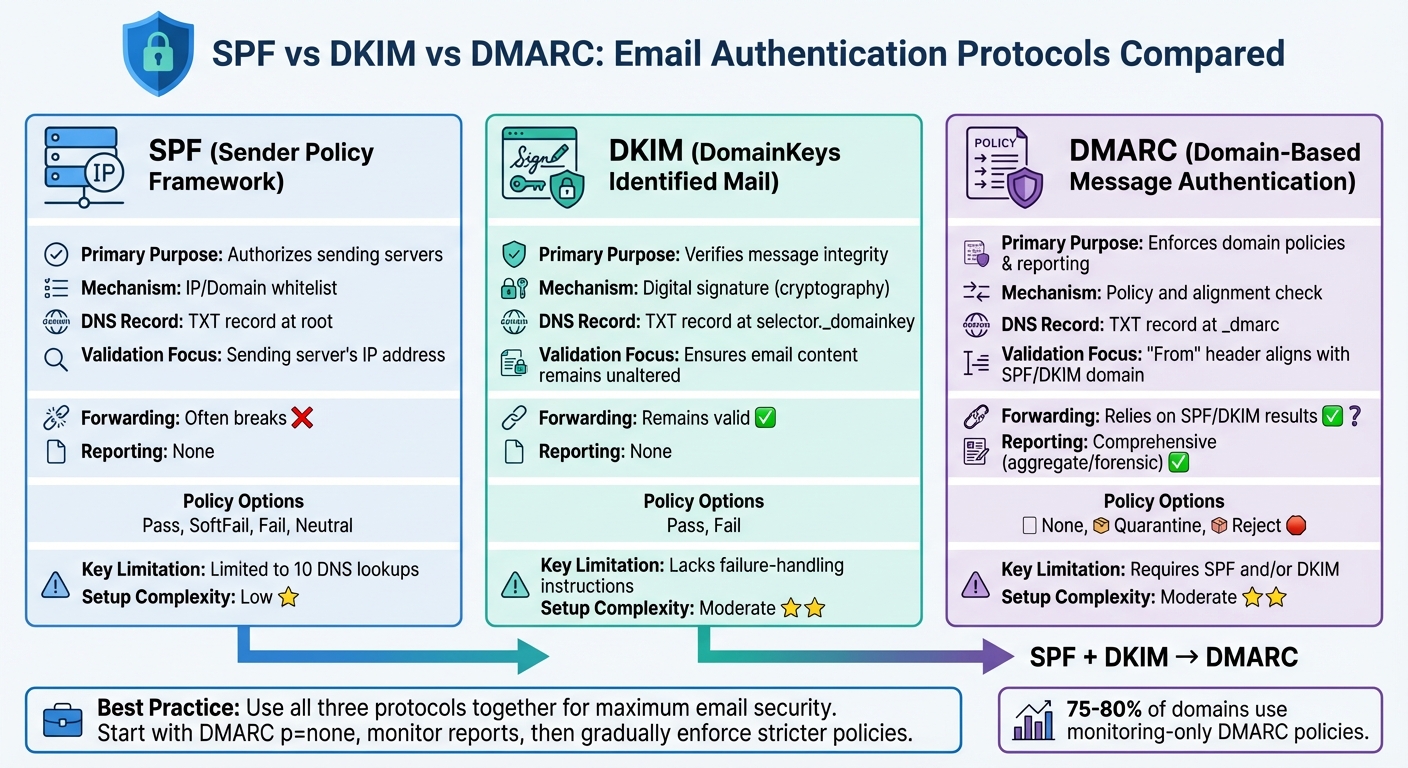
SPF vs DKIM vs DMARC Email Authentication Protocols Comparison
Let’s break down the roles of SPF, DKIM, and DMARC to understand how they work together. SPF acts like a bouncer, checking if the sending server’s IP address is on an approved list. DKIM ensures email integrity by using cryptographic signatures to confirm that the message and its headers haven’t been altered during transit. DMARC ties these protocols together, enforcing policies and providing insight through detailed reports.
Here’s where they differ: SPF focuses on verifying the source by checking the sending server’s IP address, but it only looks at the "Return-Path" (the envelope address) and not the visible "From" address that recipients see. DKIM, on the other hand, protects the integrity of the email’s content and headers using digital signatures. DMARC takes it a step further by ensuring the visible "From" domain matches the domains authenticated by SPF or DKIM. It also tells recipients’ servers how to handle emails that fail these checks.
Each protocol has its limitations, but combining them creates a stronger defense. SPF struggles with email forwarding (as explained in the SPF Limitations section), and DKIM can fail if the message is altered during transit, without offering clear failure-handling guidance. DMARC depends on SPF or DKIM to work and is often left in a monitoring mode by 75% to 80% of domains[1].
"The end goal is ideally a policy of p=reject. That’s what DMARC is for. Ensuring that your domain cannot be spoofed and protecting our mutual customers from abuse."
– Marcel Becker, Senior Director of Product, Yahoo
When layered together, these protocols cover each other’s weaknesses. For example, if SPF fails due to forwarding issues, DKIM can still validate the email. DMARC then assesses the results of either protocol to enforce the domain’s policy. The table below highlights the main differences between SPF, DKIM, and DMARC.
Comparison Table
| Feature | SPF | DKIM | DMARC |
|---|---|---|---|
| Primary Purpose | Authorizes sending servers | Verifies message integrity | Enforces domain policies & reporting |
| Mechanism | IP/Domain whitelist | Digital signature (cryptography) | Policy and alignment check |
| DNS Record Type | TXT record at root | TXT record at selector._domainkey | TXT record at _dmarc |
| Validation Focus | Sending server’s IP address | Ensures email content remains unaltered | "From" header aligns with SPF/DKIM domain |
| Forwarding | Often breaks | Remains valid | Relies on SPF/DKIM results |
| Reporting | None | None | Comprehensive (aggregate/forensic reporting) |
| Policy Options | Pass, SoftFail, Fail, Neutral | Pass, Fail | None, Quarantine, Reject |
| Key Limitation | Limited to 10 DNS lookups | Lacks failure-handling instructions | Requires SPF and/or DKIM |
| Setup Complexity | Low | Moderate (requires key management) | Moderate (requires prior SPF/DKIM implementation) |
How to Implement SPF, DKIM, and DMARC
Securing your email domain with DMARC builds on the essential protocols of SPF and DKIM. Follow these steps to implement them effectively.
Setup Instructions
Start by publishing accurate DNS records for each protocol. For SPF, list every email service provider and IP address that is authorized to send emails on your behalf. Use mechanisms like ip4: or include: to define these authorized IPs in a DNS TXT record at your root domain. The record should begin with v=spf1 and end with either ~all (soft fail) or -all (reject unauthorized mail). Keep in mind that SPF allows up to 10 DNS lookups.
For DKIM, generate a public and private key pair using tools like OpenSSL. Publish the public key as a DNS TXT record at a selector subdomain, such as selector._domainkey.example.com. Use RSA keys with a minimum length of 2,048 bits for better security. Then, activate DKIM signing in your email server or ESP settings.
"The protection DKIM offers is only as good as your key management practices. A compromised signing key could expose you to bad actors and spoofed emails" – Cameron Henry, Sinch Mailgun [7]
Finally, for DMARC, create a DNS TXT record at _dmarc.yourdomain.com. Start with a policy of p=none to monitor email activity without enforcement. Include reporting tags like rua=mailto:[email protected] to receive feedback. After monitoring for several weeks, review the DMARC reports and gradually move from p=none to quarantine, then to reject, to prevent unauthorized emails. Use the pct tag to apply the policy incrementally and verify DNS propagation before tightening enforcement. Once DMARC is set up, consider using tools to automate management and ensure smooth operations.
Using MailMonitor for DMARC Implementation
MailMonitor simplifies DMARC setup and management with automated verification and real-time monitoring. It guides users through creating DNS records and verifies their accuracy instantly. Instead of interpreting complex XML aggregate reports manually, MailMonitor translates this data into easy-to-read insights and visual summaries.
The platform also monitors your email reputation, identifying unauthorized senders and blocking phishing attempts before they harm your domain’s credibility. This is especially important since business email compromise has caused over $2.77 billion in reported losses globally, according to the FBI [4]. MailMonitor’s DMARC Authentication feature helps organizations transition safely from monitoring mode to strict enforcement by analyzing trends and flagging issues with legitimate email sources. With Gmail and Yahoo now requiring spam complaint rates below 0.3% – and ideally under 0.1% – ensuring proper authentication across all email channels, from marketing to support, is crucial for maintaining deliverability.
Common Mistakes and Best Practices
Common Implementation Errors
Even seasoned IT teams can stumble when setting up email authentication. One of the most frequent issues with SPF records is exceeding the 10 DNS lookup limit, which causes them to fail outright [4]. Another misstep is publishing multiple SPF records for the same domain. Since DNS only supports one SPF record per domain, this leads to complete authentication failure [4]. The misuse of the +all mechanism is another critical error – it allows any IP address to pass authentication, including malicious ones, nullifying SPF’s purpose [8].
When it comes to DKIM, weak key management is a common vulnerability. Many organizations still use cryptographic keys shorter than 1,024 bits, leaving them susceptible to being cracked. Upgrading to 2,048-bit keys is now the standard for stronger security [4]. Another risky practice is when Managed Service Providers share a single DKIM key across multiple clients. If one key is compromised, it puts all associated accounts at risk [8].
DMARC misconfigurations often stem from a rushed approach. Jumping directly to a p=reject policy without first monitoring can lead to legitimate emails being blocked due to minor errors [4]. Ignoring RUA (aggregate) and RUF (forensic) reports is another major oversight. These reports provide critical insights into unauthorized senders and configuration flaws, and neglecting them leaves organizations vulnerable [8].
These mistakes highlight the importance of meticulous setup and monitoring before enforcing stricter policies.
Best Practices for Email Authentication
To steer clear of these pitfalls, follow these proven strategies. Begin with a DMARC policy set to p=none. This allows you to gather data over a few weeks and identify legitimate email sources. Once you’re confident in your setup, gradually move to p=quarantine and then to p=reject for full enforcement [4]. For domains or subdomains that don’t send emails, publish a "deny all" SPF record (v=spf1 -all) and enforce a DMARC p=reject policy to block spoofing attempts [3].
Ongoing monitoring is key to maintaining security. Rotate DKIM keys every 6–12 months to limit exposure in case of leaks [4]. To avoid surpassing the SPF lookup limit, consider using dedicated subdomains (e.g., marketing.example.com, support.example.com) to organize email streams [4]. Tools like MailMonitor can simplify this process by automating tasks like real-time failure alerts and scheduled key rotations, ensuring your email security remains strong without constant manual intervention.
Conclusion
SPF, DKIM, and DMARC aren’t just technical jargon – they’re your frontline defense against email fraud, which costs organizations billions each year. For instance, Business Email Compromise alone caused over $2.77 billion in reported losses, as noted by FBI IC3 reports. A significant number of these attacks succeed because domains lack proper email authentication [4]. Each protocol plays a distinct role: SPF verifies sending servers, DKIM ensures message integrity, and DMARC enforces alignment while providing actionable instructions.
Starting February 2024, Gmail and Yahoo will require bulk senders (sending over 5,000 emails daily) to implement SPF, DKIM, and DMARC to ensure their emails land in inboxes [4][9]. Yet, only 37% of DMARC users actively enforce policies that block spoofed emails, leaving the majority vulnerable to impersonation attacks [9]. This highlights the urgent need for a straightforward implementation plan.
A practical approach is to begin with DMARC set to p=none to collect data and identify legitimate sending sources. Once you’ve gathered insights over a few weeks, gradually move to stricter policies like p=quarantine or p=reject. Organizations that make this transition often see 5% to 10% improvements in email deliverability for marketing campaigns [1].
Maintaining this defense requires ongoing effort – managing DNS records, updating DKIM keys every 6–12 months, and consistently reviewing DMARC reports. Tools like MailMonitor can simplify these tasks by automating DMARC setup, sending real-time alerts, and managing key rotations. With 3.4 billion phishing emails circulating daily [5], staying vigilant is no longer optional.
Securing your domain against spoofing while ensuring legitimate emails reach their destination demands both careful setup and continuous monitoring. The protocols work, the requirements are clear, and the tools are ready. Now is the time to act and close the gaps attackers aim to exploit.
FAQs
How do SPF, DKIM, and DMARC work together to secure email communication?
SPF, DKIM, and DMARC are essential tools in email authentication, designed to guard against spoofing, phishing, and spam. Here’s a quick breakdown of what each does:
- SPF (Sender Policy Framework) ensures only authorized servers can send emails on behalf of your domain. It checks the sender’s IP address to verify its legitimacy.
- DKIM (DomainKeys Identified Mail) attaches a digital signature to your emails. This signature confirms the sender’s identity and ensures the email hasn’t been altered during transit.
- DMARC (Domain-based Message Authentication, Reporting, and Conformance) builds on SPF and DKIM. It sets policies for handling unauthorized emails and provides detailed reports on email activity.
When these protocols work together, they create a solid barrier against email-based threats. SPF verifies the sending server, DKIM ensures the message’s integrity, and DMARC enforces rules to block or quarantine suspicious emails. This combination not only strengthens security but also boosts email deliverability, helping ensure your messages land safely in inboxes without falling victim to malicious interference.
What mistakes should I avoid when setting up SPF, DKIM, and DMARC for email authentication?
To set up SPF, DKIM, and DMARC effectively, steer clear of these common pitfalls:
- Multiple SPF records: Your domain should only have one SPF record. Adding multiple records can create conflicts, leading to email validation errors.
- Weak DKIM keys: Use strong cryptographic keys – 2048 bits or more – to improve security and guard against potential threats.
- Rushing into strict DMARC policies: Start with a less restrictive DMARC policy (like "none") and gradually tighten it. Jumping straight to a "reject" policy can unintentionally block legitimate emails, disrupting your communication.
Also, pay attention to DNS configurations. Ensure DKIM public keys are placed correctly and subdomains are properly secured. Regularly review DMARC reports to spot and fix vulnerabilities, reducing risks like spoofing and phishing. These steps will help you bolster email security while maintaining reliable deliverability.
Why should you update DKIM keys regularly and review DMARC reports?
Updating DKIM keys on a regular basis is a smart move for keeping your email security strong. Why? Because encryption standards evolve, and outdated keys can leave your emails vulnerable to spoofing or unauthorized access. By updating these keys, you’re essentially staying one step ahead of potential threats and keeping your communications secure.
Now, let’s talk about DMARC reports. These reports are like a window into how your domain is being used for email. They can reveal suspicious activity, help you spot abuse, and ensure your authentication policies are working as intended. Plus, they’re a great tool for boosting email deliverability. Regularly reviewing these reports isn’t just about security – it’s also about maintaining trust with the people receiving your emails. Cyber threats are always evolving, so staying on top of this is essential.

