
Your emails might be ending up in spam because of domain misalignment. Here’s why it matters and how to fix it:
- What is Domain Alignment? It ensures the domain in your "From" address matches the domains authenticated by SPF and DKIM. Without this, email providers like Gmail may flag your emails as suspicious.
- Why It’s Important: Misaligned emails often fail DMARC checks, leading to lower deliverability, spam folder placement, or outright rejection.
- Common Causes: Using third-party services, configuration errors, or outdated DNS records can lead to misalignment.
- How to Fix It: Adjust SPF, DKIM, and DMARC records to align with your domain. Use custom Return-Paths and DKIM signatures for third-party tools.
(2022) Aligning a domain (DMARC identifier alignment) for email authentication – MailerLite tutorial
What is Domain Alignment in Email Authentication?
DMARC Policy Impact on Email Deliverability
Domain Alignment Defined
Domain alignment plays a crucial role in ensuring the legitimacy of your email communications. It works by verifying that the domain authenticated by SPF or DKIM matches the domain visible in the "From" header. This creates a direct link between backend authentication and the sender information recipients see [1]. While SPF and DKIM confirm that an email originates from an authorized server, they don’t inherently validate the "From" address displayed to the recipient. Without this connection, attackers could exploit SPF or DKIM to pass authentication checks while presenting a misleading sender address to trick recipients.
How SPF, DKIM, and DMARC Use Domain Alignment
Each email authentication protocol has its own way of handling domain alignment:
- SPF Alignment: Checks whether the domain in the "Return-Path" (a hidden bounce address) matches the domain in the visible "From" header.
- DKIM Alignment: Verifies that the domain specified in the
d=tag of the cryptographic signature matches the "From" header domain [5].
DMARC ties these protocols together by requiring that at least one – SPF or DKIM – both passes authentication and achieves alignment [1][6]. It addresses the gaps left by SPF and DKIM by enforcing alignment and ensuring that the sender’s identity is accurately represented [3].
DMARC offers two alignment modes:
- Strict Mode: Requires an exact domain match.
- Relaxed Mode: Allows subdomains to align with the organizational domain. For instance, in relaxed mode,
marketing.example.comaligns withexample.com, but in strict mode, it does not.
Most organizations start with relaxed mode as it offers greater flexibility while still providing protection.
Why Domain Alignment Affects Deliverability
Mailbox providers like Gmail, Yahoo, and Outlook rely on domain alignment as a key factor in determining whether an email is legitimate. Proper alignment signals that the sender has authorized specific servers to send emails on its behalf, which builds trust and increases the chances of landing in the recipient’s inbox. On the flip side, failed alignment often leads to DMARC failures, which can result in deliverability issues. Depending on your DMARC policy, misaligned emails may either end up in the spam folder or be rejected outright [4].
The stakes have risen in recent years. By 2024, major email providers began enforcing stricter requirements, making SPF, DKIM, and DMARC mandatory for bulk senders. Microsoft followed suit in 2025 [2][4]. This shift means alignment is no longer optional – it’s essential for ensuring your messages reach their intended audience.
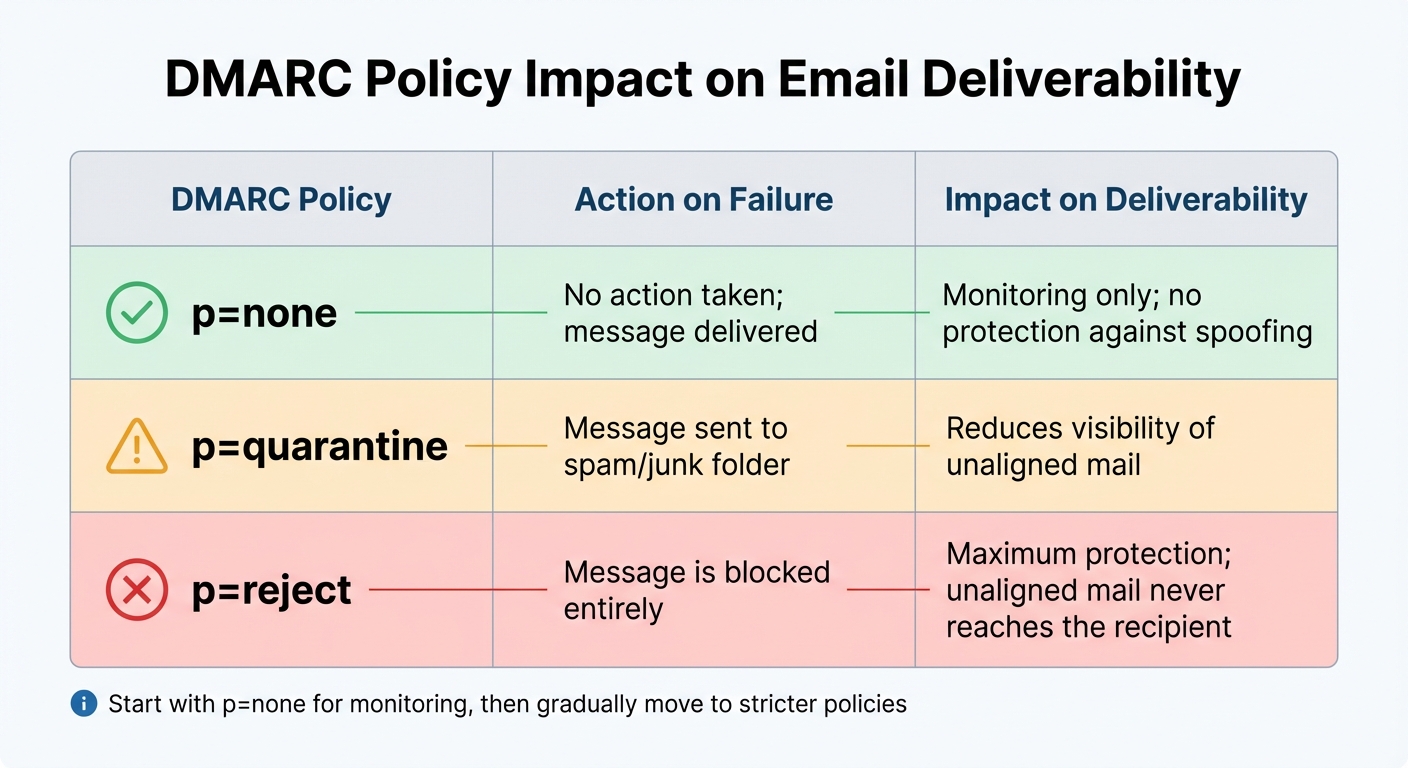
| DMARC Policy | Action on Failure | Impact on Deliverability |
|---|---|---|
| p=none | No action taken; message delivered | Monitoring only; no protection against spoofing |
| p=quarantine | Message sent to spam/junk folder | Reduces visibility of unaligned mail |
| p=reject | Message is blocked entirely | Maximum protection; unaligned mail never reaches the recipient |
Common Domain Misalignment Problems
What Causes Domain Misalignment
One of the biggest culprits behind domain misalignment is the use of third-party services. Many marketing platforms, CRMs, and help desk tools rely on their own domains for DKIM signatures or SPF Return-Paths by default, which doesn’t match the "From" header in your emails [1][7]. As noted by Valimail:
The number one cause of DKIM alignment issues is using third-party services to send email [7].
SPF focuses on the hidden Return-Path domain. If this domain belongs to the provider instead of your own, misalignment occurs – even when SPF technically passes [2]. Similarly, sending emails from subdomains – like marketing.example.com when authentication is set for example.com – can cause failures under strict alignment settings [7][5].
Misalignment issues often worsen due to configuration errors. Common mistakes include typos in DNS records, incorrect DKIM selectors, or failing to update records after rotating DKIM keys [7][8]. Other pitfalls include exceeding SPF’s 10-lookup limit or publishing multiple SPF records for a single domain, which is not allowed [2][8]. Organizational changes, like mergers or rebranding, can also leave outdated configurations in place, causing further complications [7].
These errors not only disrupt email authentication but also harm deliverability.
How Misalignment Hurts Deliverability
When domains in your email headers don’t align, DMARC fails [1][7]. Mailbox providers interpret this as a potential spoofing attempt, often sending such emails straight to spam or rejecting them outright [7][4].
Repeated misalignment damages your domain’s reputation. Without alignment, receiving mail servers can’t reliably identify you as a legitimate sender [1][4]. This makes it risky to implement stricter DMARC policies like p=quarantine or p=reject, leaving your domain more vulnerable to impersonation attacks [7]. This is becoming even more pressing – by 2024, Gmail and Yahoo will require full compliance with SPF, DKIM, and DMARC for senders delivering over 5,000 emails daily [8].
Beyond technical concerns, misalignment erodes customer trust. According to data, 53% of consumers have received legitimate brand emails they didn’t trust because of unclear authentication signals [4]. Misaligned emails often land in spam, costing businesses potential revenue from emails that fail to reach their audience.
But the consequences of misalignment go beyond deliverability – it can lead to significant financial and operational setbacks.
Business Costs of Misaligned Domains
The financial toll of misalignment is staggering. Business email compromise (BEC) has resulted in global losses of over $2.77 billion, according to the FBI’s IC3 report [8]. Misaligned domains make it easier for attackers to spoof your "From" address, using valid DKIM signatures from their own domains to evade basic security measures [7][5].
Operationally, undelivered transactional emails like password resets or invoices can overwhelm support teams with additional tickets, frustrating customers in the process. Marketing campaigns also take a hit – you pay to send emails that never reach inboxes, which damages customer relationships and increases churn [8].
Misalignment also drags down your sender reputation, making recovery even harder. With major mailbox providers now treating authentication as a requirement, misalignment can block access to large segments of your audience [8][3]. Alarmingly, more than two-thirds of DMARC implementations still use p=none policies, which provide minimal protection against spoofing while exposing you to deliverability issues for legitimate emails [4].
How to Fix Domain Alignment Problems
To resolve domain alignment issues, you’ll need to adjust your DNS records and ensure proper coordination with third-party email services.
Fixing SPF Alignment
SPF alignment happens when the domain in your "From" header matches the domain in the Return-Path (also known as the envelope-from or bounce domain). Simply adding IP addresses isn’t enough – you’ll need to configure a custom Return-Path domain that aligns with your brand.
Start by reviewing your DMARC aggregate reports to pinpoint mail streams that pass SPF but fail alignment. Reach out to your email service provider (ESP) and request the setup of a custom Return-Path or "Mail-From" domain that matches your organization’s domain.
If you send emails from multiple sources, using subdomains for different mail streams can help. For example, you could use marketing.example.com for campaigns and support.example.com for customer support emails. This approach not only isolates sender reputation but also ensures you stay within SPF’s 10 DNS lookup limit.
In your DMARC record, use the aspf tag to specify the alignment mode. You can set aspf=r for relaxed alignment (allowing subdomains to match the parent domain) or aspf=s for strict alignment (requiring an exact match). Most businesses find relaxed alignment sufficient as it’s typically the default. Interestingly, organizations that authenticate their emails effectively often experience 15% higher deliverability rates [9].
Once SPF alignment is in place, turn your attention to DKIM settings to ensure they align with your "From" domain.
Fixing DKIM Alignment
DKIM alignment requires that the domain in the DKIM signature’s d= tag matches the domain in your "From" header. A common problem arises when third-party services sign emails with their own domain instead of yours.
Review your DMARC reports to identify DKIM signatures that fail alignment. This indicates that a valid signature exists, but it’s coming from a domain that doesn’t match your "From" header. The solution? Enable custom DKIM in your ESP or CRM so emails are signed with your domain.
Set up custom DKIM and verify your public key at selector._domainkey.yourdomain.com in your DNS. Check your TXT record for any errors and test to confirm that dkim=pass (aligned) appears in your email header analysis.
| Alignment Mode | Tag | Requirement | Example |
|---|---|---|---|
| Strict | adkim=s |
Exact match | d=example.com |
| Relaxed | adkim=r |
Same organizational domain | d=mail.example.com |
For added security, rotate your DKIM keys every 6–12 months. When rotating keys, publish the new selector in DNS while keeping the old one active to prevent delivery disruptions. Allow up to 24 hours for DNS changes to propagate before conducting final tests.
Once SPF and DKIM are aligned, you can refine your DMARC policies for greater protection.
Fixing DMARC Alignment and Updating Policies
DMARC requires that either SPF or DKIM (or both) pass and align with your visible "From" domain. Begin by publishing a DMARC record with a p=none policy. This lets you monitor email streams without impacting delivery, giving you time to collect data from aggregate reports and identify legitimate senders with alignment issues.
After addressing these issues and ensuring consistent passing results in your reports, you can gradually enforce stricter policies. Use the pct tag to apply the policy to a portion of emails – for example, setting pct=20 enforces the policy on 20% of non-aligned messages. Gradually increase this percentage as you confirm that legitimate emails aren’t being blocked.
Automated tools can help enforce DMARC policies in as little as 6–8 weeks, compared to the 32 weeks often needed for manual setups [9]. Businesses frequently see their DMARC pass rates jump from below 70% to over 95% within just one week of resolving alignment problems [10].
For unused domains, publish a DMARC record with a p=reject policy. This proactive step ensures these domains can’t be exploited for spoofing, safeguarding your brand while leaving legitimate mail streams unaffected.
sbb-itb-eece389
Keeping Domains Aligned Across Your Email System
After addressing SPF, DKIM, and DMARC alignment, the next step is ensuring this alignment is consistent across all email systems. This means making sure every platform tied to your emails uses your organization’s domain properly.
Aligning All Email-Related Domains
Domain alignment involves more than just your Return-Path and DKIM signature. Every domain associated with your email system plays a role: the "From" domain that recipients see, the Return-Path domain for bounce messages, the DKIM "d=" domain in your signature, and even the link-tracking domains embedded in your emails.
Start by creating an inventory of all email platforms your organization uses. Confirm that the "From" domain, bounce domains, and DKIM signatures are properly aligned across platforms like Mailchimp, SendGrid, HR tools, helpdesk software, and automated IT alert systems. Consistency is key to avoiding misconfigurations.
Many organizations find that subdomains are an effective way to separate mail streams while staying DMARC-compliant. Subdomains also help isolate sender reputation and minimize DNS lookup issues. For example, you might use marketing.example.com for campaigns, billing.example.com for invoices, and support.example.com for customer service emails. This setup ensures that problems in one category don’t spill over into others.
Once you’ve set up subdomains, carefully review all email-related domains to confirm they are configured consistently.
Recommended Practices for U.S. Businesses
U.S. businesses should implement coordinated practices to maintain domain alignment across teams. This requires collaboration between IT, security, and marketing departments. For example, when a marketing manager signs up for a new email tool, it often introduces DNS changes that IT must oversee. Without proper communication, domain misalignment can harm your email deliverability.
Put a process in place to review any new email-sending service before it goes live. This should include steps like setting up custom Return-Paths, enabling DKIM signing with your domain, and ensuring your SPF record stays within the 10-lookup limit.
For domains that aren’t in use, publish a DMARC record with a p=reject policy and an SPF record of v=spf1 -all. This prevents cybercriminals from exploiting unused domains for spoofing while ensuring legitimate communications remain unaffected.
Keep in mind that major mailbox providers like Gmail and Yahoo have specific requirements for bulk senders. If you send over 5,000 emails daily, you must maintain at least a p=none DMARC policy and keep spam complaint rates below 0.3% [11]. Meeting these standards is crucial to ensuring your emails land in recipients’ inboxes.
Monitoring Domain Alignment with MailMonitor
Why Continuous Monitoring Matters
Email systems are in a constant state of flux. Whether it’s DNS updates, new marketing tools, or unexpected platform switches, any change can disrupt SPF, DKIM, or DMARC alignment, potentially pushing your emails into spam folders – or worse, leaving them undelivered. Did you know that about 16.9% of emails never make it to the inbox? Of those, 10.5% end up in spam, while 6.4% vanish entirely. With major providers like Google and Yahoo requiring spam complaint rates to stay below 0.1% [13], even a short period of misalignment can seriously harm your sender reputation. That’s why continuous monitoring is critical to maintaining strong email deliverability. Tools like MailMonitor are designed to help you stay ahead of these challenges.
MailMonitor Features for Domain Alignment
MailMonitor provides a comprehensive system to track SPF, DKIM, and DMARC alignment. Using a network of over 400 mailboxes across 90 ISPs, it employs a seed testing method to detect alignment issues before they impact your entire email list. The platform operates 24/7, keeping an eye on ISP feedback, blocklist statuses, and spam trap exposure. When authentication failures occur, you’re notified instantly through real-time alerts.
What sets MailMonitor apart is its integration with Microsoft SNDS and Google Postmaster tools. These features give you a clear view of how major email providers perceive your domain’s authentication health [12].
"MailMonitor’s analytics gave us insight into which internal tools and practices were getting the best results. This allowed us to transition our entire salesforce from ineffective tools to more effective sending strategies." – Dan Westenskow, CEO, Fusion HCS [12]
Beyond just identifying problems, MailMonitor helps guide you through the steps needed to resolve them.
Using MailMonitor to Improve Deliverability
MailMonitor doesn’t just identify issues; it provides actionable solutions to fix them. It tracks key metrics like DMARC pass rates and alignment trends in real time, offering a clear path to improving your email deliverability. Historical data allows you to measure progress, while features like white-labeling and API access make it easy to customize monitoring for multiple domains.
Since building a strong sender reputation generally requires 4–6 weeks of consistent effort [13], MailMonitor ensures you stay on track, helping your authentication improvements translate into tangible results.
Conclusion
Getting domain alignment right is a key factor in ensuring your emails actually make it to the inbox. If the "From" header doesn’t align with the domains authenticated by SPF and DKIM, email providers like Google and Yahoo may lose trust in your emails. This often leads to messages being flagged as spam – or worse, not delivered at all.
To keep things on track, start by auditing all your email systems. Make sure SPF and DKIM are properly configured and that identifier alignment is in place. When implementing DMARC policies, begin cautiously with p=none to monitor for issues before moving to stricter policies like p=reject. Don’t forget to configure third-party vendors to send emails using your domain – many default to their own, which can disrupt alignment. And because email systems are always changing, staying vigilant is key to keeping everything aligned.
As your email ecosystem grows – whether through new marketing tools, DNS updates, or changes in vendor configurations – alignment problems can pop up unexpectedly. That’s why continuous monitoring is essential. Catching these issues early can prevent them from impacting your deliverability.
Tools like MailMonitor can help by keeping an eye on your domain alignment, sending real-time alerts, and offering actionable insights to fix problems quickly.
Ultimately, domain alignment is the foundation of email deliverability. By prioritizing proper setup, staying proactive with monitoring, and maintaining alignment, you can protect your sender reputation and ensure your emails consistently land in the inbox where they belong.
FAQs
How do I make sure third-party email services align with my domain?
To make sure third-party email services work seamlessly with your domain, you’ll need to focus on proper authentication. Start by updating your domain’s SPF record. Add the service’s sending IPs or SPF mechanisms to authorize the MAIL FROM address. Next, set up DKIM by creating a selector that links to a public key in your DNS – this should ideally be under your domain or a specific subdomain like mail.yourbrand.com. Lastly, implement a DMARC policy that enforces alignment (either relaxed or strict) for both SPF and DKIM. Once you’re confident everything is functioning as expected, adjust the policy to p=reject or p=quarantine and monitor the reports to catch any misalignment.
After the setup is complete, test the service by sending emails and carefully reviewing the headers. Make sure the From, DKIM-Signature, and SPF-Pass results are all correct. Keep an eye on DMARC reports regularly to spot any unauthorized sources or configuration issues. This will help maintain strong email deliverability over time.
Why are my emails going to spam even though my domains are aligned?
If your emails are still ending up in spam folders despite having proper domain alignment, don’t worry – there are steps you can take to improve your email deliverability. Here’s how you can tackle the issue:
- Double-check your SPF, DKIM, and DMARC settings. Make sure your sending domain has valid SPF records, DKIM signatures are active, and your DMARC policy enforces alignment. Also, confirm that the "From" domain aligns with your SPF and DKIM domains.
- Maintain a clean and segmented email list. Regularly scrub your list to remove invalid addresses, spam traps, and inactive recipients. Keeping your list up-to-date not only protects your sender reputation but also ensures you’re reaching an engaged audience.
- Fine-tune your email content and boost engagement. Stay away from spammy words, use straightforward subject lines, and balance text with images. Personalize your emails to make them more relevant, as higher engagement rates show email providers that you’re a trusted sender.
By focusing on these areas, you can address common deliverability problems and increase the likelihood of your emails landing in your audience’s inbox.
Why is ongoing monitoring important for maintaining domain alignment?
Ongoing monitoring plays a crucial role in keeping your domain properly aligned with email authentication protocols like SPF, DKIM, and DMARC. These protocols aren’t static – they change whenever you make updates, such as adding a new email service, modifying SPF records, or rotating DKIM keys. Without careful attention, even minor misalignments can result in DMARC failures, potentially damaging your email deliverability and causing messages to end up in spam folders.
By monitoring regularly, you can quickly catch and resolve issues like outdated SPF records or missing DKIM signatures before they harm your sender reputation. Frequent reviews of DMARC reports also help you identify unauthorized attempts to spoof your domain. Staying proactive ensures you can make timely adjustments, safeguard your reputation, maintain strong authentication pass rates, and keep your emails landing in recipients’ inboxes.

