
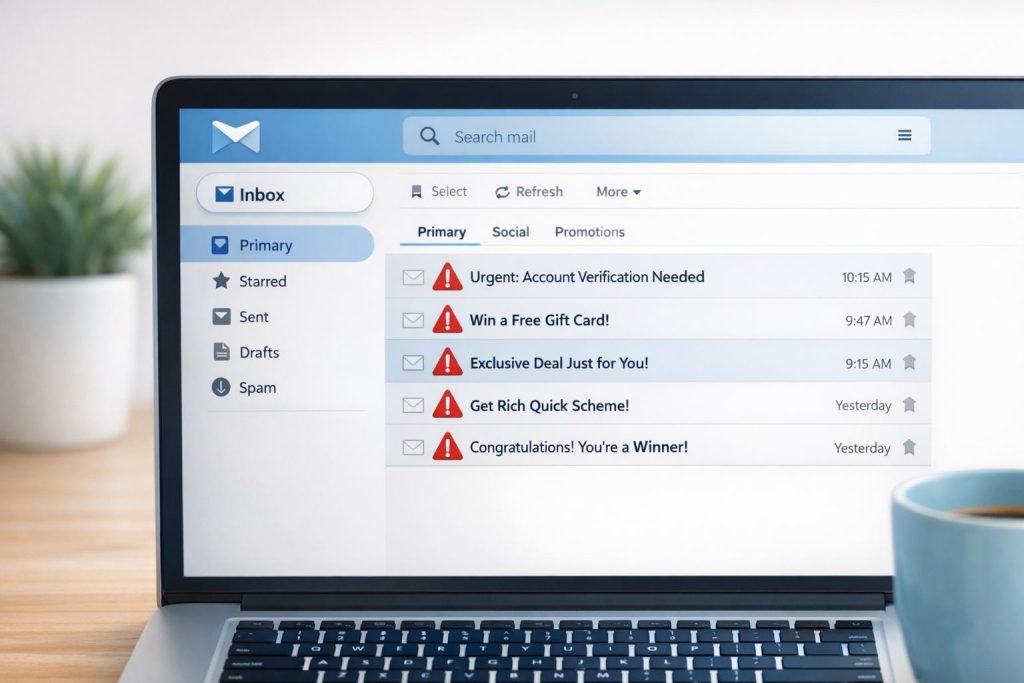
High spam complaint rates can harm your email deliverability, sender reputation, and campaign success. Here’s what you need to know:
- Spam Complaint Rate Formula: (Complaints ÷ Delivered Emails) × 100.
- Industry Standards: Stay below 0.1% (1 complaint per 1,000 emails). Gmail and Yahoo enforce stricter thresholds of 0.3%.
- Key Issues:
- Sending to inactive or unengaged subscribers.
- Poor email list hygiene (e.g., invalid addresses, spam traps).
- Excessive or inconsistent email frequency.
- Using purchased or scraped email lists.
- Irrelevant or misleading email content.
- Weak sender authentication (SPF, DKIM, DMARC misconfigurations).
Quick Fixes:
- Regularly clean your email list (remove inactive or invalid addresses).
- Use double opt-in to confirm subscribers.
- Establish consistent email schedules and offer frequency preferences.
- Align content with subscriber expectations – avoid misleading subject lines.
- Implement SPF, DKIM, and DMARC to secure your sender identity.
Pro Tip: Monitor complaint rates using tools like Google Postmaster or MailMonitor. Top senders aim for rates below 0.02%. Immediate action, like suppressing flagged emails via Feedback Loops, prevents further damage.
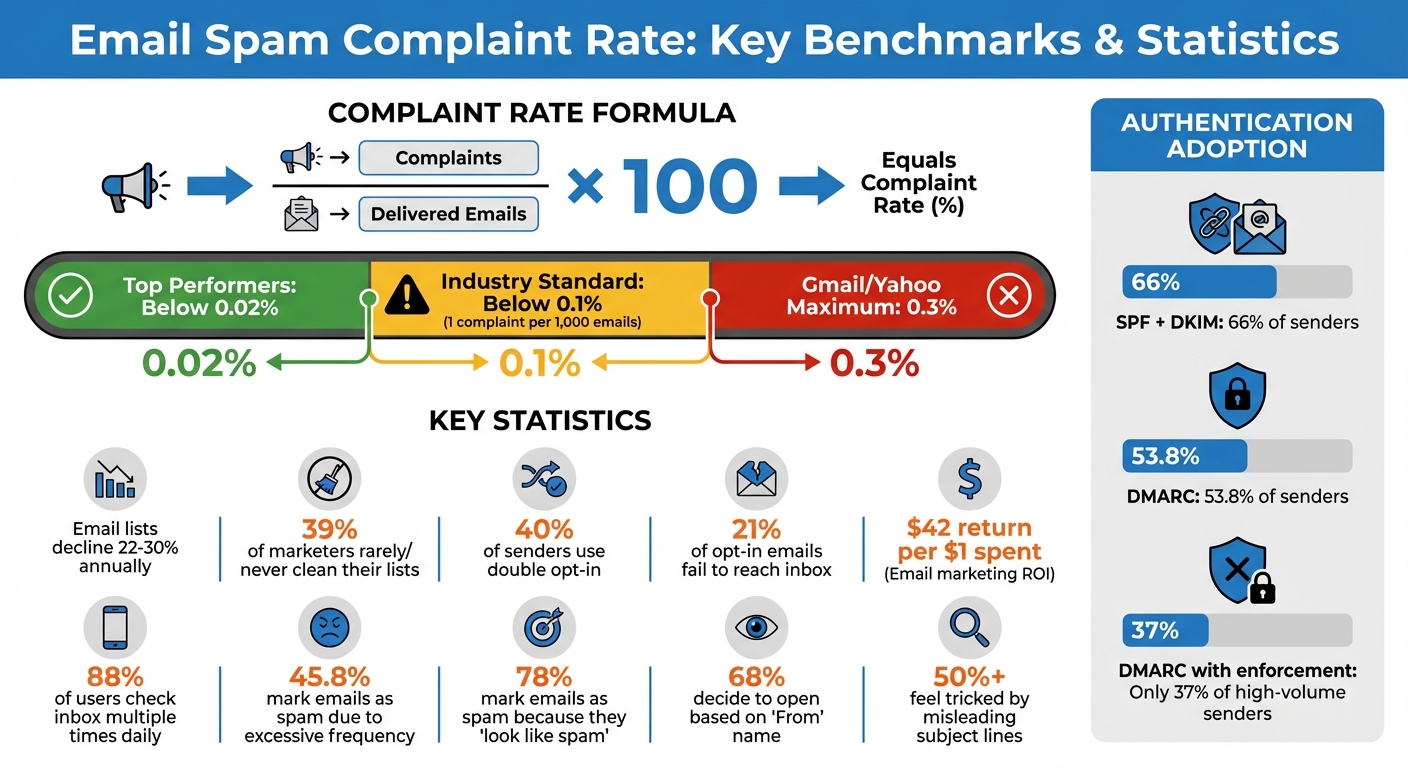
Email Spam Complaint Rate Benchmarks and Key Statistics
Spam Complaints Explained: How to Reduce Them and Improve Your Deliverability. Inbox Answers Part 1
Sending Emails to Unengaged or Inactive Subscribers
Reaching out to subscribers who haven’t engaged with your emails in a while can backfire quickly. If someone hasn’t opened or clicked an email in 90 days or more, there’s a good chance they’ve forgotten signing up in the first place[2]. When this happens, your emails can feel intrusive, like digital clutter. And if finding the unsubscribe link is a hassle, frustrated recipients might hit the spam button instead. This not only damages your sender reputation but can also cause email providers to filter your messages for all recipients[7]. To avoid this, proactive subscriber management and re-engagement strategies are crucial.
Email lists naturally decline by 22%-30% annually as people change jobs or abandon old accounts[9]. Dormant email addresses can even turn into recycled spam traps used by ISPs, further harming your reputation. Alarmingly, about 39% of email marketers rarely or never clean their lists, leaving their campaigns vulnerable to deliverability issues[7].
"Quality matters more than quantity. Cleaning your list regularly to keep your spam complaints, bounce rates, and unsubscribes down."
One way to manage this is by implementing a sunset policy combined with re-engagement campaigns. A sunset policy gradually reduces email frequency to inactive subscribers before removing them entirely. Before cutting ties, send a final win-back email to confirm if they’re still interested in hearing from you. Well-executed re-engagement campaigns can bring back up to 30% of inactive subscribers[8]. For those who remain unresponsive, it’s better to let them go – keeping them increases the risk of spam traps and deliverability problems.
The Importance of List Hygiene
Keeping your email list clean is essential for maintaining a healthy sender reputation. Regular list maintenance minimizes the risks associated with unengaged recipients. How often you clean your list depends on its size and your email volume. For most email programs, a cleaning every six months is sufficient. Larger programs with over 100,000 subscribers should consider quarterly reviews, while high-volume campaigns, especially in B2B, may need monthly cleaning[8].
Start by removing obvious issues like hard bounces, unsubscribes, and invalid email addresses. Next, look for role-based accounts (e.g., addresses like @support or @info), as these often lead to spam reports. Using real-time email verification during signups can also prevent typos, fake addresses, and bots, recovering up to 30% of inactive contacts[8].
Automation can make this process much easier. Create workflows that tag contacts based on their last engagement date, triggering re-engagement or cleanup sequences automatically[10]. Additionally, offer subscribers an "opt-down" option, allowing them to reduce email frequency (e.g., from weekly to monthly) instead of unsubscribing altogether. And always ensure your unsubscribe link is easy to find and requires just one click – this simple step can prevent frustrated users from marking your emails as spam.
Tools like MailMonitor’s Email Verification and List Optimization can help keep your audience engaged by identifying invalid addresses and monitoring engagement. Regular list cleaning paired with a clear sunset policy ensures low complaint rates and protects your sender reputation.
Excessive or Inconsistent Email Frequency
Sending too many emails is one of the quickest ways to increase complaint rates. While keeping your email list clean is important, maintaining a balanced sending schedule is just as critical for keeping your subscribers’ trust. When people feel bombarded with emails, they experience "email exhaustion" – a state where they feel overwhelmed and start ignoring your messages or, worse, marking them as spam[12]. In fact, frustrated recipients might flag your emails as spam just to stop the flood[2].
But sending too few emails can be just as harmful. Inconsistent email schedules leave subscribers disconnected from your brand. If weeks go by without contact, and then an email suddenly appears, they might not recognize your name and report it as spam[2]. This "forgotten sender" problem is surprisingly common and can hurt your sender reputation as much as over-sending.
The consequences of poor frequency management don’t stop at individual campaigns. High complaint rates caused by frequency issues can damage your sender reputation, leading to emails being blocked or sent straight to junk folders[14]. With 21% of opt-in emails already failing to reach the inbox[14], frequency missteps can make things even worse.
Establishing Consistent Schedules
To avoid the pitfalls of both over-sending and inconsistent emails, create a reliable schedule. Start by setting clear expectations in your welcome email. Let subscribers know how often they’ll hear from you – and stick to that promise[12]. This simple step builds trust and reduces the risk of spam complaints.
Finding the right balance depends on your audience. Most successful email programs send between 1 and 4 emails per week[15], but your ideal frequency should be guided by how your subscribers respond. Keep a close eye on engagement metrics like open and click rates. If these numbers start to drop as you increase your email volume, it’s a sign you need to scale back[2].
A preference center is another great way to manage frequency-related complaints. Give subscribers the option to choose how often they want to hear from you – daily, weekly, or monthly – rather than imposing a one-size-fits-all schedule[4][15]. This "opt-down" feature respects their preferences and reduces the likelihood of unsubscribes or spam reports. With 88% of users checking their inbox multiple times daily[15], offering this flexibility shows you value their time.
Tailor your email frequency based on where subscribers are in their journey. For example:
- New subscribers might benefit from more frequent emails (every 2–3 days) to build a connection and showcase your value.
- Engaged subscribers often respond well to weekly emails for ongoing nurturing.
- Long-term customers may prefer less frequent updates, such as monthly or quarterly check-ins[15].
For inactive subscribers – those who haven’t opened an email in 30 to 60 days – reduce your sending frequency. If they remain unresponsive for 90+ days, consider a re-engagement campaign or removing them from your list altogether[15]. Matching your frequency to subscriber preferences not only boosts engagement but also safeguards your sender reputation.
Avoid sudden spikes in email volume. Abrupt changes, especially during promotions or holidays, can trigger spam filters and hurt your reputation[12][14]. If you’re using a new IP address, start with smaller email volumes and gradually increase over time to build trust with ISPs[14].
Tools like MailMonitor’s Reputation Monitoring can help you track how your sending frequency affects deliverability in real time. By connecting Google Postmaster Tools, you can monitor metrics like domain and IP reputation, spam rates, and delivery errors such as "Rate limit exceeded." These insights let you fine-tune your schedule before issues escalate, ensuring your emails continue to reach your audience[13].
Poor List Quality and Acquisition Practices
When it comes to email marketing, the quality of your email list matters far more than its size. Sending emails to individuals who haven’t given their consent often leads to high complaint rates. The biggest offenders? Purchased, rented, or scraped email lists. Buying a list doesn’t mean you’re buying permission – email consent isn’t something that can be transferred [16].
The repercussions of using these lists go beyond just complaints. Purchased lists are notorious for being riddled with spam traps – email addresses set up by ISPs and anti-spam organizations to catch senders using shady tactics [1] [16]. Hitting one of these traps can instantly land your IP or domain on a blocklist. And since these lists are rarely exclusive, recipients often get flooded with emails from multiple senders, making them more likely to mark unfamiliar messages as spam [1].
The numbers back up these risks. About 9.4% of senders admit to using purchased lists or scraping contacts over the past two years [7]. B2B senders are particularly guilty, with 12.3% admitting to these practices compared to just 4.3% of B2C senders [7]. With Gmail and Yahoo enforcing a strict spam rate threshold of 0.3% by February 2024 – and experts advising an even lower rate of 0.02% [2] – even a small number of complaints can severely impact your deliverability.
The legal implications are just as serious. Sending emails to purchased lists can violate regulations like GDPR and the CAN-SPAM Act, with fines reaching up to $16,000 per email in some jurisdictions [16] [11]. These practices not only harm your reputation but also put you at legal risk. As the Messaging Malware Mobile Anti-Abuse Working Group (M3AAWG) states:
"The practice of selling, buying or sending to lists of purchased email addresses… is in direct violation of M3AAWG core values" – M3AAWG [16]
Even seemingly harmless list-building tactics can backfire. For instance, using pre-checked opt-in boxes may seem like an easy way to grow your list, but they’re often seen as deceptive and are illegal in some regions [16] [4]. Unsecured signup forms are another vulnerability, as bots can exploit them to fill your database with fake addresses, spam traps, and disposable emails [16] [11]. Without CAPTCHA protection, your signup forms are essentially an open door for abuse.
The Value of Confirmed Opt-Ins
To avoid these pitfalls, stick to proven strategies like double opt-in, also known as confirmed opt-in. This method requires subscribers to confirm their interest by clicking a link, ensuring that your list is filled with people who genuinely want to hear from you. Nick Schafer, Sr. Manager of Deliverability & Compliance at Sinch Mailgun, emphasizes its importance:
"I would recommend that every sender use a double opt-in all the time. Not only does it ensure you only acquire subscribers who are more likely to engage, but it also helps prevents bots from abusing signup forms" – Nick Schafer, Sr. Manager of Deliverability & Compliance at Sinch Mailgun [7]
Despite its benefits, only 40% of senders currently use double opt-in [7]. But the results are clear: double opt-in leads to higher engagement and fewer complaints. For example, senders using email validation tools report a 21% drop in bounce rates [7]. Additionally, 47.5% of marketers who prioritize list hygiene cite maintaining sender reputation as their top advantage [7].
Real-time email verification is another essential step. Tools like MailMonitor’s Email Verification can instantly block fake addresses, role-based emails (like info@ or support@), and disposable addresses before they corrupt your database [1] [11]. These tools also catch common typos – such as "gnail.com" instead of "gmail.com" – and help keep spam traps out of your list from the start.
For every subscriber you add, maintain detailed records. Log the signup date and time (in UTC), the channel they used (e.g., website, social media, or an event), and their IP address [16]. Having this proof of consent can protect you if an ISP questions your practices. Also, safeguard your signup forms with CAPTCHA or ReCAPTCHA to prevent bot abuse [16] [11].
Finally, make it easy for people to unsubscribe. Include a clear opt-out link in every email – ideally at both the top and bottom [2] [11]. If recipients can’t find an easy way to leave, they may resort to hitting the "Report Spam" button instead. Offering a preference center where subscribers can adjust their email frequency or content preferences can also improve your reputation [11]. As Ashley Rodriguez, Deliverability Engineer II at Sinch Mailgun, explains:
"We often compare email sender reputation to credit scores. In both cases, one costly mistake can easily damage your credit score or your sender reputation, but they take time to build back up" – Ashley Rodriguez, Deliverability Engineer II at Sinch Mailgun [7]
sbb-itb-eece389
Irrelevant or Misleading Email Content
When it comes to email marketing, the relevance and clarity of your content can make or break your campaign. Misleading subject lines are a prime example of what not to do. Over 50% of people report feeling tricked into opening promotional emails due to deceptive subject lines, which not only frustrates recipients but also violates CAN-SPAM regulations, potentially leading to hefty penalties [11].
One common culprit is the misuse of prefixes like "RE:" or "FWD:" to create the illusion of a prior conversation. Similarly, pushing false urgency for routine promotions can backfire, as it erodes trust and increases spam complaints [17][19]. The numbers don’t lie: 78% of recipients mark emails as spam simply because they "look like spam" – this includes excessive use of capital letters, exclamation points, or gimmicky characters like SP$C!AL [22].
Another issue is sending generic, unsegmented emails. When recipients get content that doesn’t match their interests, complaints rise [2][20]. Frequency matters too – 45.8% of subscribers will mark emails as spam if they feel overwhelmed by how often they’re sent [1]. These complaints contribute to 20% of all email deliverability problems [1].
Even technical issues can send your email straight to the spam folder. Emails that stray from the recommended 80/20 text-to-image ratio or use URL shorteners can appear unprofessional and trigger spam filters [1][6][18][19]. And don’t underestimate the importance of your "From" name – 68% of recipients decide whether to open an email based solely on this detail. Using a free domain like @gmail.com instead of a branded one can instantly lower trust [21].
Aligning Content with Recipient Expectations
To keep your audience engaged, your email content must align with their expectations. Start by making sure your email body delivers on the promises made in your subject line. Avoid spammy trigger words like "Free", "Winner", or "Risk-Free" [11]. Use a consistent and recognizable "From" name that reflects your brand. For instance, Virgin Experience Days sends emails from "[email protected]", making it clear who the sender is and what the email is about [17].
Segmentation is another powerful tool to ensure relevance. Take Society6, for example – they send targeted "Galentine’s Day" campaigns specifically to their female subscribers, tailoring the message to resonate with their audience [21]. By leveraging data like purchase history, browsing behavior, and engagement patterns, you can craft messages that feel personal and relevant [2][20]. The payoff is worth it: organically built email lists have 5x higher open rates and 4x fewer spam complaints compared to lists that are bought or scraped [21].
Before launching any major campaign, it’s crucial to pre-test your emails. Check for spam triggers like excessive links or poor formatting, and test how your emails display on both desktop and mobile devices. Stick to the 80/20 text-to-image ratio, add alt-text for images, and use full, branded URLs instead of link shorteners [1][23][24].
Finally, make unsubscribing simple and transparent. Parcel.io, for example, places an unsubscribe link prominently at the top of their emails to demonstrate openness [2]. Offering a preference center where subscribers can adjust their email frequency or choose specific topics can also help maintain engagement. As Carin Slater, Manager of Lifecycle Email Marketing at Litmus, puts it:
"There’s so much more that goes into it than just the words you use. It’s important not to overuse spammy words, of course, but what really matters is that your subscribers want to receive the emails you’re sending" – Carin Slater, Manager of Lifecycle Email Marketing at Litmus [22]
Sender Authentication and Reputation Challenges
Even perfectly crafted emails can end up in spam folders if your technical setup isn’t on point. That’s where SPF, DKIM, and DMARC come in – they act like digital ID cards, proving to mailbox providers that you’re a legitimate sender and not a scammer impersonating your brand [27]. Without these protocols, ISPs can’t reliably tell genuine emails from phishing attempts, which increases the chances of your messages being flagged as spam.
As of 2024, while 66% of senders have implemented both SPF and DKIM, only 53.8% have adopted DMARC [25]. For high-volume senders (those sending over 100,000 emails monthly), 71% use DMARC, but just 37% enforce it with a "Quarantine" or "Reject" policy [25]. This gap leaves domains open to spoofing. When bad actors send phishing emails using your domain, recipients often report those messages as spam, tarnishing your reputation and inflating complaint rates [42,44].
Misalignment between authentication protocols is another common issue driving spam complaints. DMARC requires the domain in your "From" header to match the domains used in SPF and DKIM checks. If third-party services or improperly configured subdomains are involved, even legitimate emails can fail authentication and be flagged as suspicious [42,45]. Email forwarding can also disrupt SPF, while mailing lists that tweak message footers may invalidate DKIM signatures [26]. These misalignments highlight the importance of securing your email infrastructure to ensure reliable delivery.
Your IP reputation is just as critical as your authentication setup. Like maintaining a clean email list, managing your IP reputation involves careful planning. New IP addresses have no history, so ISPs treat them with extra scrutiny [14]. Sending large volumes of email from a fresh IP without proper preparation can trigger spam filters. Gradually warming up your IP – starting with low volumes and increasing over 30–40 days – lets ISPs assess your practices based on engagement and complaint metrics [49,50]. Skipping this process could result in your emails being blocked or sent straight to spam, even if everything else is configured correctly.
Authentication and Infrastructure Best Practices
To tackle these challenges, follow these steps to strengthen your email authentication and IP reputation:
- Implement All Three Protocols: Use SPF to authorize specific IP addresses, DKIM to verify message integrity with cryptographic signatures, and DMARC to tie them together by defining actions for failed authentication [43,44]. As Alison Gootee, Deliverability Advocacy Specialist at Sinch Mailgun, explains:
"DMARC actually fills in a gap that SPF and DKIM both kind of left behind, introducing the concept of alignment… it closes that loophole and makes sure that you are who you say you are." [25]
- Adopt a Gradual DMARC Policy: Start with a p=none policy to monitor traffic and identify legitimate senders. Once everything is aligned, move to p=quarantine and eventually p=reject to fully protect your domain from spoofing [26]. Marcel Becker, Sr. Director of Product Management at Yahoo, advises:
"The end goal is ideally a policy of p=reject. That’s what DMARC is for. Ensuring that your domain cannot be spoofed and protecting our mutual customers from abuse." [25]
- Warm Up New IPs Carefully: Begin by emailing your most engaged subscribers – recent sign-ups or those who regularly open your messages [49,50]. Start small, sending around 20 emails per hour on the first day, and gradually increase over 30–40 days while monitoring bounce rates and complaints [49,50]. If performance dips, hold steady at the current volume until your reputation improves. Keep in mind that ISPs only retain IP reputation data for 30 days, so inactive IPs may require re-warming [28].
- Segment Subdomains for Better Control: Use separate subdomains for different email types – for instance,
news.yourdomain.comfor marketing emails andservice.yourdomain.comfor transactional messages. This approach isolates reputations, safeguarding critical communications [47,50]. - Rotate DKIM Keys Regularly: Update your DKIM keys every 6–12 months to minimize the risk of compromised keys [25].
- Monitor Success Rates and Complaints: Use tools like Google Postmaster to track your authentication success and spam complaint metrics. Gmail and Yahoo, for example, require bulk senders to keep complaint rates below 0.1% [44,46].
MailMonitor offers integrated tools for DMARC Authentication, IP Warm-Up, and Reputation Monitoring, providing real-time alerts for authentication failures or dips in reputation scores. By keeping your SPF, DKIM, and DMARC records up-to-date and monitoring your sending practices, MailMonitor helps ensure you meet the strict complaint rate thresholds set by major mailbox providers.
Monitoring and Mitigation Strategies
To maintain your sender reputation, keeping a close eye on complaint rates and addressing issues promptly is essential. Regular monitoring helps identify problems early, such as misleading subject lines or disengaged audience segments. For instance, if your complaint rate rises from 0.08% to 0.15% over a few weeks, it’s a sign of gradual reputation decline that could eventually lead to blocking by email providers [32].
The industry standard for complaint rates is 0.1% or lower. Gmail and Yahoo enforce a stricter ceiling of 0.3%, but top-performing senders aim for rates around 0.02% [32][2].
"A spam rate of 0.3% is really high… If you’re a good sender your spam rates will be well below 0.3%" – Marcel Becker, Sr. Director of Product at Yahoo [2]
Interestingly, a 0% complaint rate isn’t always a good sign. If users aren’t reporting your emails as spam, it could mean they’re already being delivered directly to the spam folder [32]. These early indicators are vital for staying proactive in managing complaints.
Tracking and Resolving Spam Complaints
When you notice an uptick in complaints, quick action is critical. Feedback Loops (FBLs) are a valuable tool; they notify you whenever someone flags your email as spam. This allows you to suppress those email addresses immediately, preventing further harm to your reputation [29][5]. Major ISPs like Gmail and Outlook offer tools to assist with monitoring. For example, Google Postmaster Tools provides updates every 48 hours, while Microsoft combines SNDS and JMRP for Outlook and Hotmail tracking [30][31].
To stay ahead of issues, set up automated alerts for complaint rates exceeding 0.2% within a 24-hour period. Also, track metrics by ISP to identify where problems are concentrated [32][31]. Another useful metric is the dissatisfaction rate, calculated as (unsubscribes/clicks) × 100. If this rate surpasses 30%, it’s time to review and adjust your campaign strategy [30].
Tools like MailMonitor can simplify this process. Its Custom Alerts notify you in real time about IP blocklist hits or spam trap detections. Meanwhile, the Deliverability Audit service helps pinpoint the root causes of complaint spikes. If your IP or domain is blocklisted, MailMonitor’s Blocklist Removal service can help resolve underlying issues, whether it’s a compromised account or poor list hygiene, before requesting delisting from services like Spamhaus or Barracuda [33]. By linking your Google Postmaster Tools account to MailMonitor, you’ll get integrated reports on spam rates, IP reputation, and domain health – all in one convenient dashboard.
Conclusion
High complaint rates in email marketing often stem from issues like poor list hygiene, irrelevant content, excessive sending, or weak authentication measures. To tackle these problems, focus on best practices: use double opt-in to confirm subscribers, regularly clean your list by removing inactive contacts, and segment your audience to ensure your content stays relevant. On the technical side, set up SPF, DKIM, and DMARC protocols to safeguard your sending identity – these are now required by major email providers like Gmail, Yahoo, and Microsoft Outlook [13][3].
The goal is to keep your complaint rate at or below the industry standard of 0.1%, with top performers aiming for as low as 0.02% [2][14]. Even small adjustments to improve list quality and align your content with audience preferences can significantly lower complaints and protect your sender reputation. Considering email marketing delivers an impressive $42 return for every $1 spent [1], maintaining a strong reputation is not just important – it’s essential.
To help you stay on top of these efforts, tools like MailMonitor offer real-time alerts for blocklist hits, spam trap detections, and reputation changes. By integrating Google Postmaster Tools with MailMonitor, you gain a comprehensive view of critical metrics like spam rates, IP reputation, and domain health [13]. Additionally, services like Deliverability Audits and Blocklist Removal ensure any issues are addressed quickly and effectively.
Lastly, always provide a clear, one-click unsubscribe option to minimize spam complaints [1][3]. By adopting these strategies and consistently monitoring your performance, you can ensure high deliverability rates and protect your sender reputation for the long haul.
FAQs
What are the most effective ways to lower my email spam complaint rate?
To cut down on spam complaints, start by creating a permission-based email list. Use double opt-ins to confirm subscribers genuinely want to hear from you, and make sure to honor unsubscribe requests without delay. Craft emails with relevant and engaging content and use subject lines that are clear and directly reflect the email’s message – no misleading tactics. For added trust and better deliverability, authenticate your emails using SPF, DKIM, and DMARC protocols. Lastly, stick to a consistent sending schedule to keep your audience engaged and reduce the likelihood of complaints.
What are the best ways to keep your email list clean and reduce spam complaints?
Keeping your email list in good shape is essential for cutting down on spam complaints and maintaining a solid sender reputation. Start by verifying email addresses before adding them to your list. Regularly check for invalid or misspelled entries, as these can lead to bounces and hurt your deliverability. Implement a double-opt-in process so subscribers confirm their email address – this not only prevents errors but also ensures you’re engaging with people who genuinely want to hear from you.
Keep an eye out for inactive subscribers – those who haven’t opened or clicked an email in the past 90–180 days or consistently cause bounces. Before removing them, try running re-engagement campaigns to give them a chance to stick around.
Steer clear of buying third-party lists, as they can lead to more harm than good. Instead, focus on keeping your data accurate by fixing typos and updating subscriber details when needed. By sticking to these list-cleaning habits, you can reduce spam complaints and boost your email deliverability.
Why is sender authentication critical for ensuring email deliverability?
Sender authentication plays a critical role in ensuring your email domain is recognized as legitimate, which helps mailbox providers trust your messages. Using protocols like SPF, DKIM, and DMARC, you can safeguard your emails from being marked as spam and increase the likelihood of them reaching your recipients’ inboxes.
These protocols not only protect your domain from misuse but also lower the chances of phishing attacks. On top of that, they strengthen your sender reputation – a crucial factor in maintaining strong email deliverability.

