

High-volume email is permission-based mail sent in the millions, and at that scale deliverability is a revenue system, not a setting. Mailbox providers judge you on authentication, complaints, list quality and consistency, and they judge every send against your history. The senders who stay in the inbox run a monitored program: opted-in lists only, full authentication, one-click unsubscribe, hygiene and sunsetting, and weekly visibility into placement and reputation.
This guide is for the people who own that program: directors of deliverability at email service providers, CRM and lifecycle leaders, email marketing VPs, and the executives whose revenue depends on the inbox. It covers permission-based email only.
TL;DR
- Google and Yahoo treat anyone sending more than 5,000 messages a day to their users as a bulk sender, and Microsoft’s Outlook.com has its own high-volume rules. All expect SPF, DKIM, aligned DMARC and easy unsubscribe.
- Keep spam complaints under 0.3% as a hard ceiling and aim for under 0.1%. Honor one-click unsubscribe within two days.
- Send only to opted-in contacts, remove spam traps, verify addresses, and sunset contacts with no engagement in 90 to 180 days.
- “Delivered” is not “inbox.” Measure placement with seed testing, reputation data and blocklist monitoring, not open rates alone.
- Our two-week audit, two-week remediation and ongoing optimization with weekly reports are built for this work. A 90-day Strategic Pilot is available.
Table of Contents
- What high-volume email means for a sender
- The provider rules that apply to bulk senders
- Authentication: SPF, DKIM and aligned DMARC
- Consent, unsubscribe and complaints
- List hygiene, spam traps and sunsetting
- Delivery, deliverability and inbox placement are different things
- Sending infrastructure and ramping volume
- Monitoring: how to see problems before revenue does
- When placement drops: a diagnostic order
- How we support high-volume senders
- A practical checklist for high-volume programs
- FAQ
- Sources
What high-volume email means for a sender
The phrase has two meanings online. One is a Microsoft 365 feature for applications that send internal notifications, with its own recipient limits and no relay to the internet. That is an infrastructure topic for IT teams and not what this article covers.
The other meaning is the one that matters for revenue: a brand or email service provider (ESP) sending promotional, lifecycle and transactional mail to millions of opted-in recipients each month. For that sender, the questions are different. Will Gmail, Yahoo and Outlook.com accept the mail? Will it land in the inbox, the promotions tab or spam? What happens to revenue when a reputation problem hits one provider?
The stakes grow with volume. A 2% placement drop on a list of 20 million sends affects 400,000 messages per campaign. The same drop on 20,000 sends goes unnoticed. At scale, small leaks are large losses, and they are hard to see without measurement built for the job.
The provider rules that apply to bulk senders
Three mailbox providers set the practical rules for US senders, and their requirements overlap heavily.
Google. Gmail’s sender guidelines apply stricter requirements to anyone sending more than 5,000 messages a day to Gmail addresses. They call for authentication, easy unsubscribe and a low spam rate as reported in Google Postmaster Tools. The guidance is to stay below 0.10% and never reach 0.30%.
Yahoo. Yahoo’s Sender Hub best practices recommend a working List-Unsubscribe header with one-click support, plus a clearly visible unsubscribe link in the message body.
Microsoft. Outlook.com announced requirements for high-volume senders that begin with authentication and extend to list quality and complaint handling. Check the Outlook postmaster pages for the current enforcement details, since providers refine them over time.
We design our program recommendations around these rules and around industry best practice, so a fix for one provider does not create a problem at another.
Authentication: SPF, DKIM and aligned DMARC
Authentication is the entry ticket. The M3AAWG Sender Best Common Practices, updated in August 2026, say that to meet major mailbox-provider requirements a sender needs a published SPF record for its envelope domain, DKIM signatures on messages, and a DMARC policy for the visible From domain with alignment passing.
In plain terms:
- SPF lists which servers may send for your domain.
- DKIM signs each message so the receiver can confirm it was not altered and came from you.
- DMARC tells receivers what to do when SPF and DKIM do not align with the From domain, and sends you reports.
At high volume, authentication usually fails in the seams, not the basics. Common causes are a new sending platform added by one team with no DKIM setup, an SPF record that grows past the ten-lookup limit after several vendors are added, subdomains with no DMARC policy, and a marketing subdomain whose DKIM is signed by the ESP’s domain instead of yours. Each of these can pass a quick check and still fail alignment on a portion of your traffic.
We recommend SPF, DKIM and aligned DMARC on every sending domain and subdomain, with DMARC reports reviewed regularly rather than left in a mailbox nobody reads. MailMonitor Analytics tracks SPF, DKIM and DMARC so changes show up before they cost you placement. See our guide on email deliverability concepts for the foundations.
Consent, unsubscribe and complaints
Permission is the most important input to the whole system, because complaints and spam traps both come from mail people did not ask for.
Opted-in lists only
Send only to people who asked for your mail, and keep a record of when and how they did. M3AAWG places explicit prior consent at the center of its practices, with confirmed opt-in as the strongest form. Purchased, rented or scraped lists are where spam trap hits and complaint spikes originate. We work only with permission-based programs for this reason.
Visible unsubscribe plus one-click, honored within two days
Give every message a visible unsubscribe link and a List-Unsubscribe header with one-click support, defined in RFC 8058. Process requests within two days. That is faster than the law requires: CAN-SPAM’s rule allows ten business days, while the provider requirements are tighter. Treat the stricter standard as your operating standard.
An easy unsubscribe protects revenue. A subscriber who cannot leave quickly will click “report spam” instead, and a complaint costs you far more than an opt-out does.
Complaint rate: under 0.3%, ideally under 0.1%
Google’s guidance puts the line where we do: stay below 0.30% and, ideally, below 0.10% in Postmaster Tools. Complaint rate is calculated against mail that reaches the inbox, so a segment sent to a tired list can push the figure up quickly even when the program as a whole looks healthy. Review complaints by segment, campaign and source, not only as a blended average.
Transactional versus promotional mail
The FTC’s CAN-SPAM rule distinguishes commercial messages from transactional or relationship messages, such as account statements and completed-transaction confirmations. For deliverability, keep those streams apart in practice: separate subdomains or sending lanes so a promotional reputation problem does not delay password resets and receipts.
List hygiene, spam traps and sunsetting
A large list is an asset only while it is clean. Three routines matter most.
- Verify at the point of capture. Reject typos and invalid addresses at sign-up. Bounces from bad addresses signal poor list practices to providers. Our email verification checklist walks through the steps.
- Remove spam traps. Traps are addresses that exist to catch senders with weak list practices. Old, abandoned addresses recycled into traps are a common risk for long-lived lists. Identify them, find the source that introduced them, and fix the source as well as the records.
- Sunset unengaged contacts. We recommend removing or suppressing contacts with no engagement in 90 to 180 days. Choose the window by your send frequency and purchase cycle: a daily retailer sunsets sooner than a quarterly financial publisher. Before sunsetting, run a short re-permission sequence so you can keep people who still want your mail.
Sunsetting often feels like losing audience. In practice the removed contacts were not producing revenue, and they were pulling down the engagement signals that decide how providers treat the contacts who do.
Delivery, deliverability and inbox placement are different things
High-volume teams often report “delivered” as success. That number only says the receiving server accepted the message. It does not say whether the message reached the inbox, the promotions tab or the spam folder.
| Measure | What it tells you | What it misses |
|---|---|---|
| Delivery rate | The receiving server accepted the message | Whether it reached the inbox |
| Bounce rate | Address validity and blocks | Mail that was accepted and filed as spam |
| Open and click rates | Engagement, with automated activity mixed in | Placement, because privacy features and bots can inflate opens |
| Seed-list inbox placement | Where test messages land across providers | Individual subscriber behavior |
| Provider reputation data | How Gmail and Microsoft see your domain and IPs | Placement at providers that publish no data |
No single measure is enough. Placement testing, reputation data and engagement together show whether a drop is a provider-specific filtering problem, a list problem or an authentication problem. Our deliverability metrics deep dive explains how to read them side by side.
Sending infrastructure and ramping volume
At millions of messages a month, infrastructure choices become deliverability choices.
- Dedicated versus shared IPs. A dedicated IP gives you control over your own reputation but requires consistent volume to build it. A shared pool is shaped by its other senders. The right answer depends on your volume pattern.
- Gradual ramping. When you add an IP, domain or large new segment, increase volume in steps and start with your most engaged recipients. M3AAWG suggests roughly six weeks for domain warm-up, starting low and slow, and says artificial warming practices are not recommended.
- Consistency. Sudden spikes look like compromised accounts to filters. Spread large sends over time where the business allows, and watch throttling and deferral messages as you scale.
- Segmented streams. Separating transactional, lifecycle and promotional sending lets each build its own reputation and limits the damage when one stream has a problem.
Always align these choices with the provider requirements above. Ramping is for permission-based mail to engaged recipients. It is not a way to hide poor list quality.
Monitoring: how to see problems before revenue does
A high-volume program needs monitoring that answers four questions every week.
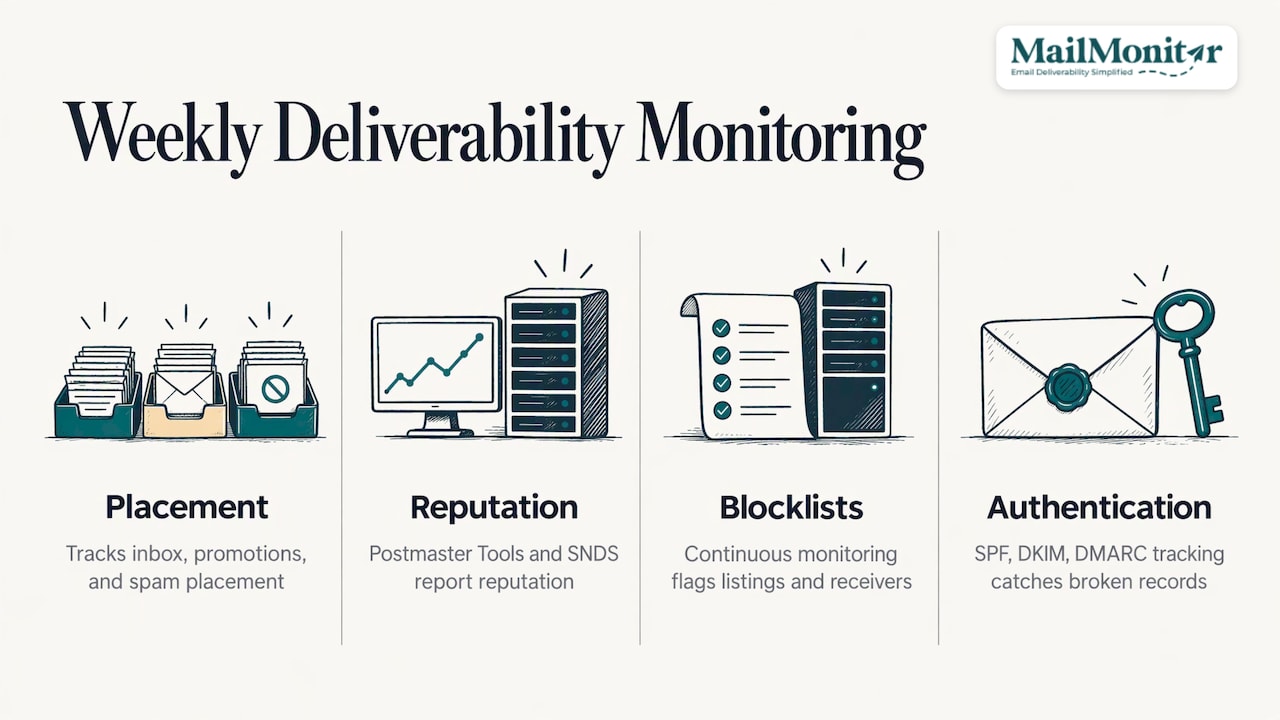
Where is mail landing? Seed testing sends test messages to addresses at many providers and records inbox, promotions or spam placement. MailMonitor Analytics uses 375 seed addresses across 80+ internet service providers, with standard and weighted seed lists. The weighted list mirrors the provider mix of your own audience, so a problem at the provider where most of your customers sit stands out. See how to test inbox placement for the method.
What do providers think of you? Google Postmaster Tools shows domain and IP reputation, spam rate and authentication results for Gmail traffic. Microsoft’s SNDS reports on IP data for Outlook.com traffic. We bring both into MailMonitor Analytics so reputation sits beside placement results.
Are you on a blocklist? A listing can cut delivery at specific receivers fast. Continuous blocklist monitoring tells you when and where it happened.
Is authentication holding? SPF, DKIM and DMARC tracking catches broken records after a DNS or vendor change.
Tie these to revenue. When placement at one provider drops, compare the revenue per send for that provider’s recipients against the baseline. That comparison turns a technical alert into a business case.
When placement drops: a diagnostic order
When results fall, work through causes in a fixed order so effort goes to the likely culprit.
- Authentication. Did a record change, expire or fall out of alignment?
- Blocklists and provider reputation. Is a listing or a Postmaster Tools reputation drop visible?
- Complaints and traps. Did a specific segment, source or campaign push complaints up or hit traps?
- Volume and cadence. Was there a spike, a new IP or a new stream?
- Content and links. Did a template, link domain or tracking domain change?
Fixing symptoms without the root cause leads to repeat incidents. A segment pulled from one campaign will reappear in the next one if the source that created it is still active. For a fuller process, read our guide to establishing an email deliverability audit.
How we support high-volume senders
MailMonitor was founded in 2010 and has helped 16,000+ companies. We combine deliverability software with deliverability experts, because dashboards show a problem and someone still has to find the cause and act on it.
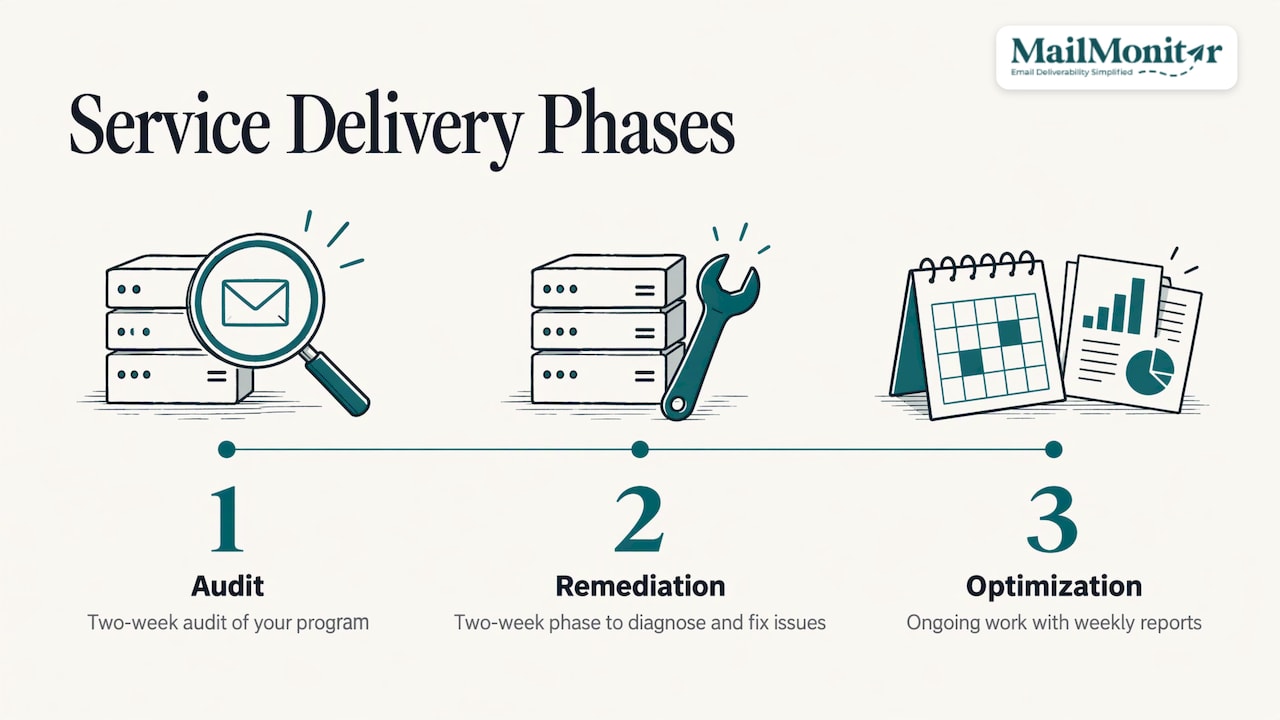
The work runs in three phases: a two-week audit of your program, a two-week remediation phase, and ongoing optimization with weekly reports. Our experts diagnose the root cause of spam placement and blocking, and guide or perform the fixes. Our approach follows mailbox provider rules and industry best practice, and we work only with opted-in, permission-based programs.
Plans start at $1,000 per month billed annually. The Strategic Pilot runs 90 days if you want to see the program working on your own sending before a longer commitment. Plans and details are on our pricing page, and the service scope is on our managed services page.
If email drives a meaningful share of your revenue, Get a Free Consultation and we will look at your authentication, complaint levels and placement with you.
A practical checklist for high-volume programs
- Opted-in lists only, with consent records kept.
- SPF, DKIM and aligned DMARC on every sending domain and subdomain.
- Visible unsubscribe link and one-click unsubscribe, honored within two days.
- Spam complaints under 0.3%, with a working target of under 0.1%.
- List verification at sign-up, ongoing hygiene and spam trap removal.
- Sunsetting for contacts with no engagement in 90 to 180 days.
- Separate streams for transactional, lifecycle and promotional mail.
- Weekly review of seed placement, Postmaster Tools, SNDS and blocklists.
For a broader walkthrough, our end-to-end deliverability guide covers each step in more depth.
FAQ
How many emails make you a bulk sender?
Google and Yahoo apply their bulk sender requirements at more than 5,000 messages a day to their users from one domain. Microsoft’s Outlook.com also sets requirements for high-volume senders. Check each provider’s guidance for current thresholds, and treat the rules as your standard well before you reach them.
What spam complaint rate is safe for high-volume email?
Keep complaints under 0.3% as a hard limit and aim for under 0.1%, the range Google describes in its sender guidelines. Track the rate by segment and source so a small problem group cannot hide inside a healthy average.
Is a high delivery rate the same as inbox placement?
No. Delivery rate means the receiving server accepted the message. Inbox placement means it reached the inbox instead of spam or another folder. Seed testing and reputation data show placement, which delivery and open rates cannot.
How long should I wait before sunsetting unengaged contacts?
We recommend a window of 90 to 180 days with no engagement, set by your send frequency and buying cycle. Run a short re-permission sequence first, then suppress the contacts who do not respond.
Sources
- Manage High Volume Email for Microsoft 365 | Microsoft Learn
- Email sender guidelines | Gmail Help
- Sender Best Practices | Yahoo Sender Hub
- Outlook’s new requirements for high-volume senders | Microsoft
- M3AAWG Sender Best Common Practices, August 2026
- RFC 8058: Signaling One-Click Functionality for List Email Headers
- 16 CFR Part 316, CAN-SPAM Rule | eCFR

