
Your email content directly impacts whether your messages land in the inbox or get flagged as spam. Internet Service Providers (ISPs) evaluate multiple factors – like subject lines, formatting, and user engagement – to assign a domain reputation score that follows your company across email platforms. A strong reputation ensures better deliverability, while a poor one can block your emails entirely.
Key Takeaways:
- Spam triggers: Avoid using spammy words (e.g., "free money") and misleading subject lines.
- Formatting issues: Maintain a balance between text and images (at least 20% text) and ensure all links are functional.
- User engagement: Positive actions like clicks and replies boost your reputation, while spam complaints and deletions harm it.
- Authentication protocols: Use SPF, DKIM, and DMARC to verify your emails and protect your domain.
- Monitoring performance: Track metrics like inbox placement rate, spam complaints, and bounce rates to identify and fix problems early.
By focusing on clean, engaging, and trustworthy email content, you can improve your domain reputation and maximize your email marketing success.
Build email sender reputation – the pathway to reliable business email
Content Problems That Damage Domain Reputation
Your email content can harm your reputation even before it’s opened. Internet service providers (ISPs) analyze every aspect of your emails – subject lines, formatting, even image usage – to detect signs of spam or phishing. If your emails raise red flags, your reputation score drops, and your messages may never reach the inbox. Let’s break down the most common content issues that can negatively impact your domain reputation.
Spam Trigger Words and Phrases
Spam filters don’t just look for specific words – they evaluate the overall tone and structure of your email. Certain words and phrases, especially those tied to financial promises or urgency, can increase your spam score [4]. For example, while “free consultation” might pass, phrases like “make $10,000” or “free money” are likely to trigger alarms [4].
Formatting matters too. Emails that use all caps, excessive punctuation, or an overload of emojis can come across as spammy [4]. Misleading subject lines are another major issue; more than half of consumers report feeling misled by deceptive subject lines [7]. These practices not only frustrate readers but also increase spam complaints, which ISPs take seriously. Even a spam complaint rate as low as 0.08% can damage your deliverability [6].
"The word ‘free’ is often considered a spam trigger word because companies use it to overpromise and underdeliver." – Mailchimp [5]
Avoid using tricks like “RE:” or “FWD:” in your subject lines to fake a sense of familiarity. Instead, focus on creating honest, personalized subject lines that resonate with your audience. This approach not only helps you avoid spam filters but also reduces complaint rates.
| Category | Common Spam Trigger Words & Phrases |
|---|---|
| Financial/Greed | Money, $, Credit card, Cash, Make $10,000, Check or money order, Increase sales |
| Urgency/Pressure | Act now, Urgent, Do it today, Limited time, Congratulations, Winner, Guarantee |
| Promotional/Sales | Free, Toll-free, Great offer, Special promotion, No obligation, Risk-free, Promise you |
| Deceptive/Generic | Dear friend, This is not spam, Click here, Cancel at any time, Amazing |
Poor Text-to-Image Balance
Emails that rely heavily on images – or worse, consist of a single image – can raise suspicion [3]. Many email clients block images by default, leaving recipients with blank emails if there’s no supporting text. This not only frustrates users but also increases the likelihood of your email being deleted or marked as spam, which hurts your reputation further.
"If you build your email in another platform and import it into Mailchimp as a single image, inbox providers may flag it as suspicious. Instead, mix and match text, buttons, and images for structure and accessibility." – Mailchimp [3]
To avoid this, ensure that your email contains at least 20% text [3]. Test your email by previewing it with images disabled to confirm that your message and call-to-action remain clear. Additionally, avoid using oversized or unoptimized images, as they can increase file size and cause email clipping in platforms like Gmail – potentially cutting off critical elements like unsubscribe links.
Broken or Suspicious Links
ISPs scrutinize every URL in your email for signs of phishing or spam [9]. Linking to blacklisted domains, such as those flagged by Spamhaus or SURBL, can damage your own domain’s reputation by association [10]. URL shorteners like bit.ly or tinyurl are particularly risky because they’re often used to hide malicious links [10].
"Some URL shorteners are associated with spammers, which can detrimentally affect your email domain reputation check results." – Ilse Van Rensburg, Marketing, Cognism [10]
Broken links are another issue. When users can’t click through, you lose valuable engagement signals like clicks and replies – metrics ISPs use to evaluate your reputation [9] [8]. If your spam rate creeps above 0.1%, your domain’s reputation can take a serious hit [8].
To maintain trust, use full, branded URLs instead of shorteners. Double-check that all links are functional, and run your domain through tools like MXToolbox to ensure it’s not listed on any blacklists.
Missing Plain Text Versions
Emails without a plain text alternative can raise red flags with ISPs. Some recipients, especially those using older email clients or assistive technologies, may struggle to read HTML-only emails. If the HTML fails to render, users are left with broken formatting or blank content, leading to deletions or spam reports. These negative interactions can harm your reputation.
Including a plain text version not only improves accessibility but also ensures your message is clear, even if the HTML doesn’t display correctly. Taking these steps ensures your emails are both user-friendly and ISP-compliant, helping to safeguard your domain reputation.
How ISPs Analyze Email Content
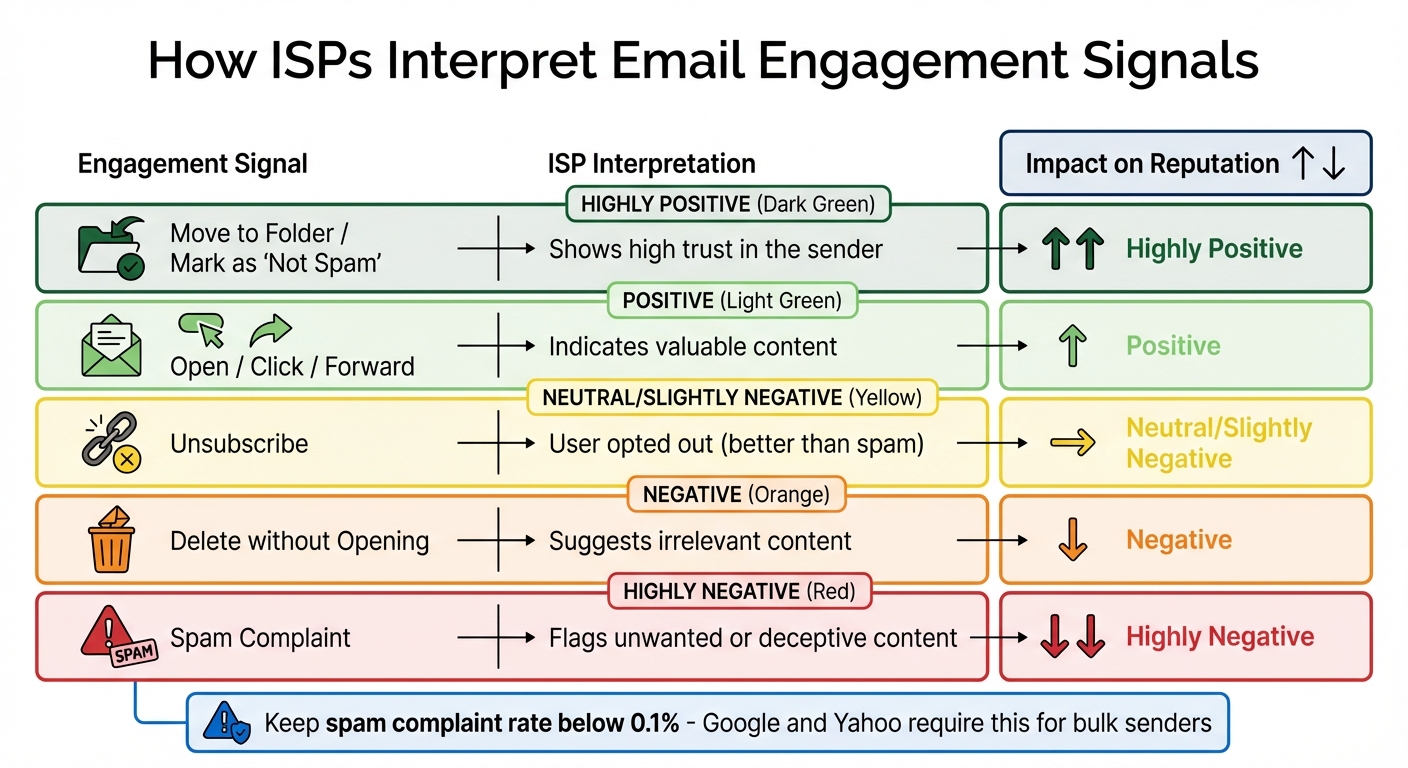
Email Engagement Signals and Their Impact on Domain Reputation
ISPs rely on automated systems to evaluate emails, focusing on aspects like HTML quality and subject line wording. Understanding how these evaluations work is crucial to safeguarding your domain’s reputation.
Content Quality and Reputation Scores
ISPs don’t just glance at your email – they dig deep into its quality. They use a two-tier scoring system to assess your messages. First, there’s the Spam Confidence Level (SCL), which ranks emails on a scale from 0 (unlikely spam) to 9 (likely spam). Then, there’s the Sender Reputation Level (SRL), which reflects how trustworthy your domain appears. Factors influencing these scores include how clean your HTML code is, the balance between text and images, and the reliability of any third-party links you include [13].
ISPs also validate your emails against authentication protocols like SPF, DKIM, and DMARC to ensure they’re legitimate and haven’t been tampered with [14]. These checks add another layer of credibility to your domain.
"IP reputation is less important than the reputation of domains and content for inbox placement." – The Spamhaus Team [11]
This shift from IP-based to content-based reputation is largely due to IPv6, which introduced a mind-boggling 340 undecillion IP addresses. With so many available, spammers can easily cycle through IPs, making IP-based blocking less effective [11].
Beyond technical checks, ISPs also factor in how users engage with your emails.
User Engagement and Feedback Signals
ISPs don’t just look at your email; they watch how users interact with it. Positive engagement – like opening, clicking, replying, or forwarding – tells ISPs that your content is relevant and appreciated [15][16]. On the flip side, actions like deleting emails without opening them or marking them as spam signal that your content might be irrelevant or misleading [5][13]. Gmail, for example, uses these engagement metrics to customize inbox experiences for individual users [13].
To stay in good standing, it’s vital to manage your spam complaint rate. Ideally, this should stay below 0.1%. Major providers like Google and Yahoo set thresholds around 0.3%, and Gmail has openly stated that its reputation system heavily weighs complaint rates [6][12][16]. Even a small uptick in complaints can lead to email filtering or blacklisting.
Here’s how ISPs interpret different engagement behaviors:
| Engagement Signal | ISP Interpretation | Impact on Reputation |
|---|---|---|
| Open / Click / Forward | Indicates valuable content | Positive |
| Move to Folder / "Not Spam" | Shows high trust in the sender | Highly Positive |
| Delete without Opening | Suggests irrelevant content | Negative |
| Spam Complaint | Flags unwanted or deceptive content | Highly Negative |
| Unsubscribe | User opted out (better than spam) | Neutral/Slightly Negative |
To encourage positive engagement, avoid using "noreply@" email addresses. These discourage replies, which are a strong signal of trust [12]. Also, regularly clean your email list to remove inactive subscribers – low engagement rates can drag down your reputation [13]. Tools like Google Postmaster Tools and MailMonitor can help you monitor these metrics and catch any spikes in spam complaints before they cause serious damage to your domain.
sbb-itb-eece389
Best Practices for Creating Better Email Content
Creating email content that resonates with your audience isn’t just about dodging spam filters – it’s about building a foundation of trust with your readers and the email providers that manage inbox access. Here’s how to improve your email strategy and ensure your messages land where they belong.
Writing Better Subject Lines
Your subject line is the gateway to your email. It’s the first thing recipients notice and one of the key factors Internet Service Providers (ISPs) evaluate. To avoid spam filters, focus on crafting subject lines that are clear, concise, and honest. They should accurately represent what’s inside the email [3].
"You don’t have to be clever, just be clear." – Mailchimp [3]
Keep subject lines short for easier readability, and consider adding a personal touch, like the recipient’s first name, to increase engagement. With new tech developments, Apple Intelligence now summarizes subject lines for iPhone users, while Gmail and Yahoo use AI to highlight discount codes or images directly in inbox previews [6]. To take control of how your emails are displayed, test subject lines across platforms and use tools like Schema.org markup (Gmail Annotations) to showcase offers or visuals.
Once you’ve nailed the subject line, focus on tailoring the rest of your email to build a stronger connection with your audience.
Personalizing Content to Increase Engagement
Personalization is more than a nice-to-have – it’s a necessity for maintaining your domain’s reputation. Emails that feel relevant and tailored to the recipient are more likely to be opened, clicked, and shared. These positive interactions signal mailbox providers that you’re a trusted sender. Personalized emails have been shown to boost revenue by 760%, while automated campaigns like abandoned cart reminders can generate 30 times more revenue per recipient compared to generic marketing emails [21]. On top of that, 62% of consumers expect personalized experiences and may turn away from brands that fail to deliver [18].
Personalization goes beyond just using a first name. Automated emails – like welcome messages, cart reminders, or follow-ups based on browsing habits – help ensure your content reaches recipients at the right moment. By leveraging real-time data, you can keep your emails relevant, reduce spam complaints, and prevent quick deletions.
To further enhance engagement, consider these additional steps:
- Set up a preference center: Let subscribers choose the types of content and frequency of emails they want [12].
- Use double opt-in: This ensures your list is filled with active, interested recipients, reducing spam traps and bounce rates [19].
- Prune inactive subscribers: Remove contacts who haven’t engaged in 12–18 months to maintain a healthy open rate and protect your reputation [20].
- Avoid "noreply@" addresses: A reply-capable address encourages interaction and can help your sender information get added to contact lists [12].
Following Email Authentication Standards
If you’re serious about email deliverability, following authentication protocols like SPF, DKIM, and DMARC is non-negotiable. Providers like Google, Yahoo, and Microsoft Outlook require these standards for bulk senders [6].
Here’s a quick breakdown of these protocols:
- SPF (Sender Policy Framework): Specifies which IPs and hostnames can send emails on your behalf.
- DKIM (DomainKeys Identified Mail): Adds a cryptographic signature to your email headers, ensuring the content hasn’t been tampered with [17] [22].
- DMARC (Domain-based Message Authentication, Reporting, and Conformance): Combines SPF and DKIM to guide servers on handling unauthenticated emails.
Start by auditing all systems that send emails under your domain – this includes marketing platforms, transactional tools, and third-party services. Implement SPF, DKIM, and DMARC with a monitoring policy to authenticate legitimate emails [6] [22]. Once you’re confident everything is set up correctly, you can move to stricter DMARC policies like "p=quarantine" or "p=reject" for added security. For subdomains or parked domains that don’t send emails, use a "deny all" SPF record (v=spf1 -all) and a DMARC "p=reject" policy to block spoofing attempts.
"Legitimate senders should be thrilled with Google and Yahoo’s sender requirements. The majority of spammers won’t be able to meet the requirements and your customers’ inboxes will be less cluttered as a result." – Denis O’Sullivan, Principal Deliverability Consultant at Twilio [6]
Tracking and Improving Content Performance
To keep your emails performing well and maintain a strong domain reputation, tracking key metrics is essential. By keeping an eye on performance data, you can identify potential problems early and use tools to address them before they harm your deliverability.
Metrics to Track
While open and click rates are useful, they only scratch the surface. To truly understand how your emails are performing, focus on metrics that directly affect your domain reputation. One critical metric is the Inbox Placement Rate (IPR), which shows the percentage of emails reaching the primary inbox versus being redirected to spam or promotions folders. For example, Google delivers about 95.54% of emails, but only 57.8% make it to the primary inbox, while 37.74% end up in the promotions tab [23]. Ideally, your IPR should exceed 95%. If it falls below 80%, it’s a red flag for serious deliverability issues [23].
Spam complaint rates are another crucial metric. Providers like Google and Yahoo require bulk senders to keep complaints below 0.1%, as even a brief spike can damage your reputation [23]. Similarly, hard bounce rates – which measure undeliverable emails – should stay under 2%. Higher rates suggest list hygiene problems that need immediate attention. Also, watch the "missing rate", as roughly 16.9% of emails fail to reach inboxes, with 10.5% landing in spam and 6.4% going undelivered [23].
Internet Service Providers (ISPs) also monitor engagement behaviors that might not show up in standard reports. Negative signals, like emails being deleted without being opened or recipients quickly unsubscribing, can indicate poor content quality [23]. On the other hand, positive actions like replies, forwards, and clicks boost your reputation. Segmented campaigns, which typically see 30% more opens and 50% more click-throughs, send strong positive signals to ISPs [23]. These engagement metrics tie your content quality directly to deliverability success.
"Poor email deliverability directly cuts your revenue by making you invisible to customers who want to hear from you – aim for 95% inbox placement to maximize your marketing ROI." – Chaviva Gordon-Bennett, Content Strategist, monday.com [23]
Testing and Optimization Tools
To ensure your emails perform as intended, leverage tools that test and optimize your campaigns. Seed testing is a valuable method to check real-time inbox placement across providers like Gmail, Outlook, and Yahoo [23]. This lets you identify content issues before they affect your entire audience. Free tools like Google Postmaster Tools offer insights into your IP and domain reputation, as well as spam rates for Gmail users [23].
For more comprehensive monitoring, platforms such as MailMonitor provide features like blacklist testing, deliverability audits, and proactive email monitoring. These tools can uncover technical issues, such as an unbalanced text-to-image ratio (ideal is 60/40) or emails exceeding 102KB, which Gmail clips and prevents open tracking [1][23].
Another useful practice is implementing Feedback Loops (FBL) with major ISPs. These allow you to receive immediate reports when subscribers mark your emails as spam, so you can promptly remove those addresses [2]. Additionally, conduct monthly or quarterly audits to verify that your authentication protocols (SPF, DKIM, DMARC) are properly configured and that your email list is free of inactive users who could lower engagement rates [2]. Regular testing, paired with ongoing audits, ensures your email strategy stays effective and resilient.
Conclusion
The content of your emails plays a key role in shaping your domain reputation. Well-crafted, optimized emails encourage positive engagement, signaling to mailbox providers that your messages are both relevant and reliable [3][5]. On the flip side, poorly written content can lead to spam complaints, unsubscribes, and deletions, all of which harm your reputation and reduce deliverability [5][6].
The numbers speak volumes about the stakes. Roughly 21% of opt-in emails never make it to the inbox, and 9%-14% of marketing emails end up flagged as spam [12][20]. Yet, email marketing remains incredibly effective, yielding an average ROI of $36 for every $1 spent [6]. Businesses that focus on improving their content and deliverability strategies report an impressive 97% delivery rate – 12% higher than the industry average [6].
Achieving this level of success involves putting the strategies discussed in this article into action. This includes steering clear of spam triggers, ensuring proper formatting, authenticating your emails, personalizing your content, and keeping a close eye on metrics like inbox placement rates, spam complaints, and bounce rates.
"Legitimate senders should be thrilled with Google and Yahoo’s sender requirements. The majority of spammers won’t be able to meet the requirements and your customers’ inboxes will be less cluttered as a result."
- Denis O’Sullivan, Principal Deliverability Consultant at Twilio [6]
FAQs
How can I improve the balance between text and images in my emails to boost deliverability?
Maintaining the right mix of text and images in your emails is key to improving deliverability and steering clear of spam filters. Aiming for a 60% text / 40% image balance or even an 80% text / 20% image ratio is a good rule of thumb. Start with at least 400–500 characters of meaningful text to help spam filters assess your email content and avoid over-relying on images.
Here are a few tips to fine-tune your emails:
- Include a short introductory paragraph above the first image. This ensures there’s visible text, even if images are blocked.
- Use HTML templates that adjust well to text-only views for email clients where images might not load.
- Compress your images to keep file sizes under 100 KB. This ensures faster loading times and reduces the chance of being flagged for large attachments.
Always test your emails before hitting send. Tools like MailMonitor can help you spot issues, check your text-to-image ratio, and flag anything that might impact deliverability. A well-balanced email doesn’t just land in more inboxes – it also helps build a stronger domain reputation over time.
How does user engagement improve domain reputation?
User engagement is a key factor in building and maintaining a strong domain reputation. When recipients take actions like opening your emails, clicking on links, or replying to messages, it sends a clear signal to mailbox providers that your emails are both trusted and worthwhile. High open rates suggest your subject lines are appealing and your sender details are credible, while clicks and replies indicate that your content resonates with your audience.
On the flip side, reducing negative interactions – such as spam complaints, unsubscribes, and hard bounces – is just as important. A higher ratio of positive engagement compared to negative feedback reassures Internet Service Providers (ISPs) that your domain is reliable. This increases the chances of your emails landing in the primary inbox rather than being filtered out.
With tools like MailMonitor, you can track engagement metrics in real time. This insight allows you to fine-tune your email strategy, ensuring your domain reputation stays strong and your messages continue to reach your audience effectively.
Why are SPF, DKIM, and DMARC important for protecting your email domain?
Email authentication relies heavily on SPF, DKIM, and DMARC – three key protocols designed to confirm that emails sent from your domain are legitimate. These tools act as a safeguard, blocking spoofing and phishing attempts by ensuring that only authorized senders can use your domain.
By setting up these protocols, you’re not just shielding your domain’s reputation; you’re also increasing the likelihood that your emails will reach recipients’ inboxes rather than being flagged as spam. These steps are crucial for building trust and ensuring your emails consistently get delivered.

