

Yahoo Mail seed testing ensures your emails land in the inbox, not spam, by simulating real-world delivery scenarios. With Yahoo accounting for 20–30% of B2C email lists and strict rules like a 0.3% spam complaint threshold, testing is critical for avoiding deliverability issues. Here’s what you need to know:
- Why Test for Yahoo? Yahoo uses domain-based reputation, strict complaint thresholds, and advanced filtering. Generic testing often misses these nuances.
- What to Test? Authentication (SPF, DKIM, DMARC), complaint rates, and spam placement.
- How to Test? Use a targeted seed list with Yahoo addresses, send test emails using your infrastructure, and analyze results for compliance.
- Common Mistakes: Ignoring Yahoo-specific filters, using placeholder content, or testing too late.
Start testing early and regularly to identify and fix issues before launching campaigns. Tools like MailMonitor can simplify the process by tracking placement rates and sender reputation. Consistent testing helps maintain strong deliverability and ensures your emails reach your audience effectively.
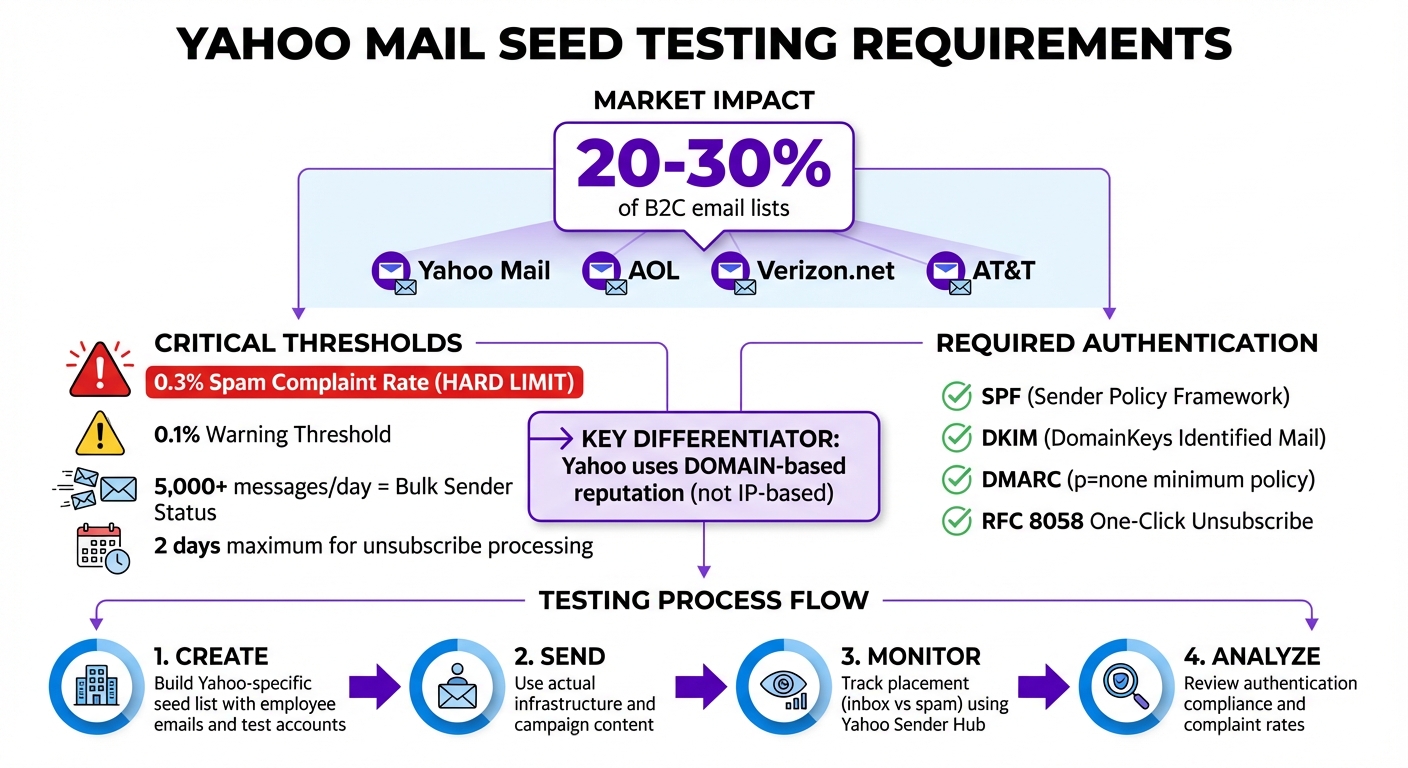
Yahoo Mail Requirements and Testing Checklist for Email Deliverability
"Yahoo & Google Email Deliverability Requirements" with Kendra Corman
Why Yahoo Mail Needs Separate Seed Testing

Yahoo Mail operates in a way that sets it apart from many other email providers, especially when it comes to inbox placement. Unlike others, Yahoo uses a domain-based reputation model, meaning your sending reputation is tied to your domain rather than your IP address. This makes testing specifically for Yahoo Mail a must to ensure your emails land where they should.
Yahoo enforces strict rules, including a 0.3% complaint threshold and flags senders at just 0.1%. With Yahoo representing around 20–30% of B2C email lists, even small issues with filtering can have a big impact on your campaign’s success[3][6].
Testing for Yahoo Mail also covers other addresses like AOL, Verizon.net, and AT&T, as they all operate under Yahoo’s infrastructure and follow the same filtering rules[3][7]. Relying on generic seed testing could mean missing these Yahoo-specific challenges, leaving gaps in your strategy.
Yahoo’s technical requirements further emphasize the need for tailored testing. Unlike some providers, Yahoo doesn’t offer traditional whitelisting programs[4]. Instead, they evaluate senders based on factors like:
- Authentication protocols: SPF, DKIM, and DMARC.
- ASN reputation: The reputation of the Autonomous System Number.
- URL reputation: How trustworthy your links appear.
By focusing on seed testing designed specifically for Yahoo, you can ensure these unique elements are verified before launching your campaign. This proactive approach helps catch compliance issues that might otherwise lead to immediate filtering.
The importance of these strict policies is summed up perfectly by Mailfloss:
"Yahoo now treats email authentication like a bouncer at an exclusive club. No credentials? You’re not getting in." – Mailfloss[6]
How to Conduct Yahoo Mail Seed Testing
To carry out effective Yahoo Mail seed testing, you’ll need to create a targeted seed list, send test emails using your actual infrastructure, and analyze the results against Yahoo’s filtering standards. Here’s a step-by-step guide to help you align with Yahoo’s criteria.
Create and Maintain a Yahoo-Specific Seed List
Your seed list should closely resemble your actual subscriber base, particularly by including Yahoo Mail addresses. You can build this list using personal employee emails, dedicated test accounts, or addresses from third-party deliverability tools[1][8].
Since seed accounts typically don’t engage with emails, it’s a good idea to add basic subscriber metadata, like first and last names, to make the testing environment feel more realistic[8]. Also, double-check that your email authentication is set up correctly with SPF, DKIM, and DMARC (with at least a p=none policy). Yahoo has been strictly enforcing these authentication standards since February 2024[2].
Send and Monitor Test Emails
When sending test emails, use the same infrastructure and content as your live campaigns. Yahoo’s Sender Hub Insights is a valuable tool for tracking your reputation, complaint rates, and email placement[6]. Pay attention to where your emails land (inbox or spam), how they display, and whether all links work as intended.
Yahoo provides two key resources for monitoring:
- Placement Feed: Shows where your emails end up (inbox or spam).
- Campaign Performance Feed: Offers detailed data on engagement metrics[6].
Keep an eye out for TSS04 errors, which indicate spam filtering caused by issues with sender reputation or email content[6]. Additionally, ensure your emails include a one-click unsubscribe header (List-Unsubscribe) as per RFC 8058 standards. This is mandatory for bulk senders[6][2].
Here’s a quick reference table for Yahoo’s key requirements:
| Metric | Yahoo Requirement/Threshold |
|---|---|
| Spam Complaint Rate | < 0.3% (Hard limit), < 0.1% (Warning threshold) |
| Bulk Sender Volume | 5,000+ messages per day |
| Unsubscribe Processing | Within 2 days |
| Authentication | SPF, DKIM, and DMARC (p=none minimum) |
Analyze and Apply Test Results
Once your test emails are sent, review the reports to ensure compliance with SPF, DKIM, and DMARC. If you notice spam placement or complaint rates nearing 0.1%, it’s time to make adjustments. Start by refining your segmentation and gradually increasing your email volume – don’t exceed more than double your previous sending average[2][3][5]. Also, confirm that none of your domains are blocklisted.
Tonya Gordon, Manager of Deliverability Strategy at Klaviyo, offers this advice:
"If you send emails on a regular basis, and you have a sudden spike of activity, Yahoo could flag you as a compromised sender." – Tonya Gordon, Klaviyo[5]
Use feedback from Yahoo’s Complaint Feedback Loop (CFL) to monitor "report spam" actions and keep your email list clean. Regularly reviewing and adjusting based on seed test results will help you maintain strong deliverability metrics[2].
sbb-itb-eece389
Mistakes to Avoid in Yahoo Mail Seed Testing
Steer clear of these common missteps to ensure your Yahoo Mail seed testing accurately reflects potential deliverability issues.
Overlooking Yahoo-Specific Filters
Using generic seed testing can lead to misleading outcomes, especially when it fails to account for Yahoo’s strict filtering standards and authentication requirements. Yahoo’s filtering logic also extends to domains like AOL.com, Verizon.net, and AT&T, which makes it vital to include Yahoo-specific seed accounts in your testing. This is particularly important since Yahoo addresses make up about 20% to 30% of typical B2C email lists[3]. Beyond filtering, content and timing are also critical factors to consider.
Using Placeholder Content
Placeholder content in seed tests is a major mistake. Mike Arsenault, Founder & CEO of Rejoiner, highlights the risks:
"Without seed list testing, you could end up revising your email subject lines and content, when the real issue is related to email deliverability, display, or function." – Mike Arsenault, Rejoiner[8]
Yahoo’s filters evaluate the actual content of your emails to determine inbox placement[1]. Using temporary text or images can cause you to miss crucial problems, such as broken links, spam-triggering words, or formatting errors, which might only appear in your final campaign.
Waiting Until the Last Minute to Test
Testing too close to your campaign launch can leave little room for corrections. If your test results show emails landing in spam folders or complaint rates nearing the 0.1% warning threshold, you’ll need time to address these issues. This might involve segmenting your audience, warming up your domain, or fixing authentication problems. Starting your testing earlier in the production process gives you the flexibility to make necessary adjustments before your emails reach your full subscriber base[3].
Yahoo Mail Seed Testing Best Practices
Structured seed testing helps identify deliverability issues before they impact your campaigns. Following these best practices ensures you gather reliable data that reflects how Yahoo handles your emails.
Set Up a Regular Testing Schedule
The frequency of your tests should align with your sending habits. At a minimum, run seed tests weekly to monitor reputation trends. Increase testing around major campaigns to catch potential issues early. Regular testing helps you detect changes in inbox placement, which could indicate that ISPs are filtering your emails into spam.
"Monitoring your deliverability levels through this process will allow you to react quickly to any changes you observe within your inbox placement levels of the monitored ISPs in your tests." – Emailable [9]
Additionally, make sure your seed list accurately represents your audience to account for diverse delivery environments.
Balance Your Seed List Composition
Your seed list should be a snapshot of your actual subscriber base. A well-balanced seed list provides the most accurate insights by reflecting the environments where your emails will be received. As Mike Arsenault, Founder & CEO of Rejoiner, puts it:
"A weighted seed list is designed to be a cross-section of your entire email list. A weighted seed list enables you to test your emails in the environments where they’ll be seen in the wild." [8]
Incorporate Yahoo accounts from a variety of devices and browsers to capture different user scenarios and potential rendering challenges [1][8].
Use Tools for Better Testing Results
Manual seed testing can be both time-intensive and difficult to scale. Once you’ve established a regular schedule and balanced seed list, leveraging advanced tools becomes essential. MailMonitor simplifies the process by offering inbox placement testing tailored to uncover deliverability issues before they affect your campaigns.
This platform allows you to preview how Yahoo Mail renders your emails and provides insights into how Yahoo’s filters evaluate your content [1][10]. MailMonitor also tracks your sender reputation across ISPs, monitors your infrastructure, and sends custom alerts when placement rates drop or authentication problems arise.
For thorough Yahoo Mail testing, ensure your tool checks email rendering on both the Yahoo Mail app and web interface. It should also verify that links and call-to-action buttons work seamlessly across different devices [8]. Pair these tools with enrollment in Yahoo’s Complaint Feedback Loop (CFL) to monitor spam reports [2]. Together, these resources offer a complete view of your Yahoo Mail deliverability performance.
Conclusion
Yahoo Mail seed testing plays a crucial role in ensuring your emails reach the inbox. With Yahoo accounting for 20–30% of most B2C email lists [3] and maintaining a strict 0.3% spam complaint threshold [6], even minor errors can harm your domain reputation and impact deliverability. As Yahoo Postmaster Lili Crowley aptly puts it: "Email deliverability isn’t that hard if you send [email] people love" [11].
Regular testing helps identify issues like authentication errors, content flaws, and rendering problems before they affect your audience. Using balanced seed lists ensures you get a clear picture of how Yahoo’s filters handle your emails across different setups. Tools like MailMonitor simplify the process by tracking your sender reputation and alerting you to any dips in placement rates [1]. This methodical approach strengthens your overall deliverability efforts.
Yahoo’s transition from IP-based to domain-based reputation means your sending history now follows your domain, making consistent compliance even more important [6].
To stay ahead, focus on technical best practices. Confirm that your SPF, DKIM, and DMARC records are properly aligned, adopt RFC 8058-compliant one-click unsubscribe, and handle opt-out requests within two days [6][2]. Use Yahoo Sender Hub to monitor performance during seed tests, and steer clear of URL shorteners, which can trigger phishing filters [6][4].
FAQs
Why is seed testing important for email deliverability on Yahoo Mail?
Seed testing in Yahoo Mail plays an important role in understanding where your emails end up – whether they land in the inbox, get flagged as spam, or fail to arrive entirely. This information is key to refining your email strategy and improving deliverability.
Using seed accounts, you can pinpoint problems with email placement and take steps to strengthen your sender reputation. This ensures your emails are more likely to consistently reach your audience’s inbox.
What should be included in a seed list for Yahoo Mail testing?
To build an effective seed list for Yahoo Mail testing, you need to focus on a few critical elements to get accurate insights into inbox placement. Start by including a range of email addresses, with a strong emphasis on Yahoo accounts, to test delivery across different conditions. Make sure to clean and verify the list regularly, removing any invalid or blocked addresses – these can harm your sender reputation and skew your results.
It’s also essential to include a mix of devices, browsers, and email service providers in your testing process. This ensures you can evaluate how your emails perform across various platforms. By keeping your seed list diverse and up-to-date, you’ll be better equipped to spot deliverability issues unique to Yahoo Mail and refine your sending strategy for better inbox placement.
How does MailMonitor improve Yahoo Mail seed testing?
MailMonitor makes Yahoo Mail seed testing easier by offering tools that deliver precise and actionable insights into inbox placement. It streamlines essential tasks like inbox placement testing, reputation tracking, and email verification, allowing you to spot and fix deliverability problems before launching your campaigns.
Its reputation monitoring features keep an eye on crucial factors like IP, domain, and sender reputation – key criteria Yahoo Mail uses to decide where emails land. By addressing issues like authentication errors or irrelevant content early on, MailMonitor helps improve the chances of your emails reaching the inbox rather than getting stuck in spam or promotions folders. This gives marketers the confidence to fine-tune their email campaigns for stronger performance.

