
Spam filters are smarter than ever. They don’t just flag emails for using words like "free" or "urgent." Instead, they analyze context, sender reputation, and even how recipients interact with your emails. Here’s what you need to know:
- Keywords matter, but context is key. Words like "free" might pass if used naturally, but phrases like "free money" are red flags.
- Sender reputation is critical. A high spam complaint rate (over 0.1%) or poorly configured protocols like SPF, DKIM, and DMARC can send your email straight to spam.
- Formatting issues raise alarms. ALL CAPS, excessive images, or misleading subject lines like "Re:" can hurt deliverability.
- Recipient behavior affects placement. If users delete your emails without opening or mark them as spam, future emails are more likely to land in spam folders.
To improve deliverability, focus on clear, natural messaging, avoid high-risk phrases, and monitor your email performance. Tools like MailMonitor can help test inbox placement and refine your strategy.
What Are Spam Trigger Words? – TheEmailToolbox.com
How Spam Filters Evaluate Keywords
Email Authentication Protocols: SPF, DKIM, and DMARC Comparison
Spam filters have come a long way from simply blocking emails based on a list of banned words. Today, they rely on machine learning and natural language processing to evaluate the context of your message. These advanced systems consider not only the words you use but also how you use them, where they appear, and your sender reputation.
Keyword Analysis in Context
Modern spam filters dig deeper than just spotting specific words – they analyze the context in which those words are used. By tokenizing your email and applying Bayesian methods, filters estimate spam likelihood based on historical data. For instance, the word "free" isn’t automatically flagged. In a phrase like "free consultation" within a professional email, it might pass without issue. But something like "free money" raises immediate alarms [2] [3].
Filters also use natural language processing to evaluate if your email sounds like it was written by a human. They assess sentence structure, vocabulary variety, and overall tone. Emails that seem machine-generated or use tricks like replacing "money" with "m0ney" to evade detection are penalized [2] [7].
Keyword placement is another factor. Words in subject lines or headers carry more weight, and using multiple promotional phrases together increases a spam score [7] [9].
Qasim Farooq from GoCustomer notes, "Spam filters in 2025 are smarter. They operate on machine learning models that look at patterns, not just individual words. That means a word like ‘limited time’ isn’t always the problem – it’s how it’s used, where it’s placed, and what surrounds it" [7].
Even images aren’t a safe hiding spot. Spam filters now use Optical Character Recognition (OCR) to scan text embedded in graphics. This prevents spammers from sneaking keywords into images to bypass text-based scanning [2].
By understanding these nuanced evaluations, you can fine-tune your email content to avoid triggering spam filters.
Factors Beyond Keywords
While keyword analysis is essential, it’s just one piece of the puzzle. Technical configurations and sender reputation are equally critical in determining whether your email reaches the inbox.
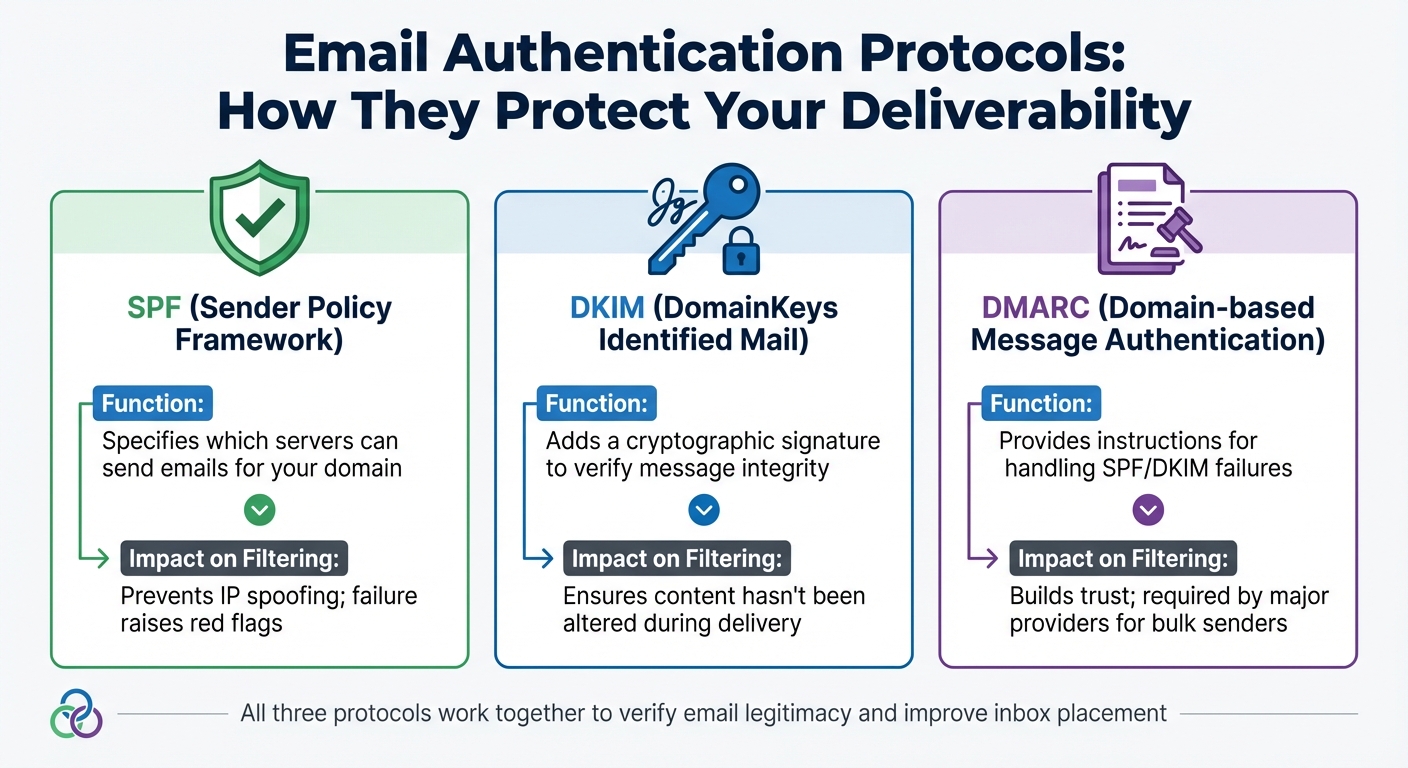
Filters place a strong emphasis on authentication protocols like SPF, DKIM, and DMARC. These protocols verify the legitimacy of your email infrastructure, ensuring your messages aren’t flagged as suspicious. Even if your content is flawless, a poorly configured setup can send your email straight to the spam folder [2] [5] [6].
| Protocol | Function | Impact on Filtering |
|---|---|---|
| SPF | Specifies which servers can send emails for your domain | Prevents IP spoofing; failure raises red flags |
| DKIM | Adds a cryptographic signature to verify message integrity | Ensures content hasn’t been altered during delivery |
| DMARC | Provides instructions for handling SPF/DKIM failures | Builds trust; required by major providers for bulk senders |
Sender reputation is another key factor. If your domain has a history of high engagement, you can often use promotional terms like "offer" or "discount" without issue. However, a new or poorly rated domain using similar language faces a higher risk of being flagged [8] [9]. Gmail’s filters, for example, block over 99.9% of spam and phishing attempts, and a spam complaint rate above 0.1% is a major warning sign [4] [5].
Recipient behavior also plays a big role. If users frequently delete your emails without opening them or mark them as spam, future messages are more likely to end up in the spam folder – even if the content is perfectly legitimate [5] [6]. This means the same email could land in one person’s inbox and another’s spam folder, depending on individual engagement history [7].
Common Keywords That Trigger Spam Filters
Certain words can set off spam filters because of their connection to scams, phishing, or misleading marketing tactics. While context plays a role – filters analyze how and where these words are used – being aware of high-risk categories can help you write safer email content. Considering that 45% to 48% of all emails end up in spam folders [10], choosing your keywords wisely is crucial for better deliverability. Let’s break down the categories of keywords that require extra attention.
Financial and Promotional Terms
Phrases linked to quick money or aggressive sales tactics – like "earn cash", "100% free", "make money fast", "pure profit", "no hidden costs," and "be your own boss" – are often flagged for their association with scams [10]. Even seemingly harmless terms such as "no fees" or "cash bonus" can raise spam scores when paired with other risky elements.
To lower your risk, swap out these terms for more transparent alternatives. For instance, instead of "100% free", try "complimentary" or "at no cost." Similarly, replace "no hidden costs" with "transparent pricing" [10]. These subtle changes can make your email appear more trustworthy.
Urgency and Scarcity Language
Phrases that create artificial urgency are another red flag. Words like "act now", "limited time", "only 24 hours left", "urgent", "last chance," and "while supplies last" are frequently flagged due to their association with phishing attempts [10][7].
Even outside of sales, language that pressures recipients can increase spam scores.
Qasim Farooq from GoCustomer explains, "Urgency is fine when grounded in truth. Instead of ‘Only 10 minutes left,’ say, ‘Our spring sale ends at midnight – last chance to grab 30% off.’ It sets a clear timeline and avoids panic language." [7]
To avoid sounding alarmist, use specific deadlines, such as "Offer ends March 21", to provide clarity and legitimacy [10]. Replace vague urgency like "hurry" with "we recommend taking action" or simply state the time frame for your offer.
Guaranteed Claims and Overpromises
Over-the-top promises and guarantees are a surefire way to trigger spam filters. Phrases like "risk-free", "guaranteed winner", "miracle cure", "100% guaranteed", "unbelievable results," and "no obligation" are frequently flagged for their ties to deceptive schemes [10]. Health-related claims, in particular, attract extra scrutiny, with terms like "Viagra", "lose weight fast," and "no prescription needed" being heavily monitored [11].
Violating CAN-SPAM guidelines can result in fines exceeding $46,000 per violation [10], so it’s essential to steer clear of exaggerated claims. Instead of absolute guarantees, use softer terms like "promise", "assurance," or "proven results." For health-related content, opt for more measured language such as "may improve" or "can help support" rather than making bold, unverified claims [7].
Additionally, avoid generic greetings like "Dear friend" or "To whom it may concern," as they can signal impersonal mass emails, increasing the likelihood of being flagged as spam [10][5]. Personalizing your emails can make a big difference – tailored content has been shown to boost open rates by 30.36% [10], signaling legitimacy to both recipients and spam filters.
How Formatting and Context Affect Keyword Risk
The way you format your email and the context in which keywords are used can trigger spam filters – even when those keywords are legitimate. Modern spam filters rely on Natural Language Processing (NLP) to determine whether your email feels natural or comes across as a machine-generated scam attempt [7]. In other words, it’s not just about the words you use; how you present them can make or break your email’s deliverability. Let’s dive into the specific formatting missteps that can increase your risk.
Formatting Issues
Certain formatting choices scream "spam" to email filters. Things like excessive capitalization, overusing exclamation marks, or broken HTML can instantly raise red flags. For instance, writing in ALL CAPS is often interpreted as "shouting", a hallmark of promotional hype or phishing attempts [7].
"In 2025, ESPs use natural language processing to check if your content reads like normal human speech. These [formatting] tricks break that flow, which signals low-quality or machine-generated content", explains Qasim Farooq from GoCustomer [7].
Another outdated tactic, known as "hashbusting" – replacing letters with numbers (e.g., "M4ke M0ney" or "L00k H3re") – is now more likely to hurt than help. Filters view this as a deceptive practice designed to bypass detection systems [9]. Similarly, technical problems like broken HTML or an image-to-text ratio exceeding 70% can make your email look like it came from an automated, low-quality source [7]. To avoid these pitfalls:
- Use clean, well-structured HTML with a plain-text version for backup.
- Avoid excessive use of images, keeping the image-to-text ratio balanced.
- Use sentence case for emphasis instead of resorting to all caps.
Misleading Subject Lines
Your subject line plays a huge role in how your email is perceived. Tactics like using fake "Re:" or "Fwd:" prefixes are among the worst offenders. These tricks mislead recipients into thinking the email is part of an ongoing conversation, which damages your sender reputation and increases the likelihood of being flagged as spam [10]. When recipients open an email expecting a reply but find promotional content instead, they’re more inclined to report it as spam – further training filters to block future emails from your address.
Subject lines with exclamation points also tend to perform poorly, with lower inbox placement rates compared to those without them [3]. And bait-and-switch subject lines – offering one thing but delivering something else – are a surefire way to provoke complaints. Even a spam complaint rate as low as 0.08% can lead to serious deliverability problems with mailbox providers [6].
The takeaway? Clean formatting and honest, straightforward subject lines are essential for improving email deliverability and maintaining your sender reputation.
sbb-itb-eece389
How to Optimize Email Content to Avoid Spam Triggers
Refining your email content is crucial for better deliverability. The aim isn’t to outsmart spam filters but to craft emails that are genuine and transparent. Modern spam filters are sophisticated – they analyze patterns, tone, and word combinations to assess intent [1].
Replacing High-Risk Keywords
Certain words and phrases can make your email look suspicious to spam filters. Instead of using high-pressure language, opt for professional alternatives that convey your message effectively. For instance, rather than a subject line like "FREE OFFER", you could go with something more straightforward, such as "A new video from [Name]" [10]. If you’re promoting a sale, swap out phrases like "Last Chance: 90% Off Everything!" for something like "New Arrivals Inspired by Your Feedback" [11]. Similarly, when discussing financial topics, replace "URGENT: Your Account May Be at Risk!" with "Secure Your Financial Future: High-Yield Savings" [11].
Focus on providing useful information rather than pushing for a hard sell. For calls-to-action, avoid generic phrases like "Click here." Instead, use descriptive text that clearly outlines the benefit, such as "Download the 2024 Marketing Report" or "Access your account" [10][12].
While swapping out risky phrases is important, the overall tone of your email also plays a big role in avoiding spam filters.
Using Natural and Transparent Messaging
A conversational and professional tone can help your email stand out as a legitimate business communication rather than a mass-marketing attempt.
Lina Klyzhko, Inbox Strategic Advisor at Folderly, notes: "Modern spam filters don’t just flag individual words – they evaluate patterns, tone, and how words work together to paint a picture of your email’s intent" [1].
Be specific and honest in your messaging. For example, if you’re running a promotion, use clear deadlines like "Enrollment closes Friday, December 15th" instead of vague phrases like "Limited time only" [1]. Replace exaggerated claims such as "Guaranteed success" with measurable statements like "Proven results across 40+ companies" [1]. Shifting from a hard-sell approach to an educational tone not only avoids triggering spam filters but also builds trust with your audience [12]. It’s worth noting that about 70% of emails contain at least one spam-related issue that can affect inbox placement [13], so every word you choose matters.
To ensure your emails perform well, consider using tools like MailMonitor to test and refine your content regularly.
Testing and Monitoring for Better Deliverability
Once you’ve polished your email content, the next step is to ensure it actually reaches your audience. A high delivery rate – like 98% – only means a server accepted your email. It doesn’t guarantee that your message landed in the inbox instead of the spam folder. That’s where testing and monitoring come in, helping you confirm that your optimized content is hitting the mark.
Inbox Placement Testing
Inbox placement testing involves sending test emails to seed mailboxes (e.g., Gmail, Yahoo, Outlook) to see exactly where they land. Despite its importance, only 13.3% of senders currently use this approach [15]. If your test email ends up in the spam folder, you can tweak elements like high-risk keywords or the text-to-image ratio and test again to improve results [15][16]. Keep in mind that email providers have unique filters – what Gmail allows might trigger Outlook’s spam detection [3][15]. By identifying these provider-specific quirks, you can fine-tune your messaging for better placement.
Engagement Metrics Monitoring
Your audience’s interactions with your emails – like opens, clicks, and replies – play a big role in maintaining your sender reputation. Positive actions strengthen your standing, while negative ones, such as spam complaints or quick unsubscribes, can damage it [14]. For instance, Gmail flags spam complaint rates above 0.1% as concerning, and most providers enforce a strict 0.3% threshold [5][15][17]. If you notice a sudden drop in open or click rates, it might be a sign that your emails are being flagged as spam [15]. To protect your reputation, regularly clean your list by removing invalid addresses and disengaged subscribers. This not only reduces bounce rates but also helps your emails reach their intended destination. After all, 16.9% of emails fail to hit the inbox – 10.5% are marked as spam, and 6.4% simply disappear [17].
Using Tools for Deliverability Optimization
Platforms like MailMonitor offer features to help maintain strong deliverability. These include inbox placement testing, reputation monitoring, and spam trigger identification [15]. For example, MailMonitor’s seed testing lets you check where your emails land before sending them to your entire list. Its reputation monitoring feature can alert you to issues like blocklist entries or authentication problems that might harm future campaigns.
Kate Nowrouzi, VP of Deliverability and Product Strategy at Sinch, emphasizes:
"By monitoring and resolving blocklist issues immediately, you can safeguard your reputation, maintain customer trust, and ensure your messages aren’t automatically flagged as spam."
- Kate Nowrouzi [15]
Conclusion
Getting your emails into the inbox takes more than just avoiding certain trigger words – it’s about crafting a well-rounded deliverability strategy. Modern spam filters use machine learning to evaluate factors like context, sender reputation, and how recipients interact with your emails, rather than just flagging specific keywords [7][3]. To succeed, you need to pair engaging content with solid technical practices, such as implementing SPF, DKIM, and DMARC authentication [7][3]. These technical measures lay the groundwork for better email deliverability.
Blending clear, natural messaging with strong authentication practices is key to staying out of spam folders. With nearly 48% of emails ending up flagged as spam [10], and risky keywords increasing that likelihood by over 20% [7], focusing on transparent communication and maintaining good engagement rates can make a noticeable difference in your inbox placement.
Consistent testing and monitoring play a major role in protecting your sender reputation. Tools like MailMonitor, along with inbox placement testing and engagement tracking, can help you spot and address potential problems before they harm your deliverability. Start applying these strategies now to boost your chances of landing in the inbox where your emails belong.
FAQs
What steps can I take to improve my sender reputation and avoid spam filters?
To make sure your emails avoid the dreaded spam folder and actually reach your audience, here are some practical tips to boost your sender reputation:
- Authenticate your emails by implementing SPF, DKIM, and DMARC protocols. These help prove your emails are legitimate.
- Keep your email list tidy by removing inactive or invalid addresses regularly. A clean list improves deliverability.
- Only send emails to recipients who are engaged and have willingly opted in. Unsolicited emails can hurt your reputation.
- Stick to consistent sending patterns. Sudden spikes in email volume can raise red flags with spam filters.
- Keep an eye on your domain and IP reputation. If issues arise, address them immediately to maintain trust.
For more detailed metrics and testing, tools like MailMonitor can help you track deliverability and ensure your emails land in inboxes where they belong.
What keywords might cause an email to be flagged as spam?
Spam filters are on high alert for specific keywords and phrases that often show up in unsolicited or misleading emails. Words like “free money,” “act now,” or “guaranteed weight loss” are red flags because they’re frequently used in promotional or scam emails.
To make sure your emails actually land in inboxes, steer clear of overloading your content – especially subject lines – with these kinds of phrases. Instead, opt for straightforward and professional wording that clearly reflects the purpose of your message.
How do SPF, DKIM, and DMARC improve email deliverability?
SPF, DKIM, and DMARC are essential email authentication protocols designed to verify the legitimacy and security of your messages. When configured correctly, they confirm that the sender has permission to send emails on behalf of a domain and ensure the message remains unchanged during transit.
Using these protocols boosts trust with receiving mail servers, making it more likely your emails will reach the inbox instead of being marked as spam. This approach not only enhances email deliverability but also safeguards your domain’s reputation.

