
Sending emails to inactive subscribers hurts your email deliverability. Here’s why:
- ISPs prioritize engagement: Providers like Gmail and Yahoo track how users interact with your emails. Low engagement signals poor content, pushing your messages to spam folders.
- Spam traps and hard bounces: Inactive addresses can turn into spam traps or generate bounces, damaging your sender reputation.
- Negative impact on metrics: High volumes of unopened emails lower your sender score, making it harder to reach engaged subscribers.
Key takeaway: A smaller, engaged list outperforms a large, inactive one. To protect your deliverability:
- Regularly clean your email list.
- Segment subscribers by engagement level.
- Use re-engagement campaigns for at-risk contacts.
- Remove long-term inactives to avoid risks.
TBC Corporation‘s 2011 strategy is a great example: separating inactive subscribers improved their delivery rates from 60% to over 99%.
How Inactive Subscribers Damage Email Deliverability
The Role of Engagement Metrics
Internet Service Providers (ISPs) like Google, Yahoo, and Microsoft keep a close eye on how recipients interact with your emails – things like opens, clicks, or even quick deletions. These actions (or lack thereof) play a huge role in determining whether your emails land in the inbox or get tossed into the spam folder.
If a large chunk of your audience ignores your emails, ISPs might conclude that your content isn’t hitting the mark. Anne-Sophie Marsh, an Email Deliverability Consultant at Iterable, explains it clearly:
"Major mailbox providers rely heavily on engagement for their spam filtering logic. If a significant portion of recipients don’t interact with your emails, algorithms will flag your messages as unworthy of the inbox" [2].
This lack of interaction affects your Sender Score – a key metric that reflects your email reputation. Scores between 75 and 100 indicate strong performance, but anything below 50 signals trouble, often linked to deliverability issues [7]. And it doesn’t stop there; inactive subscribers can lead to more serious problems, like spam traps and hard bounces.
Spam Traps and Hard Bounces
Inactive email addresses can turn into a major headache. Over time, ISPs or blocklist providers may repurpose these abandoned addresses into spam traps – essentially, a way to catch senders with poor email list management. If you’re sending emails to addresses that have been inactive for over a year, you’re stepping into risky territory [2]. And after two years of inactivity, the odds of these addresses becoming spam traps increase even more [6]. Jennifer Nespola Lantz, VP of Industry Relations & Deliverability at Kickbox, emphasizes the danger:
"After one year, the risk of mailing an inactive increases greatly due to email churn, spam traps, etc. Going beyond that becomes even riskier" [2].
Hard bounces are another red flag. These occur when emails are sent to invalid or nonexistent addresses – often because the user has closed their account or the provider has deactivated it. Each hard bounce signals ISPs that your list hygiene needs work. Accumulating too many of these can lead to severe consequences, like being blocklisted or having your emails consistently sent to spam folders [5]. And it’s not just about the bounces; even unopened emails can chip away at your sender reputation.
Unopened Emails as a Quality Signal
Unopened emails are a big warning sign for ISPs. Platforms like Gmail and Yahoo interpret a high volume of unopened messages as a lack of interest, which can push your emails straight to the spam folder. Michael Ko, Co-founder & CEO of Suped, puts it simply:
"ISPs see low engagement as a sign of irrelevant content, increasing spam folder placement" [4].
Every unopened email adds another strike against your sender reputation. Over time, these negative signals pile up, making it harder for your emails to reach even your most engaged subscribers. Studies show that subscribers who haven’t opened an email in over 13 months are unlikely to re-engage. This timeframe typically covers all major seasonal buying periods [6]. Continuing to target these inactive users only worsens deliverability issues, creating a cycle that’s hard to break.
sbb-itb-eece389
Why You Should Clean Your Email List (Yes, Even If It’s Hard)
Identifying and Categorizing Inactive Subscribers
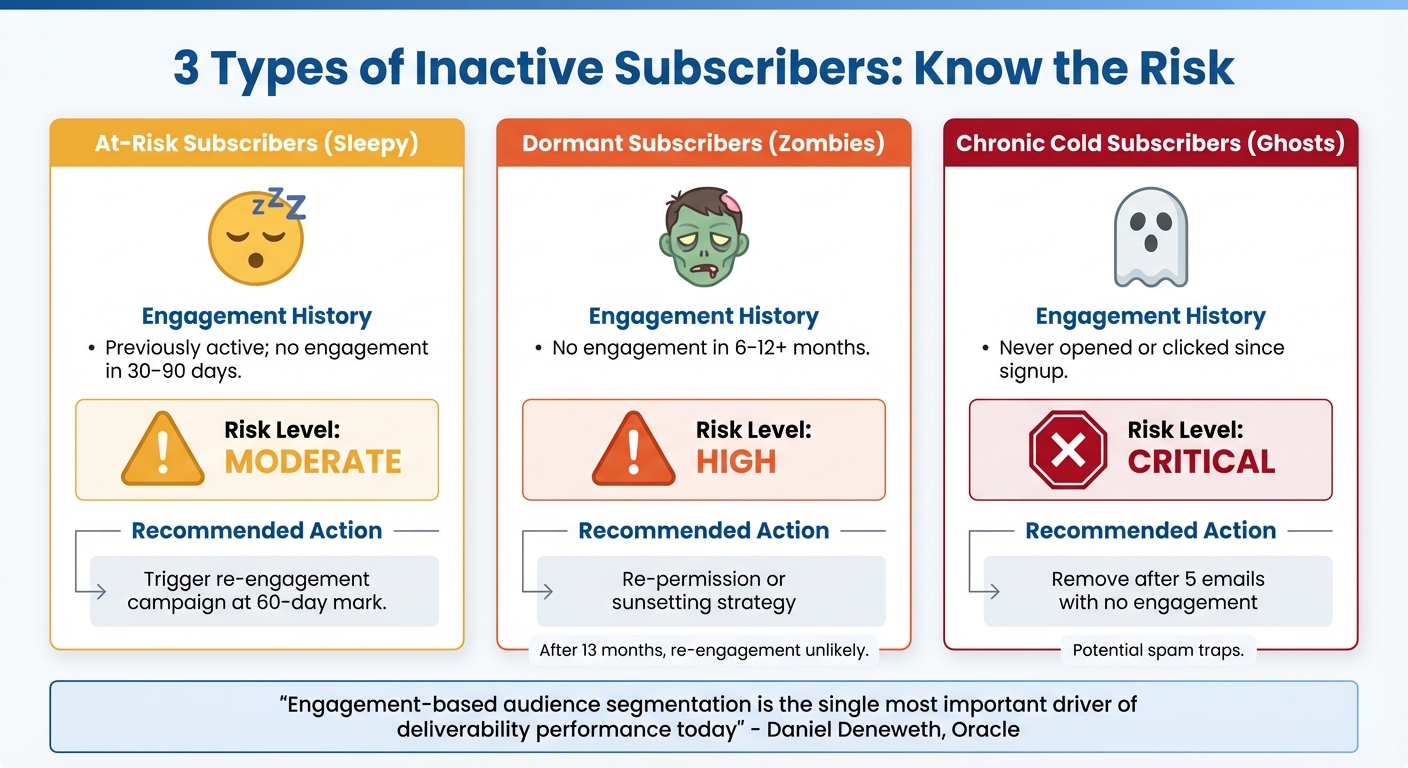
Inactive Subscriber Types: Risk Levels and Recommended Actions
Inactive subscribers don’t all fall into the same bucket – some were once engaged and loyal, while others never interacted at all. Recognizing these differences is key to maintaining your sender reputation and fine-tuning your email list. By categorizing inactive subscribers, you can design more effective re-engagement or removal strategies, which we’ll explore further.
Breaking your inactive audience into specific groups allows for targeted actions that reduce risks. As Daniel Deneweth, Head of Email Deliverability Services at Oracle Digital Experience Agency, puts it:
"Doing engagement-based audience segmentation is the single most important driver of deliverability performance today" [6].
Each group requires a unique approach based on its engagement history and the potential impact on your email performance. This segmentation is the foundation for protecting your sender reputation while optimizing deliverability.
At-Risk Subscribers
At-risk subscribers, often called "sleepy", are those who were previously active but haven’t engaged in the last 30 to 90 days [4]. These subscribers are your best chance for re-engagement since they’ve shown interest in the past. Maybe they’ve just been busy, or your emails arrived at the wrong time. Whatever the reason, their prior activity offers hope. To win them back, consider triggering automated re-engagement campaigns around the 60-day mark [6].
Dormant Subscribers
Dormant subscribers, sometimes referred to as "zombies", haven’t interacted with your emails for 6 to 12 months – or even longer [4][6]. These subscribers carry a higher risk. After a year of inactivity, their email addresses may be abandoned or even converted into spam traps [4]. Beyond the 13-month mark, re-engagement becomes unlikely, and continuing to email them could violate legal requirements like GDPR or CASL [6]. At this stage, re-permission campaigns or sunsetting strategies are often the best course of action.
Chronic Cold Subscribers
Chronic cold subscribers – also known as "ghosts" – are those who never engaged with your emails from the moment they signed up. These addresses pose the most critical risk, as they could be spam traps resulting from bot signups, typos, or intentional traps [6]. Daniel Deneweth advises:
"Until a new signup proves itself as valid by opening or clicking on one of your emails, it’s wise to consider it a potential spam trap" [6].
The solution is straightforward: if a new subscriber doesn’t engage with any of the first five emails you send, remove them from your list [6]. Keeping these addresses not only harms your sender reputation but also wastes resources.
| Subscriber Type | Engagement History | Risk Level | Recommended Action |
|---|---|---|---|
| At-Risk (Sleepy) | Previously active; no engagement in 30–90 days | Moderate | Trigger re-engagement campaign [6] |
| Dormant (Zombies) | No engagement in 6–12+ months | High | Re-permission or sunsetting [6] |
| Chronic Cold (Ghosts) | Never opened or clicked since signup | Critical | Remove after 5 emails [6] |
Setting Inactivity Thresholds for Your Email List
Once you’ve identified inactive subscribers, the next step is determining when they officially become inactive. This depends on factors like your business model, how often you send emails, and your customers’ behavior patterns.
Why a Universal Threshold Doesn’t Work
Applying a one-size-fits-all rule, like the common 90-day inactivity threshold, can backfire. Lauren Del Vecchio, Manager of Email Deliverability and Compliance at Yotpo, explains:
"The risk in picking a standard, run-of-the-mill threshold for engagement is that you either lose valuable contacts who might convert, or worse, you end up emailing risky contacts who will put your sending reputation on the line" [2].
For instance, a daily newsletter might reveal disengagement within weeks. On the other hand, a B2B company with an 18-month sales cycle may require much more time to assess engagement. Take a ski equipment retailer as an example: emails sent during the off-season, like July, may see little activity. Yet, those same subscribers could re-engage as winter approaches. A rigid 90-day cutoff could mean losing an entire season’s worth of potential customers.
Customizing Thresholds for Your Business
To set the right thresholds, analyze customer behavior – specifically, the time between sign-up, first purchase, and repeat purchases [3]. If your emails go out daily, a 3–6-month threshold makes sense because subscribers have plenty of chances to interact [4]. But for businesses that send quarterly updates, extending the threshold to 9–12 months is more practical, as engagement is measured across fewer emails [4].
The type of subscriber also plays a role. For example:
- Remove "never-actives" (those who’ve never engaged) after four months or 10 emails. These could be spam traps or invalid addresses [12].
- Lapsed customers may need 6–13 months to re-engage, especially if their purchase cycles are seasonal [12].
- Current customers who continue to buy can remain on your list indefinitely, as long as they stay active shoppers [12].
Microsoft suggests removing subscribers after six months of inactivity to maintain deliverability [2]. However, this approach is more suitable for high-volume senders. For businesses with longer sales cycles, Mary Youngblood, Sr. Deliverability Expert at Adobe, offers this advice:
"If your users only make use of your products or services every few years, no problem. You can still email once a month with updates and soft offers. This will help the user remember that there is a relationship without overwhelming them" [2].
Here’s a quick guide to thresholds by industry and email frequency:
| Industry/Frequency | Recommended Threshold | Why It Works |
|---|---|---|
| Daily/Weekly Newsletters | 3–6 months | Frequent emails quickly highlight disinterest [4] |
| Monthly/Quarterly Updates | 9–12 months | Fewer emails mean a longer evaluation period [4] |
| E-commerce | 6–9 months | Matches typical repurchase timelines [4] |
| B2B (Long Sales Cycle) | 12–18+ months | Infrequent engagement can still be meaningful [4] |
| Never-Actives | 4 months or 10 emails | No engagement suggests poor list quality [12] |
When defining thresholds, don’t rely solely on email opens. Features like Apple Mail Privacy Protection can create fake "bot-opens", making metrics like clicks, website visits, logins, and purchase history far more reliable [2][13]. These indicators offer a clearer picture of genuine engagement.
Next, we’ll explore how to manage and act on these thresholds effectively.
Strategies for Managing Inactive Subscribers
Once you’ve set clear inactivity thresholds, the next step is implementing strategies to handle subscribers who stop engaging. The aim is simple: safeguard your sender reputation and maintain strong email deliverability.
Sunsetting Inactive Subscribers
Sunsetting refers to removing subscribers who no longer interact with your emails. While it might seem counterproductive to reduce your list size, inactive contacts can harm your email performance. As Mailgun puts it:
"Good email engagement rates mean good deliverability. Bad email engagement rates mean bad deliverability. It’s as simple as that" [17].
Internet Service Providers (ISPs) often turn abandoned email accounts into spam traps after one to two years of inactivity. Sending emails to these accounts signals poor list management and can lead to blocklisting [16][6]. "Never-actives" – those who haven’t opened a single email since subscribing – are particularly risky. These should be removed if they fail to engage after receiving the first five emails [6].
Before removing long-term inactive subscribers, send a re-permission email with a clear call-to-action. If they don’t respond, set up automated removal processes through your email service provider [15][18]. One newsletter’s reactivation campaign saw 64% of readers who opened the "Last Chance" email choose to remain subscribed [18].
To streamline the process, create triggers in your email service provider to move inactive subscribers into a "sunset" segment once they reach your defined threshold – such as 180 days without engagement [17][10]. If immediate removal isn’t the best option, you can first try re-engagement tactics.
Re-Engagement Campaigns
Before saying goodbye to inactive subscribers, give them one last chance with a win-back campaign. These targeted email series can recover between 5% and 15% of inactive subscribers on average [18]. A study by Return Path found that 45% of people who opened the initial win-back email went on to engage with future messages [9]. The key is to treat re-engagement as a process, not a one-time effort [9].
Start by cleaning your list with email verification tools to remove invalid addresses and typos before launching the campaign [14][19][5]. Then, focus on smaller segments of recently inactive subscribers (2,000–5,000 at a time) and monitor results before moving on to older groups [19].
Personalization is crucial. Use purchase history and engagement data to tailor offers [19][8]. For example, subject lines like "We miss you" tend to perform better than "We want you back", and specific dollar discounts (e.g., "$10 off") often outshine percentage-based discounts (e.g., "10% off") [9].
To improve inbox placement, try these adjustments:
- Change your "From" address: Use a different sender address (e.g., [email protected] instead of [email protected]). This can give your emails a better chance of landing in the primary inbox [18].
- Experiment with send times: If you usually send emails in the morning, try afternoons to see if performance improves [18].
- Offer an "opt-down" option: Let subscribers choose to reduce email frequency instead of unsubscribing entirely. For example, switch from daily emails to weekly or monthly digests [18].
Keep a close eye on your metrics. If spam complaints exceed 0.02–0.03% or unsubscribe rates go above 1.4%, pause the campaign immediately [19]. As Lauren Meyer, Chief Marketing Officer at SocketLabs, advises:
"Slow and steady wins the race… Use a phased approach with your unengaged population, starting with your newest, most recently engaged folks" [19].
Segmentation Best Practices
After initiating sunsetting and re-engagement efforts, further segmenting your list helps fine-tune your approach. Not all inactive subscribers are the same, and treating them as such can backfire. Segmentation allows you to target subscribers based on their inactivity period and past value to your business.
Here’s a simple way to categorize inactive subscribers:
| Inactivity Level | Timeframe | Recommended Action |
|---|---|---|
| Recently Inactive | 3–6 months | Test engaging subject lines, exclusive content, or incentives [8] |
| Moderately Inactive | 6–12 months | Send reminders or limited-time offers [8] |
| Long-term Dormant | 12+ months | Send a final re-permission email; remove if unresponsive [8][9] |
Prioritize efforts based on purchase history. For instance, a customer who spent $500 deserves more attention than someone who never made a purchase [15]. Also, consider seasonal patterns. Some subscribers may only engage during specific times, like holiday shoppers or those with seasonal hobbies [15][6].
Instead of cutting off inactive subscribers entirely, try a declining frequency approach. For example, send every other campaign to those inactive for 30–90 days, and every fourth campaign to those inactive for 180–365 days [2]. As Vytis Marciulionis, Email Deliverability Manager at Emarsys, explains:
"The rule of thumb is to send more emails to recipients that engage with your emails actively and less emails to recipients that do not" [2].
It’s also essential to distinguish between "never-actives" and "long-term inactives." Daniel Deneweth, Head of Email Deliverability Services at Oracle Digital Experience Agency, explains:
"Until a new signup proves itself as valid by opening or clicking on one of your emails, it’s wise to consider it a potential spam trap" [6].
These "never-actives" often indicate fake or invalid addresses and should be removed quickly, unlike former subscribers who have simply lost interest over time.
Monitoring and Prevention
To keep your email list healthy and active, it’s crucial to track engagement from the start. These strategies work hand-in-hand with earlier segmentation efforts to maintain strong deliverability rates.
Engagement Scoring and List Hygiene
Start by automating the tracking of each subscriber’s last interaction with your emails. This allows you to group contacts based on their activity levels. For instance, subscribers who clicked an email in the last 30 days can be labeled as active, while those who haven’t interacted in 180–365 days might be classified as inactive[2].
Clicks are a more reliable metric than opens, especially since features like Apple’s Mail Privacy Protection can create misleading open data[2].
Many email platforms offer built-in scoring systems to help with this process. For example, Mailchimp uses a 1-to-5 star rating, where a "1-star" score typically flags long-term inactive users – those who rarely engage[11]. Use these scores to automate list maintenance, like moving inactive contacts to a lower-frequency segment or unsubscribing them entirely after a set period of inactivity (e.g., 90 or 180 days)[20].
It’s also wise to monitor new signups closely. If someone doesn’t engage within the first five emails, they may not be worth keeping on your list.
Expect an annual churn rate of about 30%, driven by bounces, unsubscribes, and outdated email addresses[20]. To minimize this, adopt practices like email validation tools, double opt-in processes, and CAPTCHA on signup forms[5][20].
Once engagement scores are in place, the next step is monitoring your sender reputation to ensure your emails are landing where they should.
Reputation Monitoring with Tools Like MailMonitor
Even with a clean email list, understanding how Internet Service Providers (ISPs) view your sender behavior is critical. Reputation monitoring tools can help you catch issues before they harm your deliverability.
MailMonitor, for instance, integrates with Google Postmaster Tools to provide centralized tracking of your IP and domain reputation[21]. It categorizes sender reputation into four levels: Bad (emails are almost always rejected), Low (frequent spam classification), Medium/Fair (mostly good with occasional issues), and High (outstanding performance with minimal spam flags)[21]. The tool also identifies delivery errors early, such as rate limiting, suspected spam content, or missing PTR records, and checks if your IP or domain appears on public Real-time Blackhole Lists[21].
Authentication tracking is another key feature. MailMonitor monitors SPF, DKIM, and DMARC success rates to confirm your emails are recognized as legitimate. It also analyzes spam rates to alert you if your content is losing its appeal[21].
Pay close attention to spam complaints. While a single complaint isn’t disastrous, Gmail’s spam threshold is 0.3%, and exceeding it consistently can cause your emails to bypass inboxes entirely. Similarly, aim to keep your hard bounce rate under 0.5% to maintain a healthy email program[22].
Frequency and Content Adjustments
The frequency of your emails and the content you send both play significant roles in keeping subscribers engaged. Sending too few emails can make your audience forget about you, while bombarding them – especially inactive subscribers – can drive them further away[23].
Vytis Marciulionis, Email Deliverability Manager at Emarsys, offers this advice:
"The rule of thumb is to send more emails to recipients that engage with your emails actively and less emails to recipients that do not"[2].
This approach might look like this:
- Highly active subscribers (clicked within 30 days): Receive every campaign.
- Moderately active subscribers (30–90 days): Get every other campaign.
- Long-term inactives (180–365 days): Only receive occasional emails, such as one out of every four campaigns[2].
Also, ensure your content matches what you promised at signup. For example, if someone signed up for weekly industry updates but instead gets daily promotional emails, they’re likely to disengage. Use preference centers to let subscribers choose the frequency and topics they want to hear about[2][22].
Finally, small changes like replacing "no-reply" email addresses with monitored ones can encourage two-way communication. Making sure your email templates are mobile-friendly and accessible can also reduce technical frustrations that might cause subscribers to lose interest[5].
Conclusion
Managing inactive subscribers isn’t just about tidying up your email list – it’s a crucial step in protecting your deliverability and ensuring your messages reach the right audience. Internet Service Providers (ISPs) closely monitor engagement levels, and a flood of ignored emails can flag poor list management practices[2].
Inactive accounts pose additional risks, such as being turned into spam traps or causing higher bounce rates, both of which can seriously harm your sender reputation[5][6]. The solution? Focus on engagement. Segment your list based on activity, adjust email frequency for less active subscribers, launch re-engagement campaigns, and remove those who remain unresponsive[6].
A great example of this strategy in action comes from TBC Corporation. Back in late 2011, they separated active and inactive subscribers onto different IP addresses. The result? Their delivery rate skyrocketed from 60% to over 99%, and their Sender Score climbed into the high 90s[1].
It’s also worth noting that list churn is inevitable – about 30% of your subscribers will drop off each year[20]. The real focus should be on keeping the rest engaged and maintaining a solid sender reputation. Automated tools like MailMonitor can make this easier by helping you track performance metrics, monitor authentication, and address deliverability issues before they spiral out of control.
At the end of the day, a smaller, highly engaged list will always outperform a larger one filled with inactive contacts. By setting clear inactivity thresholds and using automated list hygiene, you can safeguard your deliverability and improve your ROI. A well-targeted, engaged list is the foundation for consistent inbox placement and better email marketing results.
FAQs
What’s the best way to re-engage inactive email subscribers?
Reconnecting with inactive subscribers is essential for keeping your email list healthy and boosting engagement rates. Begin by pinpointing those who haven’t interacted with your emails – whether by opening or clicking – for at least 90 days. Gather these contacts into a dedicated re-engagement list. Once you’ve done that, craft a personalized email. Use their name, mention past interactions, and offer something enticing, like a limited-time discount or exclusive content, to spark their interest.
For better results, consider sending a brief series of 2–3 emails spaced a few days apart. Make sure these messages include a link for updating preferences, so subscribers can adjust topics or email frequency to better match their interests. If some still don’t respond, it’s best to remove them from your list to safeguard your sender reputation. Tools like MailMonitor can be incredibly useful for tracking engagement and ensuring your emails make it to inboxes instead of spam folders.
Why should I remove inactive subscribers from my email list?
Keeping inactive subscribers on your email list can seriously hurt your email deliverability. When you hold onto these disengaged contacts, you risk higher bounce rates, more spam complaints, and an uptick in unsubscribes – all of which can damage your sender reputation. And once your sender reputation takes a hit, it becomes much harder for your emails to make it to your audience’s inbox.
The solution? Regularly audit your email list and remove inactive subscribers. This practice keeps your list healthy, boosts engagement rates, and increases the chances that your emails will land exactly where they’re supposed to – your subscribers’ inboxes.
How can I set the right inactivity threshold for my email campaigns?
To figure out the best inactivity threshold for your email list, think about how often you send emails and the usual behavior patterns of your customers. A widely used standard is 90 days without any opens or clicks. However, if your campaigns are sent less frequently, you might stretch this period to as long as a year. Use your own engagement data to fine-tune this timeframe, making sure you’re focusing on the right subscribers while keeping your deliverability strong.
It’s also a good idea to regularly revisit and adjust your threshold based on performance metrics. This helps maintain a healthy list and boosts your chances of landing in the inbox.

