

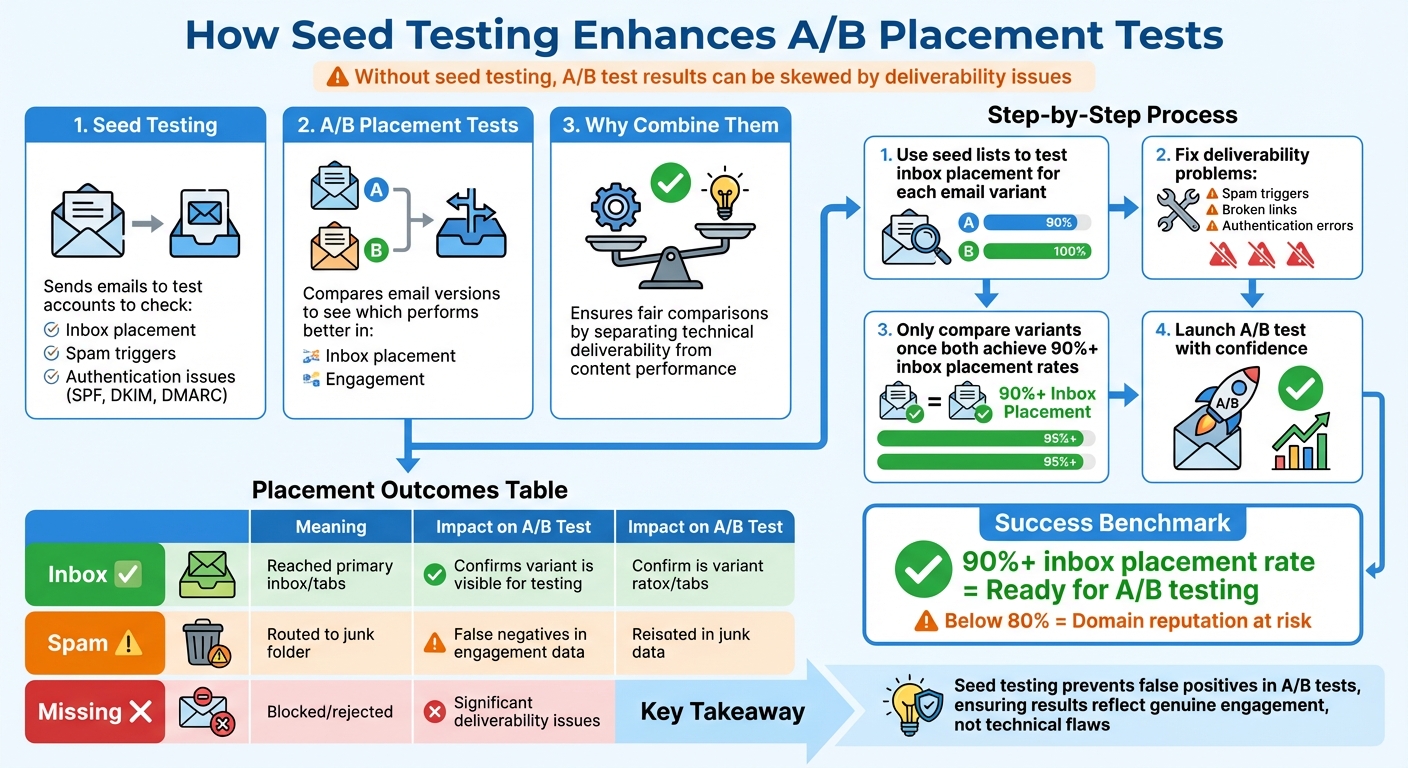
Seed testing ensures your emails reach the inbox before you measure engagement. Without it, A/B test results can be skewed by deliverability issues, making it hard to determine if poor performance is due to weak content or technical problems.
Here’s a quick breakdown:
- Seed Testing: Sends emails to test accounts to check inbox placement, spam triggers, and authentication issues (SPF, DKIM, DMARC).
- A/B Placement Tests: Compares email versions to see which one performs better in inbox placement and engagement.
- Why Combine Them: Ensures fair comparisons by separating technical deliverability issues from content performance.
Key Steps:
- Use seed lists to test inbox placement for each email variant.
- Fix deliverability problems (e.g., spam triggers, broken links) before launching A/B tests.
- Only compare variants once both achieve 90%+ inbox placement rates.
Bottom Line: Seed testing prevents false positives in A/B tests, ensuring your results reflect genuine engagement, not technical flaws.
Seed Testing and A/B Placement Test Workflow for Email Deliverability
How Seed Testing Works in Inbox Placement
Seed testing is a method used to evaluate how emails perform across different inbox environments. It works by sending your email to a carefully curated list of test addresses hosted by major providers like Gmail, Outlook, and Yahoo. These addresses are designed to replicate real inbox conditions. When you launch a campaign, the seed list receives a copy of the email at the same time as your subscribers. The testing platform then tracks exactly where each message ends up – whether it lands in the primary inbox, spam folder, promotions tab, or fails to appear altogether. This process provides a clear picture of how your emails are being treated by various inbox providers.
Seed Lists and Their Role in Deliverability
Think of a seed list as a diagnostic tool for your email infrastructure. By including addresses from a variety of providers, you can determine whether deliverability issues are isolated to a specific provider or more widespread. For instance, your emails might consistently hit the inbox with one provider while being flagged as spam by another. This suggests that something in your email setup – such as content or authentication – is triggering filters.
There are two main types of seed lists:
- Weighted seed lists: These reflect the composition of your actual subscriber base, offering performance insights that align with real-world conditions.
- Unweighted seed lists: These are used for troubleshooting specific issues, such as authentication failures or content-related triggers [3].
It’s crucial to use a fresh seed list for each test. Reusing old lists can lead to inaccurate results, potentially compromising your entire testing process [4].
Tracking Placement and Authentication Problems
Seed testing not only reveals where your emails land but also checks whether your authentication protocols are functioning correctly [6][2]. Authentication failures – like issues with SPF, DKIM, or DMARC – can harm your sender reputation and increase the chances of your emails being flagged as spam.
The results are categorized into three main outcomes:
- Inbox: Indicates high sender trust and successful delivery.
- Spam/Junk: Points to potential issues with your content, reputation, or authentication.
- Missing: Suggests that the email was blocked entirely.
Provider-specific statistics give deeper insights. For example, if one provider consistently shows poor placement while others do not, the issue might lie with that provider’s filtering system.
"Seed list testing will help you discover if your email performance metrics are being impacted by issues with your emails, that are unrelated to subscriber behavior." – Mike Arsenault, Founder & CEO, Rejoiner [3]
Analyzing Results for Actionable Data
Once you’ve identified placement and authentication issues, the next step is to act on the insights. Seed testing data highlights specific areas that need attention. For example, if DKIM authentication fails, it’s a clear sign to review your DNS records. Similarly, if your emails perform well across most providers but struggle with one, you can focus on troubleshooting that provider’s filters instead of overhauling your entire email strategy [5].
As of 2026, an inbox placement rate of 90% or higher is considered strong. Falling below 80%, however, could harm your domain’s reputation and waste valuable leads [5]. Seed testing also tracks technical details like your originating IP address and delivery speed, which can help identify infrastructure issues or IP reputation problems [1][2]. By addressing these challenges early, you protect your domain’s reputation and ensure that your A/B tests measure actual engagement rather than deliverability issues. This data helps refine your email variants, setting you up for more effective optimization in the future.
How Seed Testing Improves A/B Placement Test Accuracy
Running an A/B test without seed testing can lead to misleading engagement metrics. Why? Because without it, you can’t pinpoint whether poor performance stems from weak content or issues with email delivery. Seed testing acts as a filter, ensuring you know where your emails land before you start measuring engagement. This clarity is essential for making accurate comparisons during A/B testing.
Preventing False Positives in Placement Data
When you rely on aggregated metrics, you risk missing provider-specific deliverability issues. For instance, your emails might perform well with Outlook users but struggle to reach Gmail inboxes. Without seed testing, these nuances stay hidden, potentially skewing your assessment of a variant’s performance [5].
Here’s a breakdown of placement outcomes and their effect on A/B test accuracy:
| Placement Category | Meaning | Impact on A/B Test Accuracy |
|---|---|---|
| Inbox | Reached the primary inbox or tabs (e.g., Promotions). | Confirms the variant is visible for engagement testing. |
| Spam | Delivered but routed to the junk folder. | Highlights possible false negatives in engagement data. |
| Missing | Never reached the destination (blocked/rejected). | Signals significant deliverability issues affecting results. |
Simulating Real Inbox Conditions
Seed testing replicates how real subscribers experience your emails across different providers and devices. Before testing elements like subject lines or layouts, it’s crucial to run a seed test. Why? It helps identify technical issues – such as images not rendering or broken links – that could hurt performance. A variant might appear to underperform, not because of weak content, but due to these technical problems. By ensuring proper display and functionality upfront, you set the stage for more accurate engagement analysis [3].
Ensuring Reliable Engagement Metrics
Once deliverability and display are verified, seed testing sharpens your engagement insights even further. As Hugo Pochet, Co-Founder at Mailpool, bluntly states:
"If you’re measuring inbox placement using open rates alone, you’re guessing" [5].
Seed testing eliminates that guesswork by separating deliverability issues from content performance. For example, if a variant shows zero engagement, seed testing can help you determine whether the problem lies in delivery failures or weak content.
Mike Arsenault, Founder & CEO of Rejoiner, underscores this point:
"Without seed list testing, you could end up revising your email subject lines and content, when the real issue is related to email deliverability, display, or function" [3].
Step-by-Step Guide to Using Seed Testing with A/B Tests
Now that you know how seed testing enhances the accuracy of A/B tests, let’s dive into how to incorporate it into your workflow using MailMonitor. This approach ensures your email placement is validated before you measure how subscribers engage with your content.
Setting Up Seed Lists in MailMonitor

Start by creating a seed list in MailMonitor. Give it a unique name, add the necessary target_email, and specify sending domains if needed. MailMonitor will generate a mailing_list string that includes the target_email along with all other seed addresses for your test [2][7]. Once your seed list is ready, you can move on to testing the delivery of each A/B variant.
Running Baseline Seed Tests for A/B Variants
Before sending your emails to subscribers, run a baseline test for each variant. This step helps catch technical issues – like authentication errors, rendering glitches, or emails landing in spam folders – that could skew your engagement metrics. Be sure to include the target_email in every variant to ensure the test runs correctly [2][3].
Send each variant to the seed list and let MailMonitor gather placement data. This will help you pinpoint and resolve any deliverability problems early.
Analyzing Results and Refining Email Variants
Examine the results to spot any provider-specific issues. Pay close attention to authentication protocols like SPF, DKIM, and DMARC, and confirm that your emails render properly and that all links function as intended. If one variant performs poorly, check for technical problems – such as broken links, misaligned visuals, or faulty call-to-action buttons – before assuming the issue lies in the copy [2][5].
Once you’ve ensured the technical aspects are sound, you can move ahead with your A/B testing campaign.
Launching A/B Tests After Validating Placement
Only move forward with your A/B test when both variants consistently achieve an inbox placement rate of 90% or higher [5]. Using insights from MailMonitor, you can confidently launch your campaign, knowing that any performance differences will be due to content rather than deliverability issues. This step also helps safeguard your domain reputation.
Using MailMonitor for Continuous Monitoring and Optimization
After launching your A/B test, keep using MailMonitor to track delivery metrics, authentication statuses, and provider-specific performance over time [2]. Regularly monitor deliverability through the platform’s dashboards and clean your email list by removing outdated addresses to minimize bounces [1]. Be mindful of sudden increases in send volume, as these can trigger spam filters. Segment your data by mailbox provider to determine whether you need to focus on reputation management or technical improvements [5].
sbb-itb-eece389
Best Practices for Seed-Enhanced A/B Placement Tests
To get the most out of seed testing and improve the accuracy of your A/B placement tests, it’s essential to structure your approach carefully. Here’s how to do it effectively.
Send Realistic Email Batches
Your seed tests should mirror the conditions of your live campaigns. For example, if 45% of your audience uses Gmail, make sure 45% of your seed addresses are Gmail accounts. This proportional setup ensures your placement data closely reflects your audience’s experience. Stick to the same ESP, IP addresses, and "From" addresses as your live campaigns to keep conditions consistent.
Avoid placing seed addresses in the To:, CC:, or BCC: fields. Instead, import them as a contact group in your ESP so each address receives a separate email. To mimic natural sending patterns, break your seed list into batches of about 25 addresses and space the sends 15–20 minutes apart.
"If you ramp from 0 to 500/day on a fresh domain, you’re basically asking to be filtered" – Hugo Pochet, Co-Founder, Mailpool [5].
For cold outreach or testing, limit your daily send volume to around 100 emails per inbox. This keeps you within safe deliverability limits and allows you to assess performance across different providers [5].
Use Multiple Seeds Per Email Provider
Incorporate multiple seed addresses for each provider. For example, include several Gmail, Outlook, and Yahoo addresses in your seed list. This strategy helps you identify whether deliverability issues are widespread or specific to a single provider. A campaign might show an overall placement rate of 85%, but closer inspection could reveal complete blocking by Microsoft while other providers perform well.
"A campaign that ‘looks fine’ overall can be failing badly at one provider" – Hugo Pochet, Co-Founder, Mailpool [5].
Breaking down results by provider uncovers these hidden issues, allowing you to determine whether the problem lies with your reputation or a provider-specific filter.
Combine Seed Testing with Reputation Monitoring
Seed testing doesn’t just show placement – it also highlights trust signals. Tools like MailMonitor track authentication status, sender scores, and blocklist presence, helping you understand the factors influencing inbox placement. If both versions of your A/B test fail to reach the inbox, reputation monitoring can reveal whether the issue stems from your IP or domain rather than the email content itself. Always confirm that SPF, DKIM, and DMARC are properly configured before diving into A/B placement tests.
"Run your seed list tests before you get deep into A/B testing subject lines, CTAs, layouts, and all the other aspects of email. Otherwise, you could end up chasing a red herring" – Mike Arsenault, Founder & CEO, Rejoiner [3].
Conclusion
Key Takeaways from Seed Testing Integration
Seed testing takes A/B testing to the next level by addressing deliverability challenges head-on. As Hugo Pochet, Co-Founder of Mailpool, aptly puts it: "If you’re measuring inbox placement using open rates alone, you’re guessing" [5]. Instead of relying solely on open rates, seed testing provides a clearer picture of where your emails land – whether in the inbox, spam folder, or somewhere else entirely. This transparency helps pinpoint whether issues stem from technical delivery problems or the content itself, making it easier to apply targeted fixes.
An inbox placement rate above 90% is the gold standard, while anything lower could harm your sender reputation [5]. Seed testing is your early warning system, catching potential problems before they escalate. For example, it can reveal if an email performs well on Gmail but gets blocked by Outlook, allowing you to zero in on the specific issue without making unnecessary, sweeping changes.
By addressing these challenges early, you’re setting the foundation for a smoother and more effective campaign rollout.
Next Steps for Optimized Email Campaigns
To ensure your email campaigns hit the mark, follow a structured workflow: start with an authentication check, proceed to seed testing, and then move on to A/B testing. This sequence ensures that your engagement metrics reflect genuine subscriber behavior, not technical hiccups.
Platforms like MailMonitor make this process more manageable by combining inbox placement testing, reputation monitoring, and authentication verification in one place. With these tools, you can validate both A/B test variants, identify problematic ISPs, and monitor your sender score over time. This all-in-one approach not only protects your domain but also ensures that your test results are reliable, helping you launch campaigns with confidence.
FAQs
How do seed lists help improve email deliverability?
Seed lists are collections of test email addresses that let you check how your emails behave across various inbox providers and devices. By sending your emails to these addresses before rolling out a campaign, you can determine whether your messages end up in the inbox, spam folder, or other sections like the promotions tab.
This practice allows you to spot and fix deliverability problems early, ensuring your emails reach your audience exactly where they should. It’s a key step in boosting inbox placement and fine-tuning your email performance.
How does seed testing improve the accuracy of A/B test results?
Seed testing involves sending different versions of your email to a controlled group of monitored inboxes. This allows you to see exactly where your email ends up – whether it lands in the inbox, spam folder, or promotions tab. By spotting issues like delays or peculiarities with specific ISPs, seed testing ensures your A/B test results are reliable and can be used to make informed decisions.
Why is it important to achieve a 90% inbox placement rate for A/B testing?
Achieving a 90% inbox placement rate is key to running accurate A/B tests. Why? Because it ensures the majority of your test emails actually land in recipients’ primary inboxes, not in spam or promotions folders where they might go unnoticed.
When your emails reliably hit the inbox, the open rates and engagement metrics you gather are a true reflection of how users interact with your messages. This gives you dependable insights, allowing you to fine-tune your email campaigns with confidence.

