

Email deliverability monitoring is the continuous measurement of whether your permission-based email reaches the inbox, lands in spam or is rejected, and why. At millions of sends a month, one signal is never enough. You need inbox placement tests, mailbox-provider reputation data, authentication results and complaint rates read together, with someone who can act on them. We built MailMonitor Analytics and our managed services around that pairing: software that shows where mail lands, and deliverability experts who find the root cause.
This guide is for the people who own that revenue: directors of deliverability, lifecycle and CRM leaders, email VPs and the executives who depend on the channel. It covers only opted-in, permission-based email.
TL;DR
- Monitor four layers together: inbox placement (seed tests), mailbox-provider reputation (Google Postmaster Tools, Microsoft SNDS), authentication (SPF, DKIM, aligned DMARC) and blocklists.
- Keep spam complaints under 0.3% and aim for under 0.1%. Treat complaint rate as your leading indicator.
- Segment by mailbox provider, sending domain, stream and campaign type. A blended average hides concentrated problems.
- When placement drops, work through a fixed triage: recent changes, authentication, blocklists, provider reputation, then scope.
- Monitoring only pays off when findings become fixes. Pair the data with people who can diagnose and remediate.
Table of Contents
- What deliverability monitoring actually measures
- The four signal layers and what each tells you
- What mailbox providers require today
- How to build a monitoring routine
- When placement drops: a triage you can run in a day
- Where monitoring programs go wrong
- How MailMonitor supports high-volume monitoring
- FAQ
- Sources
What deliverability monitoring actually measures
Three terms get mixed up, and the difference matters for what you buy and what you report to leadership.
- Delivery means the receiving server accepted the message. It says nothing about where the message went next.
- Inbox placement is where an accepted message landed: inbox, spam folder or another tab or folder.
- Deliverability is the whole outcome: whether your mail reaches the inbox in a timely manner, which depends on reputation, authentication, list quality and engagement.
A 99% delivery rate can sit beside a program that lands half its Gmail volume in spam. That is why a bounce report alone is not monitoring. Revenue follows inbox placement, because a message in the spam folder rarely gets opened, clicked or converted.
Good monitoring therefore answers four questions every week: Where is my mail landing? What do mailbox providers think of my domains and IPs? Is my authentication intact? Am I on any blocklist?
The four signal layers and what each tells you
No single data source is complete. Each layer answers a different question, so the value comes from reading them side by side.
| Layer | Question it answers | Typical source |
|---|---|---|
| Inbox placement | Where does a controlled test message land at each provider? | Seed list tests |
| Provider reputation | How does the mailbox provider rate my domain, IP and spam rate? | Google Postmaster Tools, Microsoft SNDS |
| Authentication | Do SPF, DKIM and DMARC pass and align? | DMARC reports, header checks |
| Blocklists | Is my IP or domain listed where receivers look? | Blocklist monitoring |
| Engagement and complaints | How do real recipients react? | ESP data, feedback loops, Postmaster spam rate |
Seed tests: a controlled view of placement
A seed test sends your message to a panel of test mailboxes and records the folder each one lands in. It is the only layer that shows placement directly rather than inferring it. Our analytics uses 375 seed addresses across 80+ internet service providers, with both standard and weighted seed lists. A weighted list mirrors the provider mix of your own audience, so the result reflects the people you actually send to. Our guide on weighted seed lists explains how that works, and the walkthrough on testing inbox placement shows the routine.
Seed results show where a measured sample landed at a point in time. That makes them the right tool for catching placement shifts early, comparing campaigns and verifying a fix. They are read alongside provider data, which describes your real recipients.
Provider data: Postmaster Tools and SNDS
Google Postmaster Tools reports on your mail to Gmail users, including domain and IP reputation, spam rate and authentication results. Microsoft’s Smart Network Data Services (SNDS) gives IP-level data for Outlook.com and Hotmail traffic, such as complaint rates and spam trap hits. Both are free from the providers, and both are most useful when pulled into the same view as your seed and authentication data. See our notes on using Google Postmaster Tools for the marketing side.
The spam rate in Postmaster Tools is worth special attention. It measures recipients pressing the spam button, so it moves before reputation scores do. Reputation bands tell you what already happened. Complaint rate tells you what is about to.
Authentication: the foundation
Every stream needs SPF, DKIM and a DMARC policy that aligns with the visible From domain. RFC 7489 defines DMARC, which lets a domain owner tell receivers how to treat mail that fails authentication and receive reports on who is sending as the domain. Monitoring means watching pass rates by stream over time, since a sudden drop usually means a DNS change, a new sending platform or a third party sending without proper signing. Our primer on DMARC records covers the record itself.
Blocklists
A listing on a blocklist that receivers consult can cut delivery for the affected IP or domain within hours. Continuous blocklist monitoring means you learn of a listing from an alert, not from a revenue dip.
What mailbox providers require today
Monitoring needs targets. The providers publish them, and they are the baseline every high-volume sender should hold.
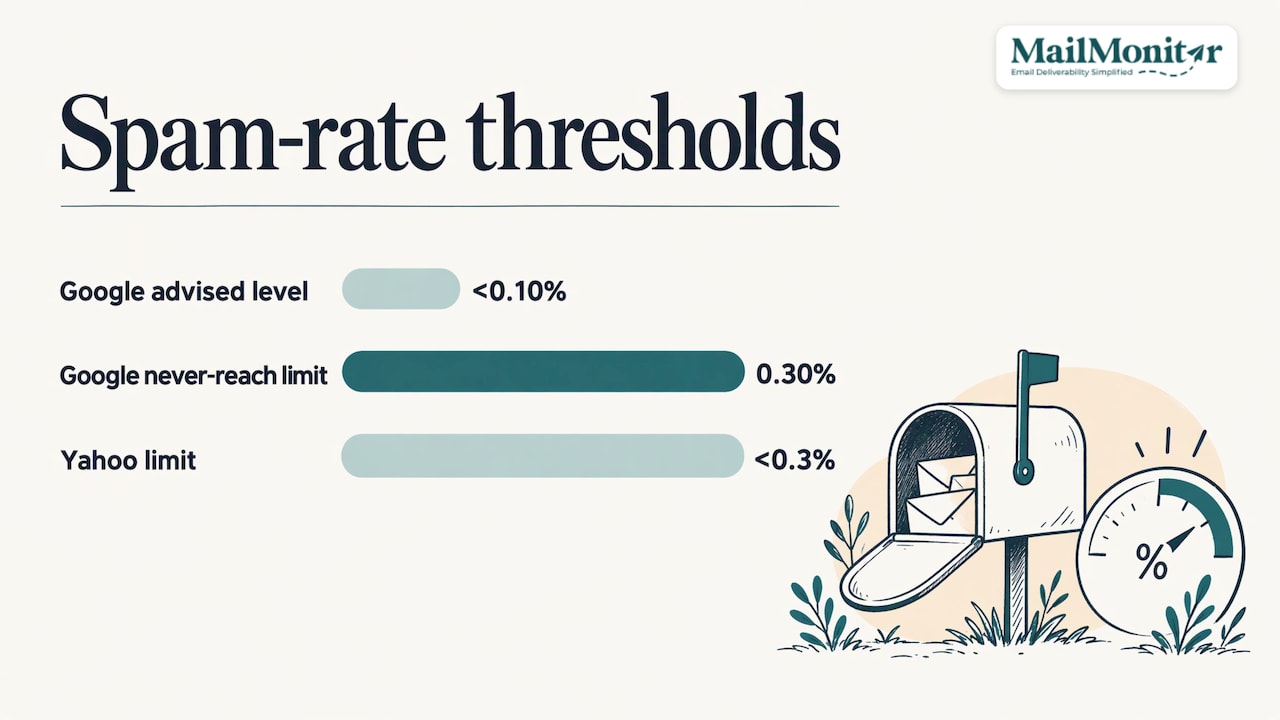
Google’s email sender guidelines set the bar for Gmail delivery. They call for authenticated mail, a spam rate kept low (Google advises staying below 0.10% and never reaching 0.30%), and, for bulk senders, easy unsubscription. Yahoo’s sender best practices likewise tell senders to keep the spam rate below 0.3%.
For marketing and subscribed mail, one-click unsubscribe follows RFC 8058, a header-based mechanism that lets a mailbox provider show its own unsubscribe button and process the request without a web page visit. Our recommendation goes a step further than the minimum: include a visible unsubscribe link in the body, support one-click unsubscribe, and honor every request within two days.
The targets we recommend to every client:
- Send only to opted-in addresses.
- Offer a visible unsubscribe link plus one-click unsubscribe, honored within two days.
- Authenticate with SPF and DKIM, and publish an aligned DMARC policy.
- Keep spam complaints under 0.3%, and ideally under 0.1%.
- Run list hygiene and spam trap removal on a schedule.
- Sunset contacts with no engagement in 90 to 180 days.
The last point deserves its reason. Unengaged addresses drag down engagement signals and are where recycled spam traps tend to hide. Sunsetting them can shrink a list on paper while raising the share of mail that gets opened, which is the number mailbox providers respond to.
How to build a monitoring routine
A routine that works at volume has four parts.
1. Segment before you average
Read every metric by mailbox provider, sending domain and IP, stream (promotional, lifecycle, transactional) and campaign type. A blended account average can look healthy while one provider or one stream is failing. A Gmail-only placement drop, for example, points toward domain reputation or spam rate. A drop across all providers points more toward authentication failure or a blocklisting.
2. Set thresholds that trigger action
Decide in advance what counts as an incident, so nobody debates it during a revenue dip. A practical starting set:
- Spam rate above 0.1% in Postmaster Tools: investigate. At 0.3%, escalate.
- Any sustained drop in SPF, DKIM or DMARC pass rate on a stream: investigate the same day.
- Any new blocklist listing: treat as an incident.
- Any spam trap hit in SNDS: treat as a list-source or hygiene problem, not a content problem.
- Seed inbox share falling against your own baseline: compare by provider before reacting.
The seed baseline should be your own history, not a universal number. Providers and audiences differ, and a trend against your own program is more informative than a generic target.
3. Match cadence to volume
For senders at millions of messages a month, seed tests belong on every significant campaign and stream, while reputation, authentication and blocklist checks should run daily. Weekly reporting turns the stream of data into decisions: what moved, why, and what changes next. That is the cadence our ongoing optimization follows, with weekly reports.
4. Tie the numbers to revenue
Report placement by provider next to revenue per send for the same segments. When 10 points of Gmail placement move, the executive question is what it cost, and a monitoring program that answers it gets funded. Our piece on deliverability metrics lists the measures worth putting on that dashboard.
When placement drops: a triage you can run in a day
Sudden drops are the moment monitoring earns its cost. Run the same sequence each time:
- Build the timeline. List every change in the previous 48 to 72 hours: new segment, new content, DNS edits, IP or platform switch, volume spike.
- Check authentication. Confirm SPF, DKIM and DMARC still pass and align for every stream.
- Check blocklists. Look at both IPs and domains.
- Read provider reputation. Review Postmaster Tools and SNDS trends for spam rate, reputation and trap hits.
- Look at errors and complaints. New 5xx rejection codes and complaint spikes, split by provider.
- Scope the problem. One provider, one stream, one domain or everything? The scope narrows the cause quickly.
- Fix, then verify. Re-run seed tests after the fix to confirm placement is recovering, and keep watching complaint rate.
The steps are simple. The difficulty is interpretation: a placement drop with a clean authentication result and a stable spam rate may come from content, from a segment with older addresses, or from a reputation shift that has not yet appeared in provider data. Our experts handle that interpretation in managed engagements: a two week audit that finds the root cause, a two week remediation phase where we guide or perform the fixes, and ongoing optimization afterward.
Where monitoring programs go wrong
They watch delivery, not placement. Bounce and accept rates stay flat while spam-folder volume climbs.
They look at one data source. Seed tests without provider data miss real-recipient behavior. Provider data without seed tests misses early placement shifts. Together they cover each other.
Nobody owns the fix. Alerts go to a shared inbox, and the DNS owner, the ESP admin and the marketing team each assume another one will act. Name an owner per stream.
They treat list hygiene as a one-off. Spam trap removal, bounce suppression and the 90 to 180 day sunset policy should run continuously, not before a big send.
They chase symptoms. Swapping content or sending times rarely helps when the cause is a hygiene or authentication problem.
For the wider picture of what supports inbox placement, our end-to-end deliverability guide and the must-dos for inbox placement go deeper on each practice.
How MailMonitor supports high-volume monitoring
MailMonitor was founded in 2010 and has helped 16,000+ companies. MailMonitor Analytics brings seed-based inbox placement testing, sender reputation and blocklist monitoring, SPF, DKIM and DMARC tracking, and Google Postmaster Tools and Microsoft SNDS data into one place. MailMonitor Managed Services adds deliverability experts who audit your program, find the root cause of spam placement and blocking, and guide or perform the fixes.
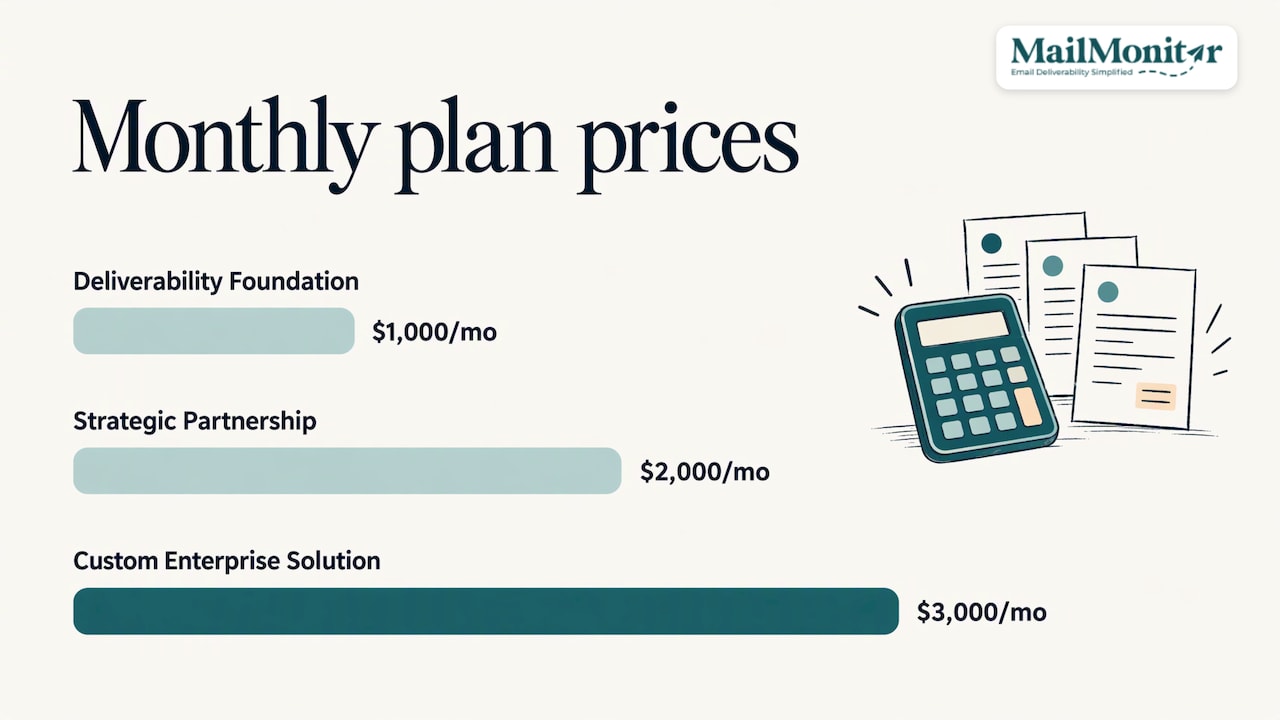
Plans start at $1,000 per month billed annually with The Deliverability Foundation, with The Strategic Partnership from $2,000 per month and the Custom Enterprise Solution from $3,000 per month. See the pricing page for details. A 90-day Strategic Pilot is also available if you want to see the work in your own program first. We work only with opted-in, permission-based email, never cold email.
If you send millions of emails a month and email drives revenue, Get a Free Consultation and we will look at where your monitoring stands.
FAQ
How is email deliverability monitoring different from tracking bounces?
Bounce tracking tells you which messages a receiving server refused. Deliverability monitoring also covers the messages that were accepted and then filtered to spam, plus the reputation, authentication and blocklist signals behind those outcomes. For revenue, the second group matters more because spam-folder mail produces no opens or clicks.
How often should a high-volume sender monitor deliverability?
Check reputation, authentication and blocklists daily, and run seed tests on each significant campaign or stream. Review the combined picture weekly so changes lead to decisions. Segment by provider, domain and stream every time.
What spam complaint rate should we aim for?
Keep complaints under 0.3% and aim for under 0.1%. Google’s sender guidelines advise staying below 0.10% and never reaching 0.30%, and Yahoo’s best practices set the 0.3% line too. Opted-in lists, a visible unsubscribe link and one-click unsubscribe keep the number down.
Do seed lists replace Google Postmaster Tools?
No, they answer different questions. Seed lists show where a test message lands across many providers, and Postmaster Tools reports how Gmail sees your real recipients’ behavior. High-volume senders read them together.
What should we do first when inbox placement drops?
Build a timeline of changes in the last 48 to 72 hours, then check authentication, blocklists and provider reputation, and scope the problem by provider and stream. If the cause is not clear within a day, a managed audit finds the root cause and a remediation plan.

